
The best captioned smart TVs make subtitles easy to read, quick to adjust, and available across the apps people actually use. My best overall pick is the Insignia 55-inch F50 Series 4K Fire TV because it balances a larger 4K screen, broad app support, and a voice remote that helps reduce menu digging. The Hisense 32-Inch A4 Roku TV stands out for beginners who want a simpler interface, while the Continuus 32-inch 12V RV Smart TV is the more specialized choice for travel setups. The main tradeoffs are screen size, caption readability, platform simplicity, voice control, and whether 720p is enough for smaller rooms. Keep reading for the full breakdown of which models make the most sense for different caption-first buyers.
Key Takeaways
- The Insignia F50 4K Fire TV models rise to the top because larger 4K panels make captions easier to read from a couch than the smaller 720p sets.
- For buyers who want fewer menus, the Hisense 32-Inch A4 Roku TV is easier to recommend than feature-heavier Fire TV or Tizen options.
- The Continuus 32-inch 12V RV Smart TV is the clear niche pick because power flexibility matters more than raw resolution in campers and small mobile spaces.
- Several 32-inch models are useful for bedrooms and kitchens, but 720p resolution is the biggest compromise when captions are small or viewers sit farther away.
- The FPD and Tizen-based models appeal most to buyers who want SmartThings, Miracast, or amazon.com/dp/B0DYVMZ4TV?tag=deafvibes01-20&ascsubtag=dc-233639″ target=”_blank” rel=”nofollow sponsored noopener”>Samsung-style menus, but Fire TV and Roku remain easier for broad streaming caption access.




| captioned smart TV | Screen Size | Resolution | Connectivity | HDMI Ports |
|---|---|---|---|---|
| Insignia 55-inch Class F50 Ser | 55 inches | 4K UHD 2160p | Wi-Fi, Ethernet, USB, Optical, Coaxial, Headphone jack | 3 |
| FPD 43 Inch Smart TV | 43 inches | 1080p Full HD | — | — |
| FPD 32-inch Smart TV with Goog | 32 inches | 720p HD | 2 HDMI 1.4, 2 USB 2.0, AV-in, Optical-out, LAN, Earphone | — |
| Hisense 32-Inch Class A4 Serie | 31.5 inches | 720p HD | — | — |
| Continuus 32-inch 12V RV Smart | 32 inches | 720p HD | 2 HDMI, 2 USB, Bluetooth, Wi-Fi | — |
| Insignia 43" Class F50 Series | 43 inches | 4K UHD 2160p | Composite, optical, USB, headphone, coaxial, Ethernet, Wi-Fi | 3 |
| Insignia 32" Class FE Series L | 32 inches | Full HD 1080p | Composite, digital optical, USB, headphone, coaxial, Ethernet, Wi-Fi | 3 |
| Samsung 32-Inch Class HD H5000 | 32 inches | HD | — | — |
| Amazon Ember 32" 2-Series with | 32 inches | HD 720p | — | — |
| Insignia 40" Class F40 Series | 40 inches | 1080p Full HD | Wi-Fi, USB, composite, optical, coaxial, headphone jack | 2 |
| Insignia 50" Class F50 Series | 50 inches | 4K UHD (2160p) | Wi-Fi, Ethernet | 3 |
| Insignia 32" Class F20 Series | 32 inches | 720p HD | — | 2 |
| Insignia 65-inch Class F50 Ser | 65 inches | 4K | — | 3 |
| 40 Inch Smart TV with Tizen OS | 40 inches | 1080p Full HD | HDMI 1.4 x2, USB 2.0 x2, AV-in, optical-out, LAN, Bluetooth, Wi-Fi | — |
More Details on Our Top Picks
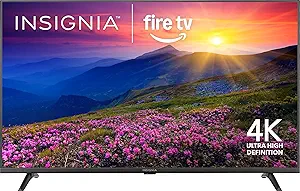
Insignia 55-inch Class F50 Series LED 4K UHD Smart Fire TV with Alexa Voice Remote
I rank the Insignia 55-inch F50 Fire TV highest here because 55-inch 4K resolution gives captions more room and sharper edges than the 720p 32-inch FPD or Hisense sets. That matters for buyers who rely on subtitles across movies, live TV apps, and streamed shows. Compared with the FPD 43-inch Tizen TV, this model is less compact but better suited to a main room where caption legibility from a couch matters. The Alexa Voice Remote also helps when searching captioned content without digging through menus. The tradeoff is that Fire TV leans heavily into Amazon’s interface, some services need paid subscriptions, and the built-in sound may still call for a soundbar if dialogue clarity is a priority.
Pros:- Large 55-inch 4K panel makes captions easier to read at a distance
- HDR10 support improves contrast around bright and dark scenes
- Alexa Voice Remote simplifies app search and playback control
- Three HDMI ports and Ethernet support make it flexible for streaming boxes, consoles, and wired internet
Cons:- Fire TV interface can feel crowded for buyers who want a simpler caption-first menu
- Some streaming apps and captioned content require subscriptions
- Built-in DTS Virtual-X sound may still need external speakers for clearer dialogue
Best for: Living-room viewers who want large, sharp captions from across the couch and already use Alexa or Fire TV apps.
Not ideal for: Small bedrooms, dorms, or RV setups where a 55-inch screen is too large or Fire TV’s Amazon-heavy interface feels busy.
- Screen Size:55 inches
- Resolution:4K UHD 2160p
- HDR:HDR10
- Smart Platform:Fire TV
- Voice Control:Alexa Voice Remote
- Sound:DTS Virtual-X
- HDMI Ports:3
- Connectivity:Wi-Fi, Ethernet, USB, Optical, Coaxial, Headphone jack
- Wall Mount:VESA 200 x 200
Our verdict“This is my pick for buyers who want the clearest caption experience in a standard living-room setup.”
FPD 43 Inch Smart TV, 1080p FHD, Tizen OS, Dolby Audio, HDR 10, Gaming Hub, SmartThings, Miracast
The FPD 43-inch Tizen TV lands behind the Insignia 55-inch F50 because it gives up 4K sharpness, but I like its balance for viewers who want larger-than-bedroom captions without buying a huge screen. Its 1080p Full HD panel is a real step up from the 720p FPD 32-inch and Hisense A4, so subtitles should look cleaner on streamed shows and free live channels. Tizen also keeps major apps close at hand, and 350+ free channels add value for captioned live viewing. The compromise is that this is still not a premium display: fine text will not be as crisp as on the 4K Insignia, full smart features need internet, and Dolby Audio does not replace a dedicated sound system for dialogue-focused viewers.
Pros:- 43-inch size gives captions more space than 32-inch sets
- 1080p Full HD is sharper than the 720p compact options in this batch
- Tizen OS offers quick access to major streaming apps
- Free live channels add no-subscription viewing choices
Cons:- No 4K resolution, so small caption text is less crisp than on the Insignia 55-inch F50
- Smart features depend on a stable internet connection
- Built-in Dolby Audio may be too basic for dialogue-sensitive listeners
Best for: Apartment viewers and families who want readable captions on a mid-size screen without moving up to a 55-inch 4K TV.
Not ideal for: Buyers who sit far from the screen or want the sharpest subtitle rendering, since this panel is 1080p rather than 4K.
- Screen Size:43 inches
- Resolution:1080p Full HD
- Operating System:Tizen OS
- HDR:HDR10
- Audio:Dolby Audio
- Streaming Apps:Netflix, YouTube, Prime Video
- Live Channels:350+ free channels
- Gaming:Samsung Gaming Hub with 1,000+ cloud games
- Smart Home:SmartThings and Miracast
Our verdict“This is the sensible middle pick when captions need to be bigger than a 32-inch screen allows but a 55-inch TV is too much.”
FPD 32-inch Smart TV with Google TV, HD 720p, HDR10, Dolby Audio, Voice Remote, Built-in Google Cast
I would choose the FPD 32-inch Google TV over the Hisense A4 if the buyer wants Google Assistant, Google Cast, and app search in one small-screen package. For captioned viewing, the voice remote can make it easier to find shows, launch apps, and adjust playback without paging through on-screen menus. Compared with the FPD 43-inch Tizen TV, though, this model is clearly a secondary-room pick: 720p resolution and a 32-inch panel make captions less comfortable from across a room. Its connectivity is strong for the size, with HDMI, USB, LAN, Bluetooth, and Wi-Fi, but buyers hoping for a main TV or crisp subtitle text should move up to a Full HD or 4K option.
Pros:- Google TV interface works well for app discovery and search
- Voice remote and Google Assistant reduce menu-heavy control
- Built-in Google Cast makes phone-to-TV streaming simple
- Strong port selection for a compact TV, including HDMI, USB, Ethernet, and optical out
Cons:- 720p resolution is soft compared with the 1080p FPD 43-inch model
- 32-inch screen is not ideal for subtitles viewed from a couch
- Stereo built-in audio may not deliver the clearest dialogue
Best for: Google ecosystem users who need a small caption-friendly TV for a bedroom, kitchen, guest room, or desk area.
Not ideal for: Main-room viewers who sit several feet away, because the 32-inch 720p panel limits caption size and sharpness.
- Screen Size:32 inches
- Resolution:720p HD
- Display Technology:LED
- Refresh Rate:60 Hz
- HDR Format:HDR10
- Operating System:Google OS
- Wireless:Bluetooth 5 and Wi-Fi 5
- Connectivity:2 HDMI 1.4, 2 USB 2.0, AV-in, Optical-out, LAN, Earphone
- Speaker Technology:Dolby Audio stereo
Our verdict“This is my small-room Google TV pick for buyers who value easy search more than big-screen caption clarity.”
Hisense 32-Inch Class A4 Series HD 720p Smart Roku TV with Alexa Compatibility
The Hisense 32-inch A4 Roku TV is the most straightforward compact pick in this group. I place it below the FPD 32-inch Google TV because it lacks that model’s built-in Google Cast emphasis, but Roku streaming is often easier for buyers who want a cleaner app grid and fewer setup choices. For captioned smart TV use, that simplicity matters: getting to Netflix, live apps, and accessibility settings should feel less fussy. It also supports Alexa and Google Assistant compatibility, giving it more voice-control flexibility than a basic non-smart set. The limits are real: 720p on a 31.5-inch screen is best at close range, Motion Rate 60 is not built for serious gaming, and the smaller panel cannot match the caption comfort of the FPD 43-inch Tizen TV.
Pros:- Roku interface is easy to scan and friendly for app-first viewing
- Works with both Alexa and Google Assistant for voice control
- Slim bezel helps the small screen feel less cramped
- Dolby Audio adds more polish than a bare-bones compact TV
Cons:- 720p resolution is less sharp than the FPD 43-inch Full HD set
- 60 Hz refresh rate and Motion Rate 60 are limited for gaming
- Small screen makes captions harder to read from farther seating
Best for: Casual streamers who want a simple Roku interface for captioned shows in a bedroom, office, or guest space.
Not ideal for: Gamers and main-room viewers, since the 720p panel and 60 Hz refresh rate are better for casual streaming than fast action.
- Screen Size:31.5 inches
- Resolution:720p HD
- Display Technology:LCD and LED
- Refresh Rate:60 Hz
- Aspect Ratio:16:9
- Backlight:Direct LED with dimming
- Motion Enhancement:Motion Rate 60
- Smart Platform:Roku TV
- Voice Compatibility:Alexa and Google Assistant
Our verdict“This is the best fit when the priority is a simple Roku captioned TV for close-range viewing.”
Continuus 32-inch 12V RV Smart TV with Android TV, Google Assistant, Chromecast, and Free Streaming Apps
The Continuus 32-inch 12V RV Smart TV has the narrowest job here, and that is exactly why it earns a spot. Unlike the FPD 32-inch Google TV or Hisense A4, this model is built around 12V power for RVs and campers, so it makes more sense for travel setups than standard living rooms. Android TV, Google Assistant, and Chromecast keep streaming and phone casting familiar, while the included adapters and multiple ports help with campground or parked-vehicle setups. The caption tradeoff is the same as other compact HD sets: 720p on 32 inches works best at close range and will not match the clarity of the 43-inch FPD or 55-inch Insignia. It is also a poor buy if the TV will live only in a house.
Pros:- 12V power design suits RVs, campers, and mobile setups
- Android TV includes access to popular streaming apps
- Google Assistant and Chromecast support hands-light control and casting
- HDMI, USB, Bluetooth, and Wi-Fi cover common travel entertainment needs
Cons:- 720p resolution limits fine caption sharpness
- 32-inch size is small for shared viewing in larger spaces
- Specialized 12V design is less appealing for standard home use
Best for: RV owners, camper travelers, and van-life setups that need a smart TV with 12V power support and compact sizing.
Not ideal for: Household buyers who do not need 12V power, since a standard 32-inch or larger smart TV will usually be a better fit.
- Screen Size:32 inches
- Resolution:720p HD
- Power:12V
- Operating System:Android TV
- Voice Control:Google Assistant
- Casting:Chromecast
- Connectivity:2 HDMI, 2 USB, Bluetooth, Wi-Fi
- Included Items:Remote and power adapters
Our verdict“This is my pick for captioned streaming on the road, not for buyers setting up a permanent living-room TV.”
Insignia 43″ Class F50 Series LED 4K UHD Smart Fire TV with Voice Remote and Alexa
I rank the Insignia 43-inch F50 Series highest in this batch because its 4K UHD resolution with HDR10 gives captions more room to look crisp without making the screen oversized. Compared with the Insignia 40-inch F40 Series, it adds sharper detail and HDR support, which matters if subtitles often sit over bright scenes or busy backgrounds. It also has more HDMI flexibility than the F40, making it easier to add a streamer, console, or soundbar. The tradeoff is that its built-in audio may still feel thin for dialogue-heavy viewing, so buyers who rely on sound as much as captions may want external speakers. It is also less compact than the 32-inch models, so it fits best as a main small-room TV rather than a desk or kitchen screen.
Pros:- 4K UHD resolution makes captions and interface text sharper
- HDR10 helps contrast in bright or dark scenes
- Three HDMI ports give more setup flexibility than the 40-inch F40
- Fire TV and Alexa voice remote simplify content search
Cons:- Built-in speakers may not satisfy dialogue-focused viewers
- Larger than compact 32-inch caption-friendly setups
- Some streaming content still requires paid subscriptions
Best for: Viewers who want readable captions on a sharper 4K screen for bedrooms, dens, or smaller living rooms
Not ideal for: Very small rooms or buyers who need strong dialogue audio without adding a soundbar
- Screen Size:43 inches
- Resolution:4K UHD 2160p
- HDR:HDR10
- Sound:DTS Virtual-X
- HDMI Ports:3
- Connectivity:Composite, optical, USB, headphone, coaxial, Ethernet, Wi-Fi
- Wall Mount:VESA 200 x 300
Our verdict“This is my pick for buyers who want the clearest caption experience in this group without jumping to a much larger TV.”
Insignia 32″ Class FE Series LED Full HD Smart Fire TV with Voice Remote and Alexa
The Insignia 32-inch FE Series makes the most sense when I want a small captioned smart TV but do not want to drop to 720p. Its 1080p Full HD panel gives subtitle text a cleaner look than the Amazon Ember 32-inch 2-Series, which stays at 720p. It also has three HDMI ports, so it is more flexible for a cable box, game system, and streaming device than many compact TVs. Compared with the Samsung 32-inch H5000F, this Insignia leans more toward Fire TV convenience and Alexa search, while Samsung leans toward security and free channel access. The main compromise is scale: captions are sharper than on HD models, but the 32-inch screen can still feel small across a room. Audio may also need help for dialogue-first viewing.
Pros:- Full HD resolution is stronger for captions than 720p compact TVs
- Alexa voice remote helps find captioned shows quickly
- Three HDMI ports support a more flexible small-room setup
- Apple AirPlay support adds easy sharing from Apple devices
Cons:- 32-inch size can limit caption readability from a sofa distance
- Built-in sound may be light for dialogue-heavy programs
- Streaming subscriptions may add to the real cost
Best for: Apartment, bedroom, or office viewers who want a compact Fire TV with sharper-than-HD caption text
Not ideal for: Living-room buyers who sit far from the screen and need larger subtitles without increasing caption size
- Screen Size:32 inches
- Resolution:Full HD 1080p
- Display Technology:LED-backlit LCD
- Voice Control:Alexa Voice Remote
- HDMI Ports:3
- Apple AirPlay:Supported
- Connectivity:Composite, digital optical, USB, headphone, coaxial, Ethernet, Wi-Fi
Our verdict“This is the compact Fire TV I would choose when caption sharpness matters more than getting the lowest price.”
Samsung 32-Inch Class HD H5000F Smart TV (2025 Model) HDR, Object Tracking Sound Lite, Knox Security, One UI Tizen
I place the Samsung 32-inch H5000F as the privacy-minded small-screen pick because Knox Security and One UI Tizen give it a more controlled smart-TV feel than the Fire TV models. For captioned viewing, its value is less about raw sharpness and more about a steady platform, free Samsung TV Plus channels, and sound that attempts to follow on-screen action. Compared with the Insignia 32-inch FE Series, though, Samsung’s HD resolution is the weak point; small captions will not look as crisp as they do on a 1080p panel. It also lacks a clearly listed voice remote, which makes captioned content search less convenient than on Alexa-based sets. This pick fits buyers who want a tidy Samsung interface, but it is not my choice for maximum subtitle clarity.
Pros:- Knox Security adds stronger protection for account-based smart TV use
- Samsung TV Plus gives broad free channel access
- Object Tracking Sound Lite may help action feel more centered
- Minimal design suits small rooms without visual clutter
Cons:- HD resolution is weaker for small captions than Full HD models
- No clearly listed built-in voice control
- App flexibility may trail Fire TV for some streaming households
Best for: Samsung users who want a secure, simple 32-inch TV with lots of free channel options
Not ideal for: Caption-heavy viewers who need the sharper subtitle text of a Full HD or 4K screen
- Screen Size:32 inches
- Resolution:HD
- Model Year:2025
- HDR:Supported
- Sound:Object Tracking Sound Lite
- Security:Samsung Knox Security
- Operating System:One UI Tizen
- Free Content:2,700+ channels including Samsung TV Plus
Our verdict“This is best for buyers who prioritize Samsung’s secure smart platform over the sharpest caption rendering.”
Amazon Ember 32″ 2-Series with Fire TV (Newest Model) – HD Smart TV with Alexa Remote
The Amazon Ember 32-inch 2-Series is the budget-friendly Fire TV pick I would choose for speed and convenience, not for the sharpest captions. Its Wi-Fi 6, quad-core processor, and Alexa Voice Remote Enhanced should make app loading and voice search feel more modern than older entry TVs. Compared with the Insignia 32-inch FE Series, though, the Ember’s 720p HD panel is a clear step down for subtitle crispness. It fights back with Omnisense features, Ambient Experience, AirPlay, and a current Fire TV interface, which may matter more for casual streaming spaces. Still, buyers who read captions constantly should treat this as a secondary-room TV. It is easy to live with, but the resolution ceiling is real when text detail is the priority.
Pros:- Wi-Fi 6 and quad-core processor support faster streaming
- Enhanced Alexa remote improves voice-based content search
- AirPlay makes phone and tablet sharing easier
- Ambient Experience and Omnisense features add modern Fire TV convenience
Cons:- 720p resolution is the weakest caption option in this batch
- Only two HDMI inputs limit wired device setups
- Small 32-inch screen may require larger caption settings
Best for: Budget buyers who want a quick, current Fire TV for a guest room, kitchen, or casual streaming spot
Not ideal for: Daily subtitle users who sit several feet away and need cleaner text than 720p can provide
- Screen Size:32 inches
- Resolution:HD 720p
- Wi-Fi:Wi-Fi 6
- HDMI Inputs:2
- Remote:Alexa Voice Remote Enhanced
- Processor:Quad-core
- AirPlay:Supported
- Special Features:Omnisense technology, Ambient Experience, free and live TV, Alexa integration
Our verdict“This is the practical pick for fast Fire TV streaming on a budget, as long as caption sharpness is not the main demand.”
Insignia 40″ Class F40 Series LED Full HD Smart Fire TV with Voice Remote and Alexa
The Insignia 40-inch F40 Series sits in the middle of this lineup: larger than the 32-inch models, sharper than 720p sets, but less detailed than the Insignia 43-inch F50 Series. I like it most for buyers who want captions to appear larger on screen without paying for 4K. Its 1080p Full HD display gives subtitle text a cleaner base than the Amazon Ember 32-inch 2-Series, and DTS Virtual-X is a helpful add-on for dialogue-focused watching. The tradeoff is connectivity and picture headroom. It has only two HDMI ports and no listed HDR support, so the 43-inch F50 is the better pick for more devices and brighter contrast. For a bedroom or modest den, though, this model balances size, readability, and Fire TV simplicity well.
Pros:- 40-inch screen makes captions easier to read than on compact 32-inch TVs
- 1080p Full HD is a sensible caption upgrade over 720p models
- Alexa voice control helps search without typing
- DTS Virtual-X and optical output support dialogue-focused setups
Cons:- Only two HDMI ports may force cable swapping
- No listed HDR support
- Not as sharp as the 43-inch 4K Insignia F50
Best for: Bedroom or den viewers who want larger captions than a 32-inch TV provides without moving up to 4K pricing
Not ideal for: Device-heavy households that need three HDMI ports or buyers who want HDR for higher-contrast scenes
- Screen Size:40 inches
- Resolution:1080p Full HD
- Smart TV Platform:Fire TV
- Voice Control:Alexa
- Sound Technology:DTS Virtual-X
- HDMI Ports:2
- Connectivity:Wi-Fi, USB, composite, optical, coaxial, headphone jack
- Parental Controls:Yes
- Wall Mountable:Yes
Our verdict“This is my mid-size choice for buyers who want readable captions and Fire TV ease without paying for a 4K model.”
Insignia 50″ Class F50 Series LED 4K UHD Smart Fire TV with Alexa Voice Remote
I rank the Insignia 50-inch F50 as the most balanced captioned smart TV here because it pairs 4K HDR10 clarity with Fire TV’s broad app support, which matters when caption controls vary by streaming service. Compared with the Insignia 65-inch F50, it gives up the theater-sized screen, but it is easier to place in apartments, bedrooms, and mixed-use living rooms. Against the Insignia 32-inch F20, the sharper panel makes subtitles, menus, and on-screen text easier to read from a couch. The tradeoff is that DTS Studio Sound may still call for a soundbar if dialogue clarity is a priority, and some services need paid subscriptions.
Pros:- 4K UHD resolution helps captions and interface text look sharper than 720p or 1080p sets
- Fire TV platform supports major streaming apps where captions are commonly used
- Alexa Voice Remote reduces remote scrolling when opening apps or finding shows
- Three HDMI ports and Ethernet give it more setup flexibility than smaller budget models
Cons:- 50-inch size may feel small for wide seating areas
- Built-in audio may not satisfy buyers focused on dialogue clarity
- Some captioned streaming libraries require separate subscriptions
Best for: Viewers who want a mid-size 4K Fire TV for subtitle-heavy streaming in a bedroom, apartment living room, or family space
Not ideal for: Home theater buyers who want a larger screen or stronger built-in audio without adding a soundbar
- Screen Size:50 inches
- Resolution:4K UHD (2160p)
- HDR:HDR10
- Audio:DTS Studio Sound
- HDMI Ports:3
- Connectivity:Wi-Fi, Ethernet
- Parental Controls:Yes
- Smart Home Integration:Yes
Our verdict“This is my pick for buyers who want caption-friendly 4K streaming without jumping to a 65-inch screen.”
Insignia 32″ Class F20 Series LED HD Smart Fire TV with Voice Remote and Alexa
The Insignia 32-inch F20 makes the list because it is the simplest way to add Fire TV captioned streaming to a small room without paying for screen size or 4K detail that may go unused. Compared with the Insignia 50-inch F50, its 720p resolution is a clear step down, so captions will not look as crisp from across a larger room. Still, in a kitchen, dorm, guest room, or close-viewing bedroom, the smaller panel makes sense. I also like that it keeps Alexa voice control and HDR10 support, but the two HDMI ports and basic sound limit it for buyers with consoles, soundbars, and multiple devices.
Pros:- Affordable entry point into Fire TV streaming with Alexa voice control
- Compact 32-inch size works well in small rooms and wall-mounted setups
- HDR10 support adds some picture range despite the budget panel
- Wi-Fi, HDMI, USB, and VESA mounting cover basic setup needs
Cons:- 720p resolution makes captions and menus less crisp than Full HD or 4K models
- Only two HDMI ports leaves little room for extra devices
- Built-in sound is basic for dialogue-heavy viewing
Best for: Dorm rooms, kitchens, guest rooms, and close-viewing bedrooms where low cost and easy captioned streaming matter more than 4K sharpness
Not ideal for: Living rooms or multi-device setups, since 720p resolution and two HDMI ports can feel limiting fast
- Screen Size:32 inches
- Resolution:720p HD
- Display Technology:LED
- Refresh Rate:60 Hz
- HDR Format:HDR10
- HDMI Ports:2
- USB Ports:1
- VESA Mount:100 x 100 mm
Our verdict“This is the one I would choose for a secondary room where caption access matters more than premium picture quality.”
Insignia 65-inch Class F50 Series LED 4K UHD Smart Fire TV with Alexa Voice Remote
I place the Insignia 65-inch F50 highest for viewers who want captions to feel easy to read from farther seating positions. Its 65-inch 4K HDR10 panel gives subtitles more visual breathing room than the Insignia 50-inch F50, and it is a much better fit than the Insignia 32-inch F20 for family rooms. Fire TV, Alexa voice control, Bluetooth, and three HDMI ports also make it stronger for shared streaming setups. The compromise is picture refinement: there is no listed local dimming, maximum brightness is 300 nits, and advanced processing is not called out. DTS Virtual-X helps, but I would still budget for external audio if dialogue clarity is the main goal.
Pros:- Large 65-inch 4K screen makes subtitles easier to read from a sofa distance
- Built-in Fire TV keeps major streaming apps in one interface
- Alexa Voice Remote helps with hands-light searching and app launching
- Bluetooth, Wi-Fi, USB, and three HDMI ports support more connected gear
Cons:- No listed local dimming or advanced picture processing
- 300-nit maximum brightness may limit HDR impact in bright rooms
- DTS Virtual-X may still fall short for viewers who need stronger dialogue separation
Best for: Families and shared living rooms where viewers sit farther from the screen and need larger, easier-to-read captions
Not ideal for: Cinema-focused buyers who want higher brightness, local dimming, or more advanced picture processing
- Screen Size:65 inches
- Resolution:4K
- Refresh Rate:60 Hz
- HDR Format:HDR10
- Maximum Brightness:300 nits
- HDMI Ports:3
- USB Ports:2
- Wireless:Wi-Fi, Bluetooth
- VESA Mount:400 x 300 mm
Our verdict“This is my big-room choice for captioned streaming, as long as buyers accept its basic LED picture controls.”
40 Inch Smart TV with Tizen OS, 1080p Full HD, HDR 10, Dolby Audio, Gaming Hub, SmartThings, Miracast, Voice Control
The 40-inch Tizen smart TV earns its spot as the best Fire TV alternative in this batch. Its 1080p Full HD panel lands between the Insignia 32-inch F20 and the 4K F50 models, so captions should look cleaner than on 720p sets while keeping the screen compact. Tizen, SmartThings, Miracast, and Samsung Gaming Hub make it more appealing for buyers already tied to that ecosystem, while Dolby Audio gives it a stronger audio pitch than many small budget TVs. The downside is scale and ceiling: it is not 4K, it stops at 40 inches, and smart home support centers on SmartThings rather than the broader Alexa setup found on the Insignia Fire TV models.
Pros:- 1080p Full HD is sharper for captions than 720p compact TVs
- Tizen OS offers quick access to major streaming apps
- Dolby Audio and 2.0-channel output give it a stronger sound profile than many small sets
- Gaming Hub, Miracast, Bluetooth, Wi-Fi, and LAN expand its everyday uses
Cons:- No 4K resolution, so it cannot match the caption sharpness of the F50 models
- 40-inch size may be too small for main living-room seating
- Smart home compatibility is limited to SmartThings
Best for: Samsung ecosystem users who want a compact Full HD TV for captioned streaming, casual gaming, and SmartThings control
Not ideal for: Buyers who want 4K captions on a larger screen or who already rely on Alexa-centered smart home routines
- Screen Size:40 inches
- Resolution:1080p Full HD
- Operating System:Tizen
- HDR Format:HDR10
- Refresh Rate:60 Hz
- Audio:Dolby Audio, 12W, 2.0 channels
- Smart Home Compatibility:SmartThings
- Connectivity:HDMI 1.4 x2, USB 2.0 x2, AV-in, optical-out, LAN, Bluetooth, Wi-Fi
Our verdict“This is the compact pick I would choose for Tizen and SmartThings users who want sharper captions than a 720p TV can provide.”
How We Picked
I ranked these captioned smart TVs by asking which models make captions easiest to live with every day, not just which ones have the longest feature list. The biggest factors were screen size and resolution, smart TV platform, remote design, voice-control support, app availability, and whether the model fits a clear room type. A 55-inch 4K TV ranks ahead of a 32-inch 720p TV when both are used in a living room because captions need enough pixel density and physical size to stay readable from normal seating distances.
I also weighed simplicity against flexibility. Roku models score well for beginners because the interface is direct, while Fire TV models rank higher for buyers who want Alexa, app depth, and more size choices. Tizen and Google TV options earned places where casting, SmartThings, or Google Assistant matter, but they sit below the strongest Fire TV and Roku picks when the caption-first decision is about easy streaming, legible text, and lower setup friction.
Factors to Consider When Choosing Captioned Smart TVs
Choosing among captioned smart TVs is less about finding a TV that merely supports closed captions and more about finding one that makes captions readable, adjustable, and easy to access across services. I would start with the room, then match screen size, platform, remote style, and resolution to how the TV will actually be watched.
Match Screen Size To Caption Distance
Caption readability depends heavily on how far you sit from the screen. A 32-inch TV can work well on a desk, kitchen counter, dorm dresser, or bedroom wall, but it is usually not the best fit for a main sofa setup. That is why the Insignia 55-inch F50 ranks above the smaller 32-inch options for most living rooms. Larger screens give subtitles more physical space, which helps when apps use thinner fonts or place captions over bright scenes. The common mistake is buying the cheapest compact TV and expecting it to perform like a family-room set. If captions are the reason for the purchase, I would rather size up before paying for extra smart features.
Choose The Smart Platform Around Caption Controls
The platform matters because caption settings are not always stored in one place. Fire TV is strong for buyers already using Alexa and Prime Video, while Roku is often easier for people who want a plain app grid and fewer distractions. Google TV can be better for casting and voice search, especially with Android phones, but it may feel busier than Roku for a first smart TV. Tizen-based models make sense for households using SmartThings or Miracast, though buyers should expect a more brand-specific menu style. The best platform is the one that makes caption toggles easy enough that people will actually use them. A powerful app store helps less if changing subtitle size or language feels buried.
Do Not Treat 720p And 1080p As The Same
For captions, resolution changes the reading experience more than many buyers expect. A 720p 32-inch TV can be acceptable in a small room, but text can look softer than on a Full HD or 4K panel. The Insignia 32-inch FE Full HD and the 40-inch Tizen Full HD model have an advantage over cheaper HD-only sets when subtitle clarity matters. 4K becomes more valuable at 43 inches and above because it keeps both video detail and caption edges cleaner. The mistake is assuming that captions are only text, so resolution does not matter. In practice, sharper panels usually make late-night viewing and lower-volume watching less tiring.
Voice Remotes Help, But They Are Not A Full Substitute
Voice control can make captioned viewing easier, especially for changing apps, searching titles, or opening settings without repeated button presses. Fire TV models with Alexa and Google TV models with Google Assistant have an advantage for buyers who dislike long menu paths. Still, voice remotes vary by app, and not every streaming service responds the same way to caption commands. A simple Roku remote may be better for someone who wants predictable button-based control instead of smart assistant features. I would treat voice support as a convenience layer, not the main reason to buy. The core decision should still be screen readability, platform fit, and room size.
Know When A Specialty TV Is The Better Buy
Some buyers need a TV that solves a location problem more than a picture-quality problem. The Continuus 32-inch 12V RV Smart TV is a good example because its value comes from RV-friendly power support and compact placement, not from beating a living-room 4K set. For campers, boats, guest rooms, and small rentals, a smaller 720p TV can be practical if viewing distance is short. For a main home setup, I would move toward the Insignia F50 4K sizes or a 43-inch Tizen model instead. Paying for portability only makes sense when the space demands it. Otherwise, the same money usually buys better caption legibility on a larger standard TV.
Frequently Asked Questions
Which captioned smart TV is best for most living rooms?
For most living rooms, I would start with the Insignia 55-inch F50 Series 4K Fire TV. It offers a better caption-reading setup than the smaller 32-inch and 40-inch models because the larger 4K panel gives subtitles more space and sharper edges. Compared with the 65-inch F50, it is easier to fit in average rooms and usually lands in a more approachable price range. It also beats the basic 720p options for shared viewing from a couch. Buyers who sit very far back may still prefer the 65-inch model.
Are 32-inch captioned smart TVs good enough for everyday viewing?
A 32-inch captioned smart TV can work well in a bedroom, kitchen, dorm, office, or RV, especially when the viewer sits close. The tradeoff is that many 32-inch models in this roundup use 720p panels, which can make captions look softer than they do on Full HD or 4K screens. The Insignia 32-inch FE Full HD is a better caption-focused small-screen choice than the HD-only models when text clarity matters. For a main living room, I would usually skip 32 inches and move to at least 43 inches. Small sets are best when space, budget, or placement matters more than cinematic scale.
Is Roku, Fire TV, Google TV, or Tizen better for captions?
There is no single winner for every buyer, but the differences are real. Roku is the easiest recommendation for beginners because the interface is simple and app-focused. Fire TV is stronger for Alexa users and buyers who want many size choices, which is why several Insignia models rank highly here. Google TV is useful for casting and Google Assistant, while Tizen fits buyers who value SmartThings and Samsung-style controls. I would pick the platform based on the household’s existing apps and how comfortable the main viewer is with menus.
Should I pay more for 4K if I mainly care about closed captions?
Yes, if the TV is 43 inches or larger or will be watched from a normal sofa distance. 4K resolution helps captions look cleaner and gives the TV more room to render fine text without fuzziness. On very small screens, the gain is less dramatic, which is why a Full HD 32-inch or 40-inch model can still make sense. The Insignia F50 4K models are stronger caption-first buys for living rooms than the 720p budget sets. If the TV is only for a close-range bedroom or RV setup, saving money with HD can be reasonable.
Which model should I choose for an older viewer who mainly wants subtitles?
For an older viewer, I would prioritize large text visibility and simple controls over advanced smart features. The Hisense 32-Inch A4 Roku TV is a friendly small-room pick because Roku keeps the interface direct, but the 55-inch Insignia F50 is better if the viewer sits across a living room. A voice remote can help, though it should not replace a clear, familiar menu. I would avoid tiny 720p screens for anyone who already struggles to read captions from a distance. The right pick depends more on seating distance than on brand name.
Conclusion
My best overall recommendation is the Insignia 55-inch F50 Series 4K Fire TV because it gives most buyers the best mix of caption readability, screen size, app access, and voice control. For best value, the Insignia 43-inch F50 makes sense if a 55-inch set is too large or too expensive but 4K still matters. The best premium pick is the Insignia 65-inch F50 for larger rooms where captions need to stay readable from farther away. For beginners, I would choose the Hisense 32-Inch A4 Roku TV, while the Continuus 32-inch 12V RV Smart TV is the best choice for RVs and mobile setups. Buyers who want Tizen, SmartThings, or Miracast should look at the FPD 43-inch or 40-inch Tizen models, but most caption-first shoppers should start with screen size, resolution, and platform simplicity before chasing extras.