
This guide helps older adults and caregivers choose and set up a personal sound amplifier, also called a personal sound amplification product or PSAP, for listening to nearby conversation, television, or other sounds. You will learn how to check whether one fits the situation, compare practical features, adjust it comfortably, and check the result. No technical experience is needed. Allow 30-60 minutes to compare options and set up a device; getting used to it may take several days.

Get everyday helpers delivered free with Prime
- Fast, free delivery on millions of items
- Prime Video, Amazon Music and more included
- Member-only deals all year
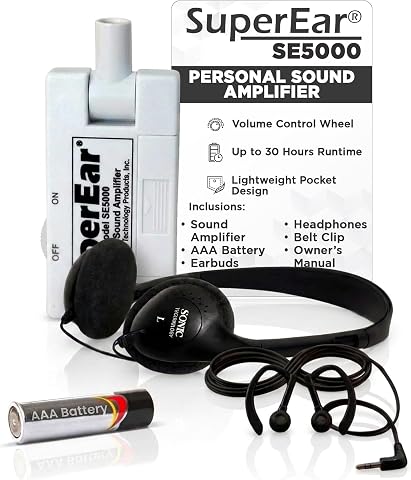
SuperEar SE5000 Hearing Amplifier for Seniors
- ✔ Amplification: Up to 50+ dB
- ✔ Battery: 1 AAA cell
- ✔ Battery life: Up to 30 hours, depending on use
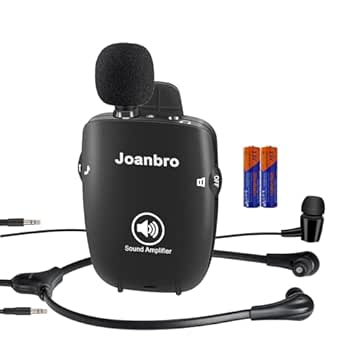
Joanbro Pocket Personal Sound Amplifier for Seniors
- ✔ Gain: Up to 108 dB, as specified by the manufacturer
- ✔ Power: Two AAA alkaline batteries
- ✔ Battery life: Approximately 40 hours of moderate use

Williams Sound Pocketalker Ultra Personal Sound Amplifier
- ✔ Amplification: Up to 40 dB
- ✔ Controls: Separate volume and tone
- ✔ Power: Battery powered
A PSAP makes sounds louder. It is not a hearing aid and does not diagnose or treat hearing loss. Sudden hearing changes, pain, drainage, or hearing loss mainly in one ear call for medical care rather than a shopping decision.
Difficulty: Beginner | Time: 30-60 minutes for selection and setup; several days to adjust to regular use
What You’ll Need
Tools & Materials:
- A phone or computer to compare product details, if available
- A quiet room for fitting and initial listening
- The device’s instructions and any included charger, batteries, or ear tips
Knowledge:
- Basic ability to charge or replace batteries, or help from a caregiver
- Awareness of the listening situations where hearing is difficult
Set aside time to check the return policy before buying. A device should feel comfortable and should not require turning the volume up until sounds become harsh. If the listener has not had a hearing check, arrange one, especially when difficulty hearing affects conversation or daily activities.
SuperEar SE5000 Hearing Amplifier for Seniors
The SuperEar SE5000 earns our top spot by keeping the basic listening routine approachable. Its swivel microphone captures nearby sound, while the tactile volume wheel gives us a physical control that is easy to locate without navigating menus. The package includes both stereo headphones and discreet earbuds, so we can choose between an over-ear fit at home and a less bulky option elsewhere.Compared with Joanbro, SuperEar offers fewer ways to tune the sound or reposition the microphone, but its controls are more straightforward. Its stated amplification reaches up to 50+ dB, and a single AAA cell can provide up to 30 hours under moderate to heavy use. That combination makes it a useful pick for TV dialogue and conversation when the amplifier can sit near the sound source. Since it captures ambient sound, it does not send TV audio directly to the headphones; background noise may also be amplified. Buyers who need tone adjustment or longer microphone leads should look at Joanbro or Pocketalker instead.
Pros:
- Tactile wheel makes volume adjustment direct and easy to locate.
- Includes stereo headphones and earbuds for different listening preferences.
- Up to 30 hours of stated battery life from one AAA cell.
- Pocket-sized body and belt clip support portable use.
Cons:
- Captures sound from the room instead of connecting directly to TV audio.
- No listed tone control or interchangeable microphone options.
Best for: Seniors who want a portable amplifier with simple tactile volume control and a choice of headphones or earbuds.
Not ideal for: Listeners who need a direct TV connection, tone adjustment, or an extended microphone to place near a distant sound source.
Bottom line: We recommend SuperEar for buyers who value a simple, portable setup more than detailed sound adjustment.
“We recommend SuperEar for buyers who value a simple, portable setup more than detailed sound adjustment.”
Joanbro Pocket Personal Sound Amplifier for Seniors
Joanbro is the most configurable option in this group. Its three interchangeable microphones include extension options, giving us more freedom to position sound capture near a conversation or another source. Adjustable bass, normal, and treble settings, plus nine volume levels, provide more ways to tailor listening than the simpler SuperEar. Active noise cancellation and automatic gain control are also listed, although they do not remove the basic limitation of capturing sound through a microphone in the room.That extra flexibility comes with more setup choices to manage. The anti-dropping headset and dual stereo earbuds offer alternatives, and the included belt clip keeps the pocket unit close at hand. Joanbro specifies up to 108 dB of gain, but the figure alone cannot predict comfort or suitability for an individual. Compared with Pocketalker Ultra, it supplies more microphone types and tone settings, while Pocketalker has separate volume and tone controls and an included 12-foot extension cord. Joanbro uses two AAA alkaline batteries; the product information describes roughly 40 hours of moderate use. We would choose it when adjustability matters, and skip it if a minimal-control device would be easier to use.
Pros:
- Three microphone options support different placement needs.
- Bass, normal, and treble settings allow tone adjustment.
- Nine volume levels give finer adjustment than a single-step control.
- Includes an anti-dropping headset, stereo earbuds, and belt clip.
Cons:
- More microphone and tone choices may take extra setup for a first-time user.
- Requires two AAA alkaline batteries that need periodic replacement.
- Does not provide a direct connection to TV audio.
Best for: Listeners who want multiple microphone placement options and adjustable tone for different rooms or conversations.
Not ideal for: Buyers who prefer the fewest possible settings or want direct TV audio instead of ambient microphone capture.
Bottom line: Joanbro is the best match when microphone flexibility and tone adjustment matter more than the simplest possible controls.
“Joanbro is the best match when microphone flexibility and tone adjustment matter more than the simplest possible controls.”
Williams Sound Pocketalker Ultra Personal Sound Amplifier
The Williams Sound Pocketalker Ultra is organized around adjusting listening and placing a microphone where it can pick up conversation or TV sound. Separate volume and tone controls let us change loudness without giving up tonal adjustment, while the included 12-foot microphone extension cord can help bring the microphone closer to a speaker or television. That makes this a more room-oriented setup than SuperEar’s compact swivel-microphone approach.Its stated amplification is up to 40 dB, lower than the figures supplied for the other two models, but those numbers should not be treated as a direct measure of which device will work best for a particular listener. The Pocketalker includes deluxe headphones, a single earbud, a neck lanyard, and compatibility with neckloops. It is the clearest pick for someone who values separate controls and extended microphone placement. Joanbro offers more microphone types and tone choices, while SuperEar is lighter in described battery burden with one AAA cell. Pocketalker’s supplied battery bundle is 20 AAA batteries, and its listed weight of 16 ounces may make it less appealing for users seeking an especially light carry. It is also an amplifier, not a hearing aid, and may not suit severe hearing impairment.
Pros:
- Separate volume and tone controls allow independent adjustment.
- 12-foot microphone extension cord supports flexible placement.
- Includes headphones, a single earbud, and neck lanyard.
- Compatible with headphones, earbuds, and neckloops.
Cons:
- Listed weight of 16 ounces is heavier than the other pocket-oriented options.
- Up to 40 dB amplification is less than the gain figures listed for SuperEar and Joanbro.
- Not a hearing aid and may not suit severe hearing impairment.
Best for: People focused on conversations or television who want separate volume and tone controls and a long microphone extension cord.
Not ideal for: Buyers prioritizing the lightest pocket carry, advanced microphone variety, or a device intended to treat significant hearing loss.
Bottom line: Pocketalker Ultra makes the most sense for conversation-focused buyers who can use its extended microphone and distinct controls.
“Pocketalker Ultra makes the most sense for conversation-focused buyers who can use its extended microphone and distinct controls.”
As an Amazon Associate we earn from qualifying purchases.
Before You Start
Write down the situations where extra sound would help, such as conversation across a table or television listening. PSAPs are intended for people with normal hearing who want amplification in specific situations. They may amplify background noise along with speech, and they do not provide the individualized fitting or hearing care of hearing aids.
Do not put an earbud or earpiece into an ear that is painful, draining, or recently injured. Do not use amplification to mask ringing or to compensate for a sudden change in hearing. Seek a clinician’s advice for those symptoms. Keep the volume low during setup; loud sound can be uncomfortable or harmful.
Step-by-Step Instructions
Step 1: Identify the listening situation
Choose one or two specific situations where you want more sound, then note the distance to the speaker and the amount of background noise. For example, write “one person speaking across the dinner table” or “television in a quiet room.” A PSAP is generally most useful for nearby sound in a defined setting. If the main problem is hearing people throughout the day, arrange a hearing evaluation before relying on an amplifier.
Tip: Ask a family member or friend to help describe situations where you often miss speech.
Check: You have a short list of situations and can describe where the sound source is.
Step 2: Check whether a hearing evaluation is needed
Book an appointment with a hearing care professional or clinician if hearing difficulty is new, getting worse, or interfering with everyday conversation. Ask about a hearing test before buying a device if you have not had one. Get prompt medical advice for sudden hearing loss, especially if it affects one ear; do the same for ear pain, drainage, dizziness, or a feeling of blockage that does not clear.
Tip: A hearing test can identify causes that a sound amplifier cannot address, including earwax or other medical problems.
Check: You know whether to proceed with a PSAP for occasional listening or get professional advice first.
Step 3: Compare devices and return terms
Compare devices based on how you will use them: ear-worn models can be convenient for conversation, while some tabletop or remote-microphone models let a speaker or microphone sit near the sound source. Check whether the device has a comfortable fit, simple volume controls, rechargeable or replaceable power, and any directionality or noise-reduction features you want. Read the instructions for compatible ear tips and cleaning. Before purchase, confirm the return period, fees, and how to request a refund if the fit or sound does not work for you.
Tip: Do not choose by maximum amplification alone. A louder setting can make noise uncomfortable without making speech clearer.
Check: You have a model suited to your main situation and know its power, fit, and return requirements.
Step 4: Prepare and inspect the device
Charge the device fully or install the specified batteries, following the manufacturer’s instructions. Wash and dry your hands, then inspect the earpiece, tips, microphone openings, and controls. Replace a damaged or dirty ear tip before wearing the device. Select the smallest included tip that sits securely and comfortably; never force an earpiece into the ear.
Tip: Keep tiny batteries and removable parts away from children and pets. Dispose of batteries according to local guidance.
Check: The device powers on, has no visible damage, and has a clean tip that fits without pressure.
Step 5: Fit the device and start at low volume
Follow the left/right markings and wearing instructions to place the device. Turn it on at the lowest volume setting, then raise the level gradually while someone speaks from the distance you noted. Stop increasing the volume when speech is comfortably audible. If the device squeals, reseat it or try another tip; feedback can happen when amplified sound escapes and returns to the microphone.
Tip: Remove the device if you feel pain, pressure, dizziness, or sudden discomfort. Do not continue by raising the volume.
Check: The device stays in place, speech is easier to hear, and the sound is comfortable without squealing.
Step 6: Test it in the intended setting
Use the device first in a quiet version of your target situation. Ask a conversation partner to speak naturally from the expected distance, then try a brief television or other relevant listening session if that is your goal. Notice whether words are clearer, whether background noise becomes distracting, and whether the fit remains comfortable. Make only small volume or mode changes, one at a time.
Tip: For a conversation, face the speaker and reduce competing noise when possible. Amplification does not replace good listening conditions.
Check: You can hear the intended sound more clearly at a comfortable level for several minutes.
Step 7: Clean, store, and review the fit
Turn off the device after use. Wipe it and clean removable tips only as directed by the manufacturer; do not immerse the electronics or use cleaning products that the instructions do not permit. Store the device dry and protected, and recharge or replace batteries as specified. After a few uses, review whether it helps the situations you listed and whether you can operate it easily.
Tip: If you are within the return period and the device is uncomfortable or does not make the target sound clearer, use the seller’s return process rather than tolerating a poor fit.
Check: The device is clean, stored safely, and you have a clear decision about whether it meets your needs.
Common Mistakes to Avoid
- Using a PSAP as a substitute for a hearing test when hearing loss is persistent. — Arrange a hearing evaluation if difficulty is ongoing, worsening, or affecting conversation. Use a PSAP only for appropriate, specific listening situations.
- Turning the volume up quickly to make every sound louder. — Start at the lowest setting and raise it in small steps. Stop when speech is comfortable; louder sound is not always clearer.
- Choosing a device without checking its return policy or fit options. — Check the return window, fees, ear-tip sizes, and wearing instructions before purchase.
- Wearing the device despite pain, pressure, or feedback squeal. — Remove it, check the fit and tip, and stop using it if discomfort continues. Ask a hearing professional or clinician for advice.
Troubleshooting
Problem: Speech is louder but still difficult to understand.
Solution: Lower the volume and reduce background noise. Move closer to the speaker, face them, and test again in a quiet setting. If speech remains unclear, arrange a hearing evaluation; amplification alone may not address the cause.
Problem: The device squeals or whistles.
Solution: Lower or mute it before reseating the earpiece. Check that the tip fits securely and that the microphone is not covered. Try another included tip if needed. If feedback continues, stop use and contact the seller or manufacturer.
Problem: The device feels painful, itchy, or as if it is pressing on the ear.
Solution: Remove it and check for a tip that is too large, damage, or moisture. Do not wear it again while pain or irritation continues. Seek clinical advice for persistent symptoms.
Problem: The device does not turn on or its sound cuts out.
Solution: Check the charge or battery orientation and confirm that the battery compartment or charging contacts are clean and dry as directed. Restart it using the manual. If it still fails, contact the seller or manufacturer while any return or warranty period remains active.
What Success Looks Like
The device fits without pain, turns on reliably, and makes the selected nearby sound easier to hear at a comfortable volume. It does not cause persistent squealing, dizziness, or irritation. You can operate and clean it according to its instructions, and you know when to stop using it and seek professional advice. If it does not meet these checks, do not keep raising the volume; use the return terms or request help.
Next Steps
Use the amplifier only in the situations where it helps, and keep following the cleaning and charging instructions. Reassess the fit and usefulness after several sessions. Arrange a hearing evaluation if hearing difficulty continues, worsens, or affects daily communication. Seek prompt care for a sudden hearing change, pain, drainage, or other new ear symptoms.
Frequently Asked Questions
Is a personal sound amplifier the same as a hearing aid?
No. A PSAP amplifies sound for specific listening situations and is not a substitute for a hearing aid fitted to address hearing loss. Ask a hearing care professional which option fits your needs.
Can I wear a PSAP all day?
Follow the manufacturer’s directions and use it for the situations where it helps. Take it out if it causes discomfort, feedback, dizziness, or harsh sound. Persistent hearing difficulty deserves a professional evaluation.
What should I do if I hear a sudden change in one ear?
Seek prompt medical advice. Do not try to correct sudden hearing loss by turning up a PSAP or waiting for the device to solve it.
How loud should I set the amplifier?
Start at the lowest setting and increase gradually until the target sound is comfortably audible. Reduce it if speech sounds harsh or background noise becomes tiring.
What if the amplifier does not help me follow conversation?
Test it in a quieter setting, move closer to the speaker, and confirm the fit and settings. If words remain unclear, stop relying on higher volume and arrange a hearing evaluation.
Halloween Picks
halloween
As an affiliate, we earn on qualifying purchases.