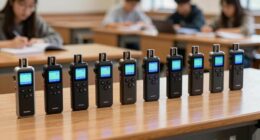
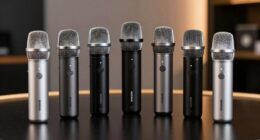
Managing phone-heavy roles with assistive tech involves using ergonomic accessories like phone holders and noise-canceling headsets to reduce physical strain. Implement voice recognition and speech-to-text tools to enable hands-free communication and automatic note-taking. Integrate call management software to handle high volumes efficiently. Additionally, use eye care technologies to prevent visual fatigue and establish workplace policies promoting healthy habits. Exploring these solutions further can help you optimize your workflow and protect your well-being.
Key Takeaways
- Implement ergonomic accessories like adjustable phone holders and noise-canceling headsets to reduce physical strain.
- Use speech recognition and speech-to-text tools for hands-free communication and automatic note-taking.
- Automate call management with intelligent routing, IVR, and real-time analytics to improve efficiency and reduce workload.
- Incorporate eye care technologies such as blue light filters and adaptive screens to prevent visual fatigue.
- Establish workplace policies encouraging regular breaks, boundaries on after-hours phone use, and ongoing employee training on assistive tech.
Amazon Product B0F74DH64V
As an affiliate, we earn on qualifying purchases.
Understanding the Challenges of Phone-Intensive Tasks

Phone-intensive tasks can be physically and mentally exhausting, especially when you’re constantly on call or handling multiple conversations throughout the day. This relentless activity can lead to call fatigue, making it harder to stay focused and engaged. As you juggle numerous calls, communication barriers may emerge, whether due to background noise, poor audio quality, or difficulty understanding different accents. These obstacles can cause misunderstandings, increase frustration, and slow your workflow. Over time, the strain can affect your overall well-being and productivity. Recognizing these challenges is the first step toward finding solutions. Being aware of how call fatigue and communication barriers impact your performance helps you seek effective tools and strategies to manage your phone-heavy role better. Additionally, understanding the importance of audio quality can help you select better communication devices to improve clarity and reduce fatigue.
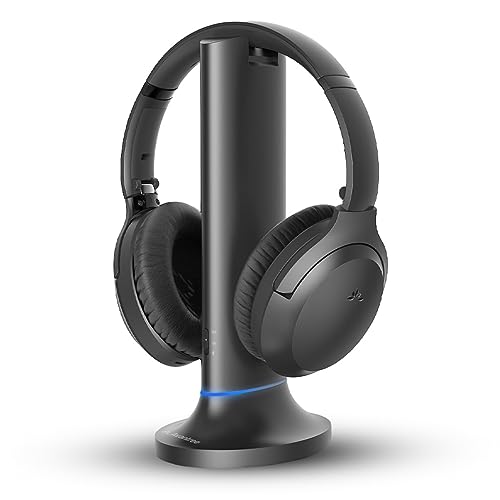
Avantree Opera Plus – Wireless Headphones for TV Watching, Clear Dialogue & Volume Boost for Seniors, Optical Soundbar Passthrough, Charging Transmitter Base
【Designed for Clear TV Dialogue】Designed for wireless TV watching, ideal for seniors or viewers who struggle to hear...
As an affiliate, we earn on qualifying purchases.
Ergonomic Accessories to Reduce Physical Strain

Using ergonomic accessories can considerably cut down physical strain during long phone sessions. Items like ergonomic phone holders, anti-strain headsets, and adjustable workstations help keep your posture comfortable and reduce fatigue. Incorporating these tools into your setup makes managing phone-heavy roles much easier on your body. Being mindful of symptoms of strain can help prevent long-term discomfort.
Ergonomic Phone Holders
To reduce physical strain during long calls or frequent phone use, ergonomic phone holders provide a practical solution. These devices feature ergonomic design principles that support your phone at a comfortable viewing angle, minimizing neck and hand strain. When selecting a holder, guarantee it offers good tech compatibility with your device, whether it’s a smartphone, tablet, or other gadgets. Adjustable angles and stable bases allow you to position your phone precisely where you need it, reducing awkward postures. This setup helps you maintain better posture and reduces muscle fatigue. Additionally, choosing a holder that complements your dog’s name’s lifestyle can promote better overall comfort. By using ergonomic phone holders, you can work more comfortably for extended periods, preventing discomfort and potential injuries associated with improper device handling. They’re an essential accessory for anyone managing phone-heavy roles.
Anti-Strain Headsets
Ergonomic accessories like anti-strain headsets are designed to help you maintain proper posture during long periods of phone use. They reduce physical strain on your neck and shoulders by allowing you to keep your head in a comfortable position. High-quality headsets feature noise cancellation, which minimizes background noise and helps you focus on calls. This improves call quality, ensuring your voice comes through clearly and reducing misunderstandings. Anti-strain headsets also lessen the need to cradle the phone between your shoulder and ear, preventing muscle fatigue and discomfort. With adjustable headbands and lightweight designs, they offer a customized fit for prolonged use. Investing in these headsets can boost your comfort, productivity, and overall well-being during demanding phone-heavy tasks. Additionally, automation technology in ergonomic tools is enhancing the design and functionality of accessories to better support users in various work environments.
Adjustable Workstations
An adjustable workstation allows you to customize your workspace to fit your body, reducing physical strain during long phone or computer sessions. By investing in ergonomic accessories, you support an effective office redesign that promotes comfort and health. An adaptable setup encourages better posture, minimizes repetitive strain injuries, and keeps you focused. When employees can easily adjust their desks, it boosts engagement and overall well-being. This flexibility helps prevent fatigue and discomfort, ensuring you stay productive throughout the day. Incorporating adjustable workstations also signals that your organization values employee health, fostering a positive work environment. Additionally, understanding resources and tools available for ergonomic improvements can further enhance your workspace. Ultimately, a well-designed workspace tailored to individual needs enhances efficiency and shows your commitment to a healthier, more engaged team.
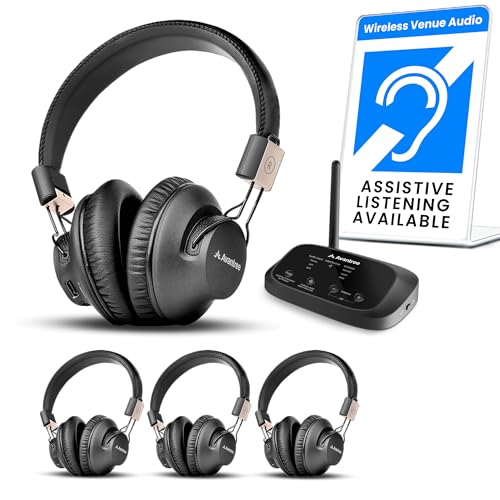
Avantree Quartet 2 - Wireless Group Listening Headphones & Transmitter for TV, Church, Classroom, Silent Discos, Plug & Play, 2.4GHz Expandable Multi-Headphone System with Low Latency & Clear Voice
【Seamless group listening】Instantly connect the Quartet 2 transmitter and share TV, movie, music, or live audio to 4...
As an affiliate, we earn on qualifying purchases.
Voice Recognition and Speech-to-Text Technologies

Voice recognition and speech-to-text tech have come a long way, offering better accuracy as the systems learn your speech patterns. They enable hands-free communication, reducing physical strain and increasing efficiency. Plus, these tools easily integrate with your workflows, making your daily tasks smoother and more seamless. Additionally, understanding legal requirements, such as residency requirements, can help users utilize these technologies effectively in various professional settings.
Accuracy Improvements Over Time
As voice recognition and speech-to-text technologies evolve, their accuracy has considerably improved over time, enabling more reliable communication for phone-heavy roles. Continuous accuracy tracking helps identify errors and refine algorithms, boosting overall performance. Over the years, advancements in machine learning and neural networks have driven performance optimization, reducing misinterpretations. This progress means fewer repeats during calls and increased efficiency. The table below highlights key factors influencing accuracy improvements:
| Factor | Impact |
|---|---|
| Accuracy Tracking | Identifies errors for refinement |
| Performance Optimization | Enhances recognition precision over time |
| Algorithm Enhancements | Reduce misinterpretation |
| Data Quality | Improves training and accuracy |
European cloud innovation has supported the development of more sophisticated speech recognition systems that operate efficiently across diverse languages and dialects.
Hands-Free Communication Benefits
Recent improvements in speech recognition accuracy have made hands-free communication more practical and efficient. With voice recognition and speech-to-text technologies, you can handle calls without manual input, boosting productivity and safety. These tools reduce the need to look at screens, helping you stay focused on your tasks while maintaining mobile security. They also enhance call analytics, providing valuable insights into call patterns and customer interactions. By automating note-taking and call summaries, you save time and improve accuracy. Hands-free communication allows you to multitask effectively, especially in roles involving frequent phone use. As technology advances, you’ll find it easier to manage high call volumes securely, while gaining deeper insights into your communication workflows. Additionally, integrating Glycolic Acid benefits into skincare routines can improve skin health, which is especially useful when taking care of yourself during busy workdays.
Integration With Workflows
Integrating speech recognition and speech-to-text technologies seamlessly into your workflows can substantially streamline your daily tasks. These tools help you manage high call volumes efficiently, reducing manual note-taking and freeing up time for customer engagement. Imagine a workflow where incoming calls are transcribed instantly, allowing you to prioritize and respond faster. Here’s an example to visualize the process:
| Incoming Call | Speech-to-Text Capture | Action Taken |
|---|---|---|
| Customer Inquiry | Transcribed in real-time | Immediate response or routing |
| Follow-up Notes | Automatically generated | Reduced manual entry |
| Call Summary | Summarized and stored | Better call analysis |
This integration enhances call volume management and boosts employee engagement by minimizing repetitive tasks and empowering staff with instant information. Additionally, adopting ethical hacking practices can help protect sensitive call data from vulnerabilities.

Avantree Audikast 4 - Auracast & Bluetooth TV Transmitter for Headphones & Selected Hearing Aids, aptX Adaptive & HD, Optical & AUX Output, Future-Ready & Upgradeable
【Check TV Compatibility Before Buying】Your TV must have Optical (TOSLINK) or 3.5 mm AUX output. TVs with HDMI...
As an affiliate, we earn on qualifying purchases.
Software Solutions for Call Management and Automation

Software solutions for call management and automation streamline your phone-heavy roles by reducing manual tasks and enhancing efficiency. They handle high call volume by routing calls intelligently, so callers reach the right department faster. Automated features like call queuing, IVR systems, and auto-dialers decrease wait times and prevent missed connections. These tools also boost customer engagement by providing quick responses and consistent information, creating a better experience. With real-time analytics and reporting, you gain insights into call patterns and staff performance, helping you optimize workflows. Integrating these solutions allows you to focus on complex issues instead of routine tasks. Overall, they make managing a high volume of calls more manageable, freeing up your time and improving service quality.
Eye Care Technologies for Screen and Phone Use

As screen time increases, protecting your eyes from strain and damage becomes essential. Eye care technologies focus on enhancing visual comfort by reducing eye fatigue during prolonged phone or screen use. Many devices now feature adjustable screen brightness, allowing you to tailor brightness levels to ambient lighting, which minimizes eye strain. Additionally, blue light filters can be applied via software or built-in features, decreasing exposure to blue light that can disrupt sleep and cause discomfort. Some screens automatically adjust brightness based on surrounding light, promoting healthier viewing habits. Incorporating aviator-inspired accessories and technologies into your routine helps maintain eye health, reduces fatigue, and improves overall comfort.
Implementing Workplace Policies for Healthy Phone Use

To promote healthy phone habits in the workplace, implementing clear policies is essential. These policies should encourage regular breaks and digital detox periods to prevent burnout and reduce stress. Set guidelines that limit constant phone checking during work hours, allowing employees to focus on tasks without interruptions. Promote stress management by encouraging employees to step away from their devices during designated break times. Establish boundaries around after-hours phone use to help maintain work-life balance. Communicate these policies clearly and consistently, emphasizing the importance of mental health and productivity. By fostering a work environment that values mindful phone use, you help employees manage stress better and develop healthier habits. Clear policies create a foundation for balanced, sustainable phone use in your team.
Training Employees on Assistive Technologies

Building on your workplace policies for healthy phone use, providing thorough training makes certain employees can effectively utilize assistive technologies. In a call center setting, this step is crucial for maximizing productivity and comfort. To ensure success, focus on:
- Demonstrating how to operate assistive devices specific to call center tasks
- Offering hands-on practice to build confidence and familiarity
- Providing ongoing support and updates as new assistive technologies emerge
Measuring the Impact of Assistive Tech on Well-Being

Measuring the impact of assistive technology on well-being is essential to guarantee these tools genuinely benefit employees. By tracking mental health indicators, you can see if the technology reduces stress or burnout associated with phone-heavy roles. Use productivity metrics to assess changes in efficiency and task completion times, ensuring that assistive tools improve work flow without unintended strain. Regular surveys or check-ins can provide qualitative insights into employees’ mental health and overall satisfaction. Combining quantitative data with feedback helps you determine if the technology supports sustained well-being and performance. Ultimately, consistent measurement allows you to adjust strategies, ensuring that assistive tech truly enhances both mental health and productivity in phone-intensive roles.
Frequently Asked Questions
How Can Companies Customize Assistive Tech for Different Phone-Heavy Roles?
You can customize assistive tech by implementing personalization strategies tailored to each phone-heavy role. Assess each user’s needs and modify settings or features accordingly. Provide thorough user training to ensure they can utilize the tech effectively. By focusing on individual workflows and offering ongoing support, you empower employees to navigate their tasks efficiently, reducing frustration and boosting productivity in roles that rely heavily on phone communication.
What Are the Initial Costs Versus Long-Term Savings of Implementing These Technologies?
Oh, the thrill of a cost analysis! You’ll find that initial tech integration costs can seem sky-high, but long-term savings make it worthwhile. Over time, assistive tech reduces employee fatigue and boosts productivity, saving money on turnover and sick days. While the upfront investment might sting, the lasting benefits—like happier, more efficient staff—prove that smart tech choices pay off, big time.
How Do Employees Typically Adapt to New Assistive Tools and Protocols?
When you introduce new assistive tools and protocols, you’ll likely face training challenges, but employee engagement grows as they see the benefits. You should provide clear instructions and ongoing support to help your team adapt quickly. Encouraging feedback and involving employees in the process boosts confidence. Over time, their familiarity improves, leading to increased productivity and smoother progression, making the initial effort worthwhile for long-term success.
Are There Privacy Concerns Related to Voice Recognition and Call Automation?
Imagine your conversations are like delicate treasures, but voice recognition and call automation can feel like open safes. Privacy concerns pop up, making you wonder if your data security is at risk. You need to trust that your sensitive information stays locked away, safe from prying eyes. While these tools boost efficiency, it’s crucial to stay vigilant about privacy concerns and guarantee robust data security measures are in place to protect your voice and calls.
What Ongoing Support Is Necessary to Ensure Effective Use of Assistive Tech?
To guarantee you effectively use assistive tech, ongoing training is essential so you stay updated on new features and best practices. Encourage regular user feedback to identify challenges and areas for improvement. Support also includes providing prompt technical assistance and refresher sessions. By maintaining active communication and continuous education, you empower yourself to maximize the technology’s benefits and adapt to evolving needs, ensuring sustained productivity and comfort.
Conclusion
As you implement these assistive technologies, picture a workspace where your phone’s constant buzz no longer strains your neck or eyes. Instead, smooth voice commands and ergonomic accessories create a seamless flow, like a well-orchestrated symphony. With each step, you’re paving a healthier, more comfortable path through your daily tasks. Embrace these tools, and watch your workload transform into a manageable, stress-free rhythm, making every call feel lighter and more controlled.