
Finding the best smart pens for accessible note capture involves balancing ease of use, compatibility, and features that support different needs. The LivePen Digital Smart Pen stands out as the overall best choice for its seamless Bluetooth connectivity and simplicity. For those seeking more advanced features, the inq Smart Writing Set offers impressive AI note-taking and voice recording, while the Neo Smartpen M1+ provides a sleek, reliable design for everyday use. Yet, each option presents tradeoffs—some focus on affordability, others on feature depth, and compatibility varies widely. Continue reading for a detailed comparison that helps you find the ideal smart pen for your note-taking needs.
Key Takeaways
- Top-ranked smart pens combine reliable Bluetooth connectivity with user-friendly design for accessible note capture.
- Compatibility across devices varies; choosing a pen that syncs with your preferred platform is essential.
- Feature sets differ significantly—some prioritize OCR and audio recording, others focus on simple digital note conversion.
- Price ranges reflect tradeoffs in functionality, with premium options offering more advanced AI and integration.
- Build quality and ergonomics are critical for long-term comfort, especially for users with accessibility needs.
| LivePen Digital Smart Pen with Bluetooth and Wireless Connectivity |  | Best Overall for Accessibility and Seamless Syncing | Weight: 0.15 lbs (0.07 kg) | Battery Life: 7-day standby | Compatibility: Android 10.0, iOS 13 | VIEW LATEST PRICE | See Our Full Breakdown |
| Lamy Safari All Black ncode Smart Pen |  | Best for Creative and Precise Handwriting Digitization | Processor: Dual-Core ARM9 | Recording Speed: 120 FPS | Storage Capacity: 16MB internal | VIEW LATEST PRICE | See Our Full Breakdown |
| Smart Pen and Digital Notebook Set for Real-Time Paper-to-Digital Note-Taking with OCR Conversion |  | Best for Lectures and Offline Note-Taking with OCR | Notebook Sheets: 60 sheets | Included Items: Smart pen, writing board, refills | App Compatibility: iOS/Android only | VIEW LATEST PRICE | See Our Full Breakdown |
| Ophayapen Smart Sync Pen for Note Taking with Notebook and Writing Board |  | Best for Real-Time, Searchable Digital Notes from Paper | Included Items: Smart pen, notebook, writing board | Compatibility: iOS and Android smartphones/tablets | File Formats: PDF, Word, PNG, GIF, MP4 | VIEW LATEST PRICE | See Our Full Breakdown |
| XNote Smart Pen & Notebook Starter Set |  | Best for AI-Enhanced Notes with Long Battery Life | Battery Life: 17 hours | Bluetooth Version: 4.2 | Included Items: Smart pen, notebook, ink refills | VIEW LATEST PRICE | See Our Full Breakdown |
| Smart Pen and Notebook Set with Real-Time Sync for iPad, iPhone, and Android |  | Best Overall for Cross-Platform Accessibility | Battery Included: 1 A battery (included) | Compatible Devices: Smartphone, iPad, iPhone | Charging Time: 1.5 hours | VIEW LATEST PRICE | See Our Full Breakdown |
| Ophaya Sync Smart Pen and A5 Notebook (5-Pack) |  | Best Value with Multiple Notebooks and Rich Features | Number of Batteries: 1 (nonstandard, included) | Compatible Devices: Smartphone, Tablet | Minimum OS Version: Android 13.0 / iOS 16 | VIEW LATEST PRICE | See Our Full Breakdown |
| Ophayapen Smart Pen + Mini Notebook |  | Best Portable Digital Pen for On-the-Go Note Capture | Compatibility: Android, iOS | Features: Real-time sync, note digitization | VIEW LATEST PRICE | See Our Full Breakdown | |
| Smart Sync Pen with OCR and Audio Recording for Digital Note-Taking |  | Best for Multi-Format Note Conversion and Voice Integration | Bluetooth Connectivity: Yes | Compatibility: iOS and Android | Offline Storage: Supported | VIEW LATEST PRICE | See Our Full Breakdown |
| Neo Smartpen M1+ (Black) |  | Best for Extended Use with Smart Search and Export Flexibility | Battery Life: 17 hours | Bluetooth Version: 4.2 | Export Formats: PDF, PNG, SVG, Animation | VIEW LATEST PRICE | See Our Full Breakdown |
| inq Smart Writing Set – Converts Handwriting to Text with AI Note-Taking and Voice Recording for iPhone & Android (Letter Size Notebook) | 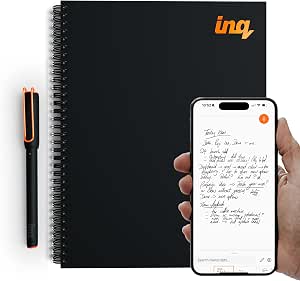 | Best for AI-Enhanced Digital Note Conversion | Ink Color: Black | Drill Point: Fine | Line Size: 0.3mm | VIEW LATEST PRICE | See Our Full Breakdown |
| Yuan Smart Digital Notebook with Pen |  | Best for Offline Flexibility and Portability | Battery Life: 8 hours | Standby Time: 110 days | Charging Time: 1.5 hours (fast charge) | VIEW LATEST PRICE | See Our Full Breakdown |
More Details on Our Top Picks
LivePen Digital Smart Pen with Bluetooth and Wireless Connectivity
The LivePen stands out for its automatic backup and real-time transcription, making it highly accessible for users who need quick digital conversion without complex setups. Unlike the Ophayapen Smart Sync Pen, which offers more extensive offline features, LivePen’s primary advantage is effortless smartphone integration, catering well to users who prefer mobile-centric workflows. Its 7-day battery life and wireless connectivity are significant benefits, though it’s limited to only 20 A5 pages before syncing, which could be a drawback for extensive note-takers. The need for separate Livescribe notebooks adds an extra step and cost, but for those seeking straightforward, wireless note capture, this remains a compelling choice.
Pros:- Automatic backup and transcription streamline digital note capture
- Real-time sharing via smartphone enhances accessibility
- Long 7-day rechargeable battery supports frequent use
Cons:- Requires purchase of Livescribe notebooks, increasing overall cost
- Limited to 20 pages of notes before syncing, which may be restrictive for intensive users
Best for: Individuals who want a simple, wireless smart pen with automatic transcription and primarily use smartphones for note management.
Not ideal for: Power users needing extensive offline storage or those who prefer a pen that works directly on any paper without additional notebooks.
- Weight:0.15 lbs (0.07 kg)
- Battery Life:7-day standby
- Compatibility:Android 10.0, iOS 13
- Storage Capacity:20 A5 pages
- Enclosure Material:Plastic
- Color:Black
Bottom line: Best suited for users seeking a wireless, smartphone-compatible smart pen for quick, accessible note digitization.
Lamy Safari All Black ncode Smart Pen
The Lamy Safari ncode offers high-quality digitization with its 120 FPS internal camera, making it ideal for users who need detailed, accurate handwriting conversion. Compared with the LivePen, which relies on Bluetooth syncing, the Lamy uses internal storage, offering more flexibility in when and how notes are transferred. Its export options to TXT, PDF, and PPT make it a versatile tool for students and professionals. However, the limited internal storage of just 16MB means frequent transfers are necessary for larger projects, and it requires the Neo Studio app for full functionality, which may be less convenient for some.
Pros:- High-speed 120 FPS recording captures detailed handwriting
- Internal storage allows delayed syncing, reducing dependency on immediate connection
- Supports multiple export formats for versatile use
Cons:- Limited internal storage requires frequent data transfers
- Requires Neo Studio app, adding complexity for casual users
Best for: Creative professionals and students who value high-fidelity handwriting capture and flexible exporting options.
Not ideal for: Users seeking a purely wireless experience or those who prefer a simple, plug-and-play device without app dependencies.
- Processor:Dual-Core ARM9
- Recording Speed:120 FPS
- Storage Capacity:16MB internal
- Ink Type:LAMY D1-Type pen tip
- Compatibility:Requires Neo Studio app
- Color:All Black
Bottom line: Ideal for users who prioritize detailed, accurate handwriting capture and don’t mind managing internal storage and app setup.
Smart Pen and Digital Notebook Set for Real-Time Paper-to-Digital Note-Taking with OCR Conversion
This combo set excels for those who prefer writing on paper but want digital flexibility, thanks to its OCR conversion and audio sync. Unlike the Ophayapen, which relies on its app for real-time syncing, this set enables offline writing with automatic syncing when reconnected, making it ideal for classrooms or meetings without constant internet. Its ability to convert handwritten notes into editable text and export in multiple formats is notable, although it requires proprietary Ophaya paper, which adds a recurring expense. The app’s incompatibility with computers might limit some users who want seamless desktop integration.
Pros:- Converts handwritten notes to editable digital text with OCR
- Audio recording sync provides context to notes
- Works offline and auto-syncs later for convenience
Cons:- Requires proprietary Ophaya paper, increasing ongoing costs
- Not compatible with computers, limiting workflow options
Best for: Students and professionals who record lectures and need offline, OCR-enabled note conversion on paper with audio context.
Not ideal for: Those seeking a fully integrated, computer-friendly device or who dislike proprietary paper requirements.
- Notebook Sheets:60 sheets
- Included Items:Smart pen, writing board, refills
- App Compatibility:iOS/Android only
- Paper Requirement:Ophaya proprietary paper
- Features:OCR, audio sync, multiple export formats
- Offline Storage:Yes
Bottom line: Best for users who need offline paper-based notes with OCR and audio support, especially in educational settings.
Ophayapen Smart Sync Pen for Note Taking with Notebook and Writing Board
The Ophayapen Smart Sync Pen offers robust real-time digitization with OCR, making it ideal for those who want searchable, editable notes directly from paper. Its ability to sync instantly with the Ophaya Pro+ app, including audio recording, makes it a strong choice for lectures and meetings. Compared to the XNote set, which emphasizes AI-driven organization and summarization, Ophayapen excels at immediate note conversion and searchability. However, it demands a smartphone or tablet, and its ecosystem is limited to the Ophaya app, which may be a constraint for some users seeking broader compatibility.
Pros:- Real-time syncing of handwritten notes to digital devices
- OCR converts handwriting into searchable, editable text
- Supports audio recordings for added context
Cons:- Requires a smartphone or tablet for full operation
- Limited to Ophaya Pro+ app ecosystem
Best for: Students and professionals who want real-time OCR conversion and searchable notes from manual writing.
Not ideal for: Users looking for a standalone device or those who prefer device independence from specific app ecosystems.
- Included Items:Smart pen, notebook, writing board
- Compatibility:iOS and Android smartphones/tablets
- File Formats:PDF, Word, PNG, GIF, MP4
- Offline Storage:Yes
- OCR Support:Yes
- Audio Recording:Supported
Bottom line: Ideal for users needing instant, searchable digital notes from handwritten paper in real time.
XNote Smart Pen & Notebook Starter Set
The XNote offers a feature-rich experience, with AI-powered organization, summarization, and translation, making it especially useful for those managing large amounts of notes. Its 17-hour battery life and offline storage make it dependable for long sessions and remote use. While it doesn’t include a built-in microphone, requiring an external device for audio recording, its compatibility with platforms like Zoom and Teams makes it well-suited for professional or educational environments. Compared to the LivePen, which emphasizes simple wireless sync, XNote’s AI features provide smarter organization but come at a slightly higher complexity and potentially higher cost.
Pros:- AI-powered summarization, auto-tagging, and translation streamline note organization
- Long 17-hour battery with fast charging supports extended use
- Offline storage ensures functionality without internet
Cons:- Lacks built-in microphone; external device needed for audio recordings
- Price details are not specified, potentially limiting budget considerations
Best for: Students and professionals who want AI-driven note management and long-lasting battery performance.
Not ideal for: Users seeking a simple, low-cost device or those who prefer integrated audio recording without external apps.
- Battery Life:17 hours
- Bluetooth Version:4.2
- Included Items:Smart pen, notebook, ink refills
- Materials:Aluminum alloy, plastic
- Compatibility:Google Meet, Zoom, Microsoft Teams
- File Storage:Offline
Bottom line: Best for users interested in intelligent, AI-enabled note-taking with extended battery life for professional or academic use.
Smart Pen and Notebook Set with Real-Time Sync for iPad, iPhone, and Android
This set stands out for its seamless real-time synchronization across iOS and Android devices, making it ideal for users who switch between platforms. Compared to the Neo Smartpen M1+, it offers broader device compatibility but relies on official Yuan notebooks, which can limit flexibility. Its offline storage for just 15 pages is a notable tradeoff, suitable for quick notes rather than extensive writing. The customizable handwriting styles enhance accessibility, yet the inability to erase permanent handwriting might frustrate some users. Overall, this option makes the most sense for those seeking dependable cross-device syncing without premium features, though its storage limits and notebook dependency can be drawbacks.
Pros:- Real-time digital note synchronization across iOS and Android
- Customizable handwriting styles and colors
- Offline storage for 15 pages of notes
- Compatibility with multiple devices
Cons:- Requires official Yuan Smart Notebooks for full functionality
- Limited offline storage capacity (8MB)
- Permanent handwriting cannot be erased
Best for: Users who need a straightforward, cross-platform note capture system with real-time digital syncing and are willing to use official notebooks.
Not ideal for: Heavy note-takers who require extensive offline storage or prefer to use third-party notebooks, as the limited capacity and notebook dependency may hinder workflow.
- Battery Included:1 A battery (included)
- Compatible Devices:Smartphone, iPad, iPhone
- Charging Time:1.5 hours
- Memory Storage:8MB (approx. 15 A4 pages)
- Minimum OS Version:Android 4.4 KitKat
Bottom line: This pick suits users seeking easy cross-platform access to handwritten notes, with some tradeoffs in storage and flexibility.
Ophaya Sync Smart Pen and A5 Notebook (5-Pack)
This kit combines five A5 notebooks with a smart pen that digitizes notes in real time, supporting OCR and audio-linked notes, making it ideal for students and busy professionals. Unlike the Neo Smartpen M1+, it offers a high-volume notebook pack, but the notebooks themselves may lack premium paper quality, which could affect writing comfort. The device syncs automatically when connected, offering convenience, yet it has a learning curve to maximize features like OCR and audio recording. Compared to the simpler B0CD2C67J2, it provides more notebooks for less per-unit cost but demands more setup and familiarity. This set makes the most sense for those who want bulk notebooks and versatile digital features at a reasonable price, despite some complexity and quality tradeoffs.
Pros:- Real-time note digitization and automatic cross-device sync
- OCR converts handwriting to editable text
- Audio recording synchronized with notes
- Includes five notebooks for extensive use
Cons:- Limited compatibility to specific Android/iOS versions
- Basic notebooks may lack premium paper quality
- Requires some learning to utilize all features
Best for: Students or professionals who need multiple notebooks with integrated digital features for extensive note-taking and audio recordings.
Not ideal for: Casual users or those who prefer premium paper quality, as the included notebooks may not offer the best writing experience or ease of use.
- Number of Batteries:1 (nonstandard, included)
- Compatible Devices:Smartphone, Tablet
- Minimum OS Version:Android 13.0 / iOS 16
- Enclosure Material:Plastic
- Color:Brown
Bottom line: This kit offers high value for heavy note-takers needing multiple notebooks and multimedia features, with some setup complexity.
Ophayapen Smart Pen + Mini Notebook
This compact digital pen pairs with a mini notebook, making it ideal for quick notes, sketches, or classroom use. Its real-time sync ensures instant digital access, similar to the B0FFSBK445 but in a smaller form factor. Unlike larger options, its portability is a key advantage, though its reliance on a smartphone limits standalone functionality. Battery life isn’t specified, raising questions about long-term use without frequent charging. It’s best suited for users who need a lightweight, portable solution rather than extensive offline storage or advanced editing features. Compared with the Neo Smartpen M1+, it sacrifices some export versatility for size and convenience, making it a good choice for those prioritizing mobility over advanced features.
Pros:- Real-time syncing for instant digital notes
- Compact, portable design
- Compatible with both Android and iOS
- Includes mini notebook for convenience
Cons:- Requires smartphone for full functionality
- Battery life not specified, raising concerns about endurance
Best for: Students and professionals needing a portable, easy-to-carry digital pen for quick notes and sketches.
Not ideal for: Heavy note-takers who require large storage capacity or advanced editing features, as the mini notebook and portability limit extended use.
- Compatibility:Android, iOS
- Features:Real-time sync, note digitization
Bottom line: This pen excels for mobile users seeking simple, quick digital note capture in a small package.
Smart Sync Pen with OCR and Audio Recording for Digital Note-Taking
This pen offers real-time handwriting synchronization, converting notes into editable formats like Word and PDF, and supports audio recording, making it a versatile choice for meetings and lectures. Compared to the Neo Smartpen M1+, it provides more format options and voice integration, though its full functionality depends on the dedicated app. The need for a compatible app and unspecified battery life are potential hurdles. Its offline storage support ensures uninterrupted use, which is helpful during long sessions. Overall, this pick is ideal for users who want a comprehensive digital note-taking tool that combines handwriting, text conversion, and voice recording, but it may involve a learning curve and reliance on app stability.
Pros:- Real-time handwriting synchronization
- Converts notes into Word and PDF formats
- Includes voice recording feature
- Supports offline storage
Cons:- Requires dedicated app for full functionality
- Battery life not specified, which may affect long use
Best for: Professionals and students who need multi-format notes with voice notes for meetings, classes, or interviews.
Not ideal for: Casual note-takers who don’t require format versatility or voice features, as the device’s complexity might be unnecessary.
- Bluetooth Connectivity:Yes
- Compatibility:iOS and Android
- Offline Storage:Supported
- OCR Capabilities:Handwriting to text conversion
- Audio Recording:Yes
Bottom line: This pen suits users needing multi-format, multimedia notes, with some complexity and app dependency involved.
Neo Smartpen M1+ (Black)
The Neo Smartpen M1+ is distinguished by its zero-lag real-time handwriting-to-digital conversion and impressive 17-hour battery life, making it well-suited for long sessions. Its export options, including PDF, PNG, SVG, and animation, cater to professionals seeking versatile sharing capabilities. Compared with the B0DS6V84WK, it is more focused on long-term use and advanced search features, although it requires Android devices running version 13.0 or newer, which could limit compatibility. The need to download Neo Studio 2 app adds a layer of setup but enhances functionality. This pen makes sense for users who prioritize extended battery life and powerful search, yet compatibility constraints and the app requirement are considerations.
Pros:- Zero-lag, real-time handwriting conversion
- 17-hour battery life for all-day use
- Multiple export formats including animation
- Smart search for handwritten notes
Cons:- Limited to Android devices running Android 13.0+
- Requires download of Neo Studio 2 app for full features
Best for: Android users who need a reliable, long-lasting digital pen with versatile export options and smart search capabilities.
Not ideal for: Users with older Android devices or iOS users, since it requires Android 13.0+ and the Neo Studio app, limiting accessibility.
- Battery Life:17 hours
- Bluetooth Version:4.2
- Export Formats:PDF, PNG, SVG, Animation
- Compatible Devices:Smartphones, Fire tablets
- Color:Black
Bottom line: This pen is perfect for Android users needing long-lasting battery life and advanced search, with some app dependency and compatibility requirements.
inq Smart Writing Set – Converts Handwriting to Text with AI Note-Taking and Voice Recording for iPhone & Android (Letter Size Notebook)
This option stands out for its ability to seamlessly convert handwritten notes into digital text, including cursive and diagrams, which makes it ideal for users who want to digitize complex notes with minimal hassle. Unlike the Yuan Smart Digital Notebook, which excels in offline storage and longer battery life, the inq Smart Writing Set offers AI-driven features like note summarization and real-time voice recording linkage, providing a richer note-taking experience. The need for a smartphone app for full functionality can be a hurdle for those seeking a truly standalone device, but for those willing to sync, it offers powerful cross-device access. The set’s focus on AI and voice integration makes it perfect for professionals and students who need contextual, searchable notes but don’t mind using an app regularly.
Pros:- Converts handwriting to digital text with cursive and diagram recognition
- Syncs notes across devices via a free app for easy access and editing
- Integrates voice recording with written content for richer context
- Includes an AI assistant for note summarization and brainstorming
Cons:- Requires a smartphone app to access full features, which may be inconvenient for some
- Limited to letter-size notebooks, reducing flexibility for larger or different formats
Best for: Professionals and students who want AI-enhanced, cross-device note capture with voice integration
Not ideal for: Users seeking a portable, standalone device with long battery life or those who prefer offline-only note-taking
- Ink Color:Black
- Drill Point:Fine
- Line Size:0.3mm
- Grip Type:Ergonomic
- Style Color:Black
- Unit Count:1.0
Bottom line: This pick makes the most sense for users who want AI-driven, cross-device note management with integrated voice capabilities, accepting the need for app reliance.
Yuan Smart Digital Notebook with Pen
Compared with the inq Smart Writing Set, the Yuan Smart Digital Notebook shines in portability and offline use, thanks to its 8-hour battery life and offline storage, making it a strong choice for on-the-go note takers. Its primary limitation is the requirement to use exclusive Yuan smart notebooks, which could pose a compatibility challenge for users already invested in other systems. The device’s real-time digital conversion capabilities are reliable, but the learning curve for app features and syncing may slow down new users. This model is best suited for those who prioritize portability and offline operation over the more AI-driven, cross-device features of the inq set, especially in environments with limited connectivity.
Pros:- Real-time digital conversion of handwritten notes
- 8-hour battery with offline storage for flexibility
- Includes accessories like mini notebook and refills for extended use
- Lightweight and portable design for easy carrying
Cons:- Requires exclusive Yuan smart notebooks, limiting flexibility
- Learning curve involved in mastering app features and syncing process
Best for: Frequent commuters or students who need portable, offline-capable note-taking with real-time digital conversion
Not ideal for: Users who prefer a non-proprietary system or need seamless multi-device synchronization without a learning curve
- Battery Life:8 hours
- Standby Time:110 days
- Charging Time:1.5 hours (fast charge)
- Notebook Pages:94 sheets
- Compatibility:iOS/Android
Bottom line: This device is ideal for those who prioritize portability, offline use, and real-time conversion, accepting the need for proprietary notebooks and a learning curve.