When selecting an HDMI capture card for accessible livestreaming, the main concern is balancing ease of use with quality and compatibility. The Elgato 4K X Capture Card stands out for its low latency and 4K capabilities, making it ideal for high-end streamers. The Magewell USB Capture HDMI Gen 2 offers reliable 1080p60 recording, perfect for those prioritizing stability. Meanwhile, budget options like the UGREEN 2K@30Hz HDMI to USB 3.0 Capture Card serve well for casual or beginner streamers. The tradeoffs often involve resolution, latency, and ease of setup — continue reading for the full breakdown to find your best fit.

Get everyday helpers delivered free with Prime
- Fast, free delivery on millions of items
- Prime Video, Amazon Music and more included
- Member-only deals all year
Key Takeaways
- Higher-end models like the Elgato 4K X excel in low latency and 4K support, ideal for professional streamers.
- Budget options tend to have lower resolution and fewer features but are accessible for beginners.
- Compatibility with various devices varies; USB-C and HDMI loop-out features improve flexibility.
- Latency and passthrough quality significantly impact live streaming smoothness and quality.
- Build quality and driver stability are critical for accessible livestreaming, especially for long sessions.
| Roland UVC-01 USB Video Capture Device |  | Best Overall for High-Quality Livestreams | Hardware Interface: USB | Video Capture Resolution: 1080p | Operating System: Windows, Mac | VIEW ON AMAZON | See Our Full Breakdown |
| UGREEN 2K@30Hz HDMI to USB 3.0 Capture Card for Streaming and Recording |  | Best Value for Versatile Device Support | Input Resolution: 4K@30Hz | Output Resolution: 2K@30Hz, 1080p@60Hz | Interface: USB 3.0, USB-C, USB-A | VIEW ON AMAZON | See Our Full Breakdown |
| Acer USB 3.0 HDMI Capture Card, 4K HDMI Loop-Out, 1080P 60Hz for Streaming |  | Best for 4K Input with Reliable Performance | Hardware Interface: HDMI, USB 3.0 Type A/C | Video Capture Resolution: 1080p, 720p | Operating System: Linux, Windows | VIEW ON AMAZON | See Our Full Breakdown |
| Elgato 4K X Capture Card, HDMI 2.1, 4K144 Ultra-Low Latency, VRR Passthrough, HDR10, Up to 1080p240 Capture, USB 3.2 Gen 2, Compatible with PS5, Xbox, Switch, PC, Mac |  | Best for Professional-Grade 4K Streaming and Gaming | Resolution: 4K at 144 fps, 1080p at 240 fps | HDMI Support: HDMI 2.1 | VRR Passthrough: Yes | VIEW ON AMAZON | See Our Full Breakdown |
| Magewell USB Capture HDMI Gen 2 – HDMI to USB Video/Audio Capture Device, Up to 1080p60 Recording |  | Best for Reliable Continuous Recording | Input Resolution: up to 1080p60 | Supported Resolutions: up to 1080p60 | Connectivity: USB 3.1 Gen 1 | VIEW ON AMAZON | See Our Full Breakdown |
| Elgato Cam Link 4K Capture Card for DSLR, Camcorder, Action Cam |  | Best Overall for Accessible Livestreaming with High-Quality Video | Hardware Interface: USB 3.0 | Video Capture Resolution: 1080p60, 4K60 | Dimensions: 3.19 x 1.22 x 0.47 inches | VIEW ON AMAZON | See Our Full Breakdown |
| Magewell USB Capture HDMI 4K Pro 32150 – 1-Channel HDMI 2.0 to USB 3.2 Gen2x2 Video/Audio Capture Device with Loop-Through, Analog Audio In/Out, Up to 4K60 Input and Capture |  | Best for Professional-Grade Streaming and Flexible Monitoring | Input Resolution: up to 4096×2160 at 60fps | Output Resolution: up to 4K60 | HDMI Version: HDMI 2.0 | VIEW ON AMAZON | See Our Full Breakdown |
| 4K HDMI Video Capture Card, 1080P 60FPS Game Capture Device for Streaming | 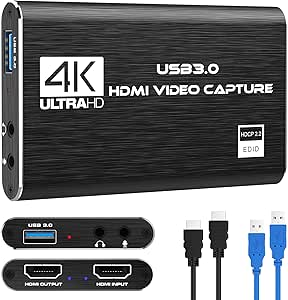 | Best for Budget-Conscious Gamers and Casual Streamers | Capture Resolution: 1080p at 60FPS | Input Support: 4K30/60Hz | Output Support: up to 2K30Hz | VIEW ON AMAZON | See Our Full Breakdown |
| Audio Express AXHDCAP 4K HDMI Video Capture Card |  | Best for Versatile Streaming with Broad Compatibility | Input Resolution: 3840×2160@30Hz | Output Resolution: 1920×1080@30Hz | Connection: HDMI to USB 2.0 | VIEW ON AMAZON | See Our Full Breakdown |
| OREI 4K HDMI Capture Card, USB 3.0, HDR, 8K60 Input, 4K144 Pass-Through, HDMI 2.1, HDCP 2.3 |  | Best for Future-Proof High-Resolution Streaming and Gaming | Input Resolution: 8K@60Hz | Pass-Through Resolution: 4K144 | Connectivity: USB 3.0 | VIEW ON AMAZON | See Our Full Breakdown |
| Guermok Video Capture Card, 4K USB3.0 HDMI to USB-C, 1080P 60FPS & 2K 30FPS, Compatible with Windows, Mac, iPad, Quest 3, PS5/4, Switch, Xbox, Camera |  | Best Overall for Versatile Livestreaming and Compatibility | Input Resolution: up to 4K@30Hz | Output Resolution: up to 2K@30Hz or 1080P@60Hz | Connection Interface: USB 3.0, USB-C | VIEW ON AMAZON | See Our Full Breakdown |
| KONDOR BLUE USB-C to HDMI Capture Card for Live Streaming |  | Best for High-Quality, Durable Live Streaming Setup | Compatible Devices: Cameras, Laptops, Desktops | Connector Type: Full HDMI (Female), USB Type C | Number of Ports: 1 | VIEW ON AMAZON | See Our Full Breakdown |
| 4K HDMI Capture Card USB 3.0 – 1080P 60FPS Gaming & Streaming Video Capture Card with HDMI Loop-Out |  | Best for Gaming and Seamless Streaming with Pass-Through | Video Resolution: 1080P 60FPS | Input: HDMI | Output: HDMI Loop-Out | VIEW ON AMAZON | See Our Full Breakdown |
| Guermok USB 3.0 HDMI Capture Card, 1080P 60FPS & 2K30 Video Capture Device with 4K HDMI Pass-Through |  | Best for Multi-Resolution Flexibility and Streaming | Video Capture Resolution: 1080P@60Hz, 2K@30Hz | HDMI Pass-Through: 4K@60Hz (YUV420), 4K@30Hz (RGB/YUV444) | Input/Output Ports: Mic input, audio output, HDMI pass-through | VIEW ON AMAZON | See Our Full Breakdown |
| 4K HDMI Capture Card, USB3.0/Type-C, 1080P60FPS, for Streaming, Gaming, Video Recording |  | Best for Compact, All-in-One Streaming and Gaming | Hardware Interface: HDMI, USB 3.0, USB Type C | Video Capture Resolution: 1080p | Operating System: Windows, macOS, Linux, Android | VIEW ON AMAZON | See Our Full Breakdown |
More Details on Our Top Picks
Roland UVC-01 USB Video Capture Device
The Roland UVC-01 stands out for its ability to deliver uncompressed 1080p HD at 60 FPS, making it a top choice for streamers who prioritize image quality. Compared with the Elgato 4K X, it lacks 4K support but offers more straightforward plug-and-play compatibility for Mac and Windows, which can be crucial for beginners. Its dedicated audio line input also benefits musicians and event hosts who need real-time audio integration. The tradeoff is its larger size, which could be cumbersome for portable setups. For those seeking reliable, high-quality HD streaming without complex configuration, this device fits well.
Pros:- Uncompressed 1080p HD at 60 FPS for crisp, professional streams
- Easy plug-and-play setup on Mac and Windows
- Supports HDMI input from cameras and video switchers
- Includes dedicated audio line input for live music
Cons:- Large physical size makes it less portable
- Requires high-speed USB 3.0 port for optimal performance
Best for: Content creators, musicians, or live event professionals needing high-quality, reliable HD streaming with straightforward setup.
Not ideal for: Travelers or mobile streamers who require a compact, lightweight capture device, as its size might hinder portability.
- Hardware Interface:USB
- Video Capture Resolution:1080p
- Operating System:Windows, Mac
- AV Output:HDMI
- Item Dimensions:6.57 x 12.83 x 5.31 inches
- Special Features:Uncompressed 1080p HD at 60 FPS
Our verdict“This pick is ideal for streamers who prioritize high-quality HD output and straightforward operation over portability.”
UGREEN 2K@30Hz HDMI to USB 3.0 Capture Card for Streaming and Recording
The UGREEN HDMI capture card offers flexibility with support for 2K at 30Hz and 1080p at 60Hz, making it suitable for a broad range of streaming setups. Unlike the Elgato Cam Link 4K, it supports a wider array of devices, including gaming consoles, PCs, and mobile gadgets, which is a significant advantage for multi-platform content creation. Its low latency and durable aluminum casing make it reliable for long streaming sessions. However, it requires HDCP to be disabled on some devices, which can complicate use with protected content. This device makes the most sense for users who need broad compatibility and decent quality without the high cost of premium options.
Pros:- Supports 2K@30Hz and 1080p@60Hz for flexible streaming quality
- Compatible with a wide range of devices including consoles and smartphones
- Low latency for smooth live streaming and recording
- Durable aluminum alloy casing for heat dissipation
Cons:- Requires HDCP to be disabled for gameplay devices
- Limited to HDMI input with no output support
Best for: Gamers and streamers who need a versatile, affordable capture solution compatible with multiple devices and platforms.
Not ideal for: Streamers who want 4K video or ultra-low latency for high-end production, as this device maxes out at 2K and 30Hz for the input, or 1080p at 60Hz for output.
- Input Resolution:4K@30Hz
- Output Resolution:2K@30Hz, 1080p@60Hz
- Interface:USB 3.0, USB-C, USB-A
- Compatibility:Windows, MacOS, Linux, Android
- Supported Devices:Switch, PS4, PS5, Xbox Series X
- Data Transfer Speed:5 Gbps
Our verdict“This device is suited for budget-conscious streamers needing broad device compatibility and decent video quality for gaming or casual streaming.”
Acer USB 3.0 HDMI Capture Card, 4K HDMI Loop-Out, 1080P 60Hz for Streaming
The Acer USB 3.0 HDMI Capture Card provides 4K input support with 1080P at 60Hz output, making it suitable for users who want to future-proof their streaming setup. Its plug-and-play design simplifies setup compared to more complex models like the Elgato 4K X, and its wide compatibility across devices and platforms is a strong advantage. The inclusion of mic-in for commentary also appeals to streamers who combine video and voice. The main limitation is the need for a USB 3.0 port to achieve optimal performance, and it only outputs at 1080p despite supporting 4K input, which might disappoint those chasing the highest resolution for streaming. This device is ideal for those who want high input resolution with straightforward operation.
Pros:- Supports 4K input and 1080P@60Hz output for high-quality streaming
- Plug-and-play design with minimal setup
- Includes mic-in for commentary
- Broad device compatibility
Cons:- Requires USB 3.0 port for full performance
- Limited to 1080P output despite 4K input
Best for: Streamers looking for a simple, reliable 4K input device with easy setup and decent output quality.
Not ideal for: High-end content creators requiring 4K streaming at 4K resolution, as this device only outputs 1080p for streaming purposes.
- Hardware Interface:HDMI, USB 3.0 Type A/C
- Video Capture Resolution:1080p, 720p
- Operating System:Linux, Windows
- Special Features:4K input, mic-in
- Compatible Devices:Gaming consoles, PCs, smartphones
- Minimum System Requirements:USB 3.0 port
Our verdict“This pick suits users who need a simple, reliable device with high-quality input support and easy setup for streaming or recording.”
Elgato 4K X Capture Card, HDMI 2.1, 4K144 Ultra-Low Latency, VRR Passthrough, HDR10, Up to 1080p240 Capture, USB 3.2 Gen 2, Compatible with PS5, Xbox, Switch, PC, Mac
The Elgato 4K X delivers 4K resolution at 144 fps and supports HDMI 2.1, making it a powerhouse for high-end streamers and gamers who demand ultra-smooth visuals. Its support for 1080p at 240 fps and VRR passthrough caters to competitive gamers seeking tear-free, low-latency gameplay. While its advanced features appeal to serious users, the setup can be complex for those unfamiliar with high-end hardware, and the premium price reflects its professional focus. Compared to models like the UGREEN, it offers higher frame rates and better future-proofing but at a significant cost. This makes it a strong choice for those building a professional streaming studio or high-performance gaming setup.
Pros:- Supports 4K at 144 fps for ultra-smooth visuals
- HDMI 2.1 support enables future-proofing
- VRR passthrough reduces tearing during gameplay
- Ultra-low latency for responsive streaming
Cons:- Premium price may be prohibitive for casual users
- Setup complexity can be challenging for beginners
Best for: Professional streamers and gamers wanting cutting-edge 4K resolution and ultra-low latency for competitive play or high-quality content.
Not ideal for: Casual streamers or beginners who don’t need 4K at 144 fps or can’t justify the high price point.
- Resolution:4K at 144 fps, 1080p at 240 fps
- HDMI Support:HDMI 2.1
- VRR Passthrough:Yes
- Latency:Ultra-low
- Connectivity:USB 3.2 Gen 2
- Compatibility:PS5, Xbox, Switch, PC, Mac
Our verdict“This device is aimed at serious streamers and gamers requiring top-tier 4K performance and minimal latency for professional-quality content.”
Magewell USB Capture HDMI Gen 2 – HDMI to USB Video/Audio Capture Device, Up to 1080p60 Recording
The Magewell USB Capture HDMI Gen 2 emphasizes durability and consistent performance, supporting HDMI input up to 1080p60 with FPGA-based processing that reduces CPU load. Its broad OS compatibility—including Windows, macOS, and Linux—makes it a flexible choice for various streaming setups. Compared to the Roland UVC-01, it lacks high frame rate support and uncompressed HD but offers a more rugged design suitable for 24/7 use. Its focus on stable, high-resolution capture makes it ideal for professionals who need dependable long-term operation, though it doesn’t support 4K or more advanced features like HDR or VRR.
Pros:- Supports high-resolution capture up to 1080p60
- FPGA-based processing reduces CPU load
- Plug-and-play with multiple operating systems
- Durable, suitable for 24/7 operation
Cons:- Limited to HDMI input only
- Does not support 4K or HDR features
Best for: Long-term streamers or surveillance operators needing reliable, high-quality 1080p60 capture for extended periods.
Not ideal for: Streamers seeking 4K support or ultra-low latency for fast-paced gaming, as this device maxes out at 1080p60 and lacks advanced features.
- Input Resolution:up to 1080p60
- Supported Resolutions:up to 1080p60
- Connectivity:USB 3.1 Gen 1
- Compatibility:Windows, macOS, Linux
- Operation Mode:24/7
- Warranty:3 years
Our verdict“This device is best suited for users prioritizing reliable, high-quality 1080p60 recording over advanced features or higher resolutions.”
Elgato Cam Link 4K Capture Card for DSLR, Camcorder, Action Cam
The Elgato Cam Link 4K stands out for turning a variety of high-quality cameras into versatile webcams, supporting up to 4K60 resolution with ultra-low latency, making it ideal for streamers seeking professional-grade visuals. Unlike the Magewell USB Capture HDMI 4K Pro, which offers more extensive hardware options and multi-system compatibility, the Cam Link 4K is more user-friendly and widely supported across popular streaming apps like OBS, Zoom, and Discord. However, it’s limited to HDMI input and requires a compatible camera, which can be a restraint for those with non-HDMI devices or older cameras. Its compact size and simple setup make it accessible for many, but the need for specific camera compatibility is a tradeoff. This pick suits creators prioritizing seamless high-quality video integration without complex configurations.
Pros:- Supports 4K60 streaming and recording for crisp visuals
- Compatible with a wide range of DSLR, mirrorless, and action cameras
- Ultra-low latency for real-time video sync
Cons:- Requires a compatible camera and the latest Cam Link 4K model
- Limited to HDMI input, not suitable for non-HDMI sources
- Some users may need additional adapters for specific devices
Best for: Streamers and content creators who want high-quality 4K video from DSLR or mirrorless cameras for accessible livestreaming
Not ideal for: Users aiming for multi-device compatibility or needing HDMI pass-through for live gaming, as it lacks HDMI loop-out
- Hardware Interface:USB 3.0
- Video Capture Resolution:1080p60, 4K60
- Dimensions:3.19 x 1.22 x 0.47 inches
- Weight:20.14 g
- Input:HDMI (unencrypted)
- Supported resolutions:4K60 (MJPG only), 4K30, 1080p60, 1080p30, 720p60, 720p30, 576p50, 480p60
Our verdict“Ideal for streamers seeking a straightforward way to upgrade to high-quality camera feeds for accessible livestreaming.”
Magewell USB Capture HDMI 4K Pro 32150 – 1-Channel HDMI 2.0 to USB 3.2 Gen2x2 Video/Audio Capture Device with Loop-Through, Analog Audio In/Out, Up to 4K60 Input and Capture
The Magewell USB Capture HDMI 4K Pro supports up to 4K60 HDMI input with hardware video processing, making it a clear choice for professionals needing reliable, high-quality streams. Its HDMI loop-through allows real-time monitoring, a feature that surpasses the Elgato Cam Link 4K’s simple output, especially useful during live production. Compared to the Audio Express AXHDCAP, which offers lower resolution, the Magewell excels at high fidelity, though it demands more setup and a compatible SDK for full functionality. It’s more expensive but offers robust multi-platform support—Windows, macOS, Linux—and a three-year warranty. This device is best suited for broadcasters or serious streamers who want flexibility and top-tier performance, even if it means a steeper learning curve.
Pros:- Supports 4K60 HDMI input with hardware processing
- Built-in HDMI loop-through for monitoring
- Cross-platform compatibility including Linux
Cons:- Requires additional SDK for full software support
- Higher price point compared to entry-level capture cards
- More complex setup for beginners
Best for: Professional streamers or broadcasters prioritizing high-resolution input and reliable hardware processing
Not ideal for: Casual streamers or those with limited technical knowledge; it’s better suited for users comfortable with advanced setup and software configuration
- Input Resolution:up to 4096×2160 at 60fps
- Output Resolution:up to 4K60
- HDMI Version:HDMI 2.0
- Audio Inputs:Embedded HDMI audio, external mic/line input
- Connectivity:USB 3.2 Gen2x2
- Warranty:3 years
Our verdict“Best for professional or serious streamers seeking reliable, high-resolution capture with monitoring capabilities.”
4K HDMI Video Capture Card, 1080P 60FPS Game Capture Device for Streaming
The 4K HDMI Video Capture Card provides reliable 1080p60 capture from HDMI devices, making it a practical choice for gamers and streamers on a budget. Its plug-and-play setup with USB 3.0 makes it accessible, but it’s limited to 1080p output and doesn’t support higher refresh rates like 120Hz or 144Hz, which are common in competitive gaming. Unlike the Elgato Cam Link 4K, which offers higher resolution options, this device keeps things simple and affordable, though that comes with some performance compromises. The inclusion of HDMI loop-out and microphone input makes it versatile for live commentary, but system requirements and device compatibility could pose challenges for less experienced users. It makes the most sense for casual streamers who prioritize ease and affordability over ultra-high resolution.
Pros:- Supports 1080p at 60FPS for smooth streaming
- Plug-and-play with no driver installation
- Includes HDMI loop-out for seamless gameplay
Cons:- Limited to 1080p output, not suitable for 4K streaming
- No support for 4K120Hz or higher refresh rates
- Requires compatible HDMI source and system setup
Best for: Casual gamers or streamers seeking affordable, straightforward capture for 1080p content
Not ideal for: High-end streamers or those needing 4K or high-refresh-rate support for competitive gaming, as it falls short on advanced features
- Capture Resolution:1080p at 60FPS
- Input Support:4K30/60Hz
- Output Support:up to 2K30Hz
- Connection:USB 3.0
- Microphone Input:3.5mm TRS
- Compatible Systems:Windows, Mac OS
Our verdict“A solid budget option for casual streamers focusing on 1080p gameplay and straightforward setup.”
Audio Express AXHDCAP 4K HDMI Video Capture Card
The Audio Express AXHDCAP offers a versatile solution with 4K HDMI input at 30Hz and 1080p output at 30Hz, supporting stereo sound and broad OS compatibility. It is notably more adaptable than the Elgato Cam Link, with support for multiple streaming platforms and a plug-and-play design that simplifies setup. While it doesn’t support 4K recording at high frame rates, it provides sufficient quality for many streaming needs and professional applications. Compared to the OREI 4K HDMI Capture Card, which supports higher resolutions, the AXHDCAP balances affordability with broad device support, though its lower resolution output is a tradeoff. It makes the most sense for streamers who need a flexible, easy-to-use capture device that works across different systems and platforms.
Pros:- Supports 4K HDMI input at 30Hz and 1080p output
- Broad compatibility with Windows, Mac, and Linux
- Plug-and-play with low latency
Cons:- Limited to 1080p output at 30FPS
- Not suitable for high-frame-rate gaming or professional broadcasting
- Requires compatible software for optimal use
Best for: Streamers and broadcasters requiring broad OS compatibility and flexible input/output options
Not ideal for: Users who demand high frame rates or ultra-high resolution for gaming at competitive levels; it’s better suited for general streaming and recording
- Input Resolution:3840×2160@30Hz
- Output Resolution:1920×1080@30Hz
- Connection:HDMI to USB 2.0
- Compatibility:Windows, MacOS, Linux
- Additional Features:Low latency, broad OS support
Our verdict“A flexible, easy-to-setup capture device ideal for streamers needing cross-platform support and moderate resolution quality.”
OREI 4K HDMI Capture Card, USB 3.0, HDR, 8K60 Input, 4K144 Pass-Through, HDMI 2.1, HDCP 2.3
The OREI 4K HDMI Capture Card pushes the boundaries with support for up to 8K@60Hz input and 4K@60fps capture, making it suitable for upcoming high-resolution gaming and professional workflows. Its HDMI 2.1 support and HDR capability set it apart from other options in this roundup, which often cap at 4K or lower. The inclusion of HDMI pass-through at 4K144 and low-latency USB 3.0 transmission ensures a smooth, zero-delay monitoring experience, comparable to the Magewell’s high-end features. However, its advanced specs come with a heftier price tag and potentially more complex setup, especially for users unfamiliar with high-bandwidth HDMI systems. This device is best for tech-savvy streamers or professionals who want to stay ahead of the resolution curve and require ultra-high-definition input for future-proof workflows.
Pros:- Supports 8K@60Hz input and 4K144 pass-through
- HDMI 2.1 with HDR support for vivid, high-dynamic-range visuals
- Low-latency USB 3.0 transmission with HDMI loop-out
Cons:- Higher cost and more complex setup process
- Requires compatible HDMI sources and high-bandwidth cables
- Limited details on bundled accessories and software support
Best for: High-end streamers, gamers, or professionals needing ultra-high-resolution input for future-proof streaming and recording
Not ideal for: Casual streamers or those with limited technical setup experience; it’s overkill for basic streaming needs and budget-conscious users
- Input Resolution:8K@60Hz
- Pass-Through Resolution:4K144
- Connectivity:USB 3.0
- HDMI Version:HDMI 2.1
- HDR Support:Yes
- Includes:Capture card, USB cable, user manual
Our verdict“Best for high-end users seeking maximum future-proofing and ultra-high-resolution live streaming capabilities.”
Guermok Video Capture Card, 4K USB3.0 HDMI to USB-C, 1080P 60FPS & 2K 30FPS, Compatible with Windows, Mac, iPad, Quest 3, PS5/4, Switch, Xbox, Camera
The Guermok Video Capture Card stands out for its support of high-resolution input up to 4K and smooth output at 1080P 60FPS, making it a strong choice for streamers seeking quality and flexibility. Unlike the KONDOR BLUE or the 4K HDMI Card, which focus on specific resolutions or gaming, this pick excels in portable versatility, supporting a broad array of devices including tablets and VR headsets. Its plug-and-play design simplifies setup, but it requires capture software to function, which might be a barrier for total beginners. Signal loss can occur with unstable cables or disconnections, so reliable cabling is essential. It does not support direct screen casting or multi-source input, limiting its use to single HDMI sources.
Pros:- Supports high-resolution input and smooth 60FPS output for quality streaming and recording
- Plug-and-play design with broad device compatibility, including tablets and VR devices
- Portable, lightweight, suitable for outdoor use and on-the-go streaming
Cons:- Requires capture software; no direct screen casting
- Potential signal loss with certain cables or disconnections
- Limited to single HDMI source transmission
Best for: Content creators and streamers who prioritize device compatibility and portability without sacrificing resolution quality
Not ideal for: Streamers looking for a straightforward plug-and-play device that requires no software or setup complexity
- Input Resolution:up to 4K@30Hz
- Output Resolution:up to 2K@30Hz or 1080P@60Hz
- Connection Interface:USB 3.0, USB-C
- Compatibility:Windows, Mac, Linux, Android, XR, Consoles
- Material:Aluminum alloy
- Dimensions:Small and lightweight
Our verdict“This is best suited for streamers needing a flexible, high-quality capture device compatible with various devices and setups.”
KONDOR BLUE USB-C to HDMI Capture Card for Live Streaming
The KONDOR BLUE USB-C to HDMI Capture Card offers a reliable solution for high-quality streaming with 4K input at 30Hz and 1080P output at 60Hz, making it ideal for professional or semi-professional streamers. Compared with the Guermok, which supports multiple device types, this model is more focused on users with USB-C ports and offers a lifetime warranty, emphasizing durability. Its plug-and-play design means no external power is needed, but this also limits its flexibility with some setups that require additional power. The limited to HDMI input means it’s not suitable for direct device casting, and some users may need adapters for non-USB-C devices.
Pros:- Supports 4K input at 30Hz and 1080p at 60Hz for crisp visuals
- Plug-and-play with no external power required
- Durable nylon braided connectors enhance longevity
Cons:- Requires USB-C port; may need adapters for some devices
- Limited to HDMI input, no multi-source support
- No external power option limits flexibility with some setups
Best for: Streamers and content creators with USB-C laptops or cameras seeking a durable, high-quality capture solution
Not ideal for: Users with older devices lacking USB-C or those needing multi-source or multi-input support
- Compatible Devices:Cameras, Laptops, Desktops
- Connector Type:Full HDMI (Female), USB Type C
- Number of Ports:1
- Media Capture:Built-In
- Warranty:Lifetime
- Supported Resolutions:4K@30Hz, 1080p@60Hz
Our verdict“This device is best for users with USB-C devices wanting a durable, high-quality HDMI capture solution for live streaming.”
4K HDMI Capture Card USB 3.0 – 1080P 60FPS Gaming & Streaming Video Capture Card with HDMI Loop-Out
The 4K HDMI Capture Card USB 3.0 provides a straightforward solution for capturing 1080P 60FPS video with an added HDMI loop-out for real-time gameplay display. Unlike the Guermok or the Guermok USB, which focus on broader device compatibility, this model emphasizes low-latency performance and ease of use for gamers. Its compact size and plug-and-play setup make it ideal for quick, on-the-move streaming, but it’s limited to 1080P resolution, which might be a drawback for users seeking 4K recording. It demands a USB 3.0 port to function properly, which could be a limitation on older computers.
Pros:- High-quality 1080P 60FPS capture suitable for gaming
- Plug-and-play with no drivers needed
- Includes HDMI loop-out for real-time gameplay display
Cons:- Limited to 1080P resolution, not 4K recording
- Requires USB 3.0 port for optimal performance
Best for: Gamers and streamers who prioritize lag-free gameplay and easy setup for live streaming
Not ideal for: Streamers who want 4K recording or multi-source input support
- Video Resolution:1080P 60FPS
- Input:HDMI
- Output:HDMI Loop-Out
- Connection:USB 3.0
- Compatibility:PS5, PS4, Xbox, Switch, PC, Mac
- Latency:Low
Our verdict“This capture card best serves gamers needing low-latency, high-quality 1080P streaming with simple setup.”
Guermok USB 3.0 HDMI Capture Card, 1080P 60FPS & 2K30 Video Capture Device with 4K HDMI Pass-Through
The Guermok USB 3.0 HDMI Capture Card combines solid 1080P 60FPS and 2K30 capture with 4K HDMI pass-through, making it ideal for streamers needing both high-quality capture and real-time gameplay display. Compared with the KONDOR BLUE, which emphasizes durability, this model offers more resolution options and flexible pass-through capabilities. Its inclusion of mic input and audio output enhances streaming setups, but the necessity of capture software for full functionality can be a barrier for some users. The device’s compatibility with a wide range of streaming platforms makes it versatile, yet some resolutions and frame rates may depend on system bandwidth and software support.
Pros:- Supports 1080P@60Hz, 2K@30Hz, and 4K HDMI pass-through at 60Hz
- Includes mic input and audio output ports for comprehensive audio support
- Compatible with multiple streaming software platforms
Cons:- Requires capture software for full functionality
- Some resolutions depend on bandwidth and system performance
- Microphone input may not support all headset types
Best for: Content creators and streamers who need flexible resolution options and live gameplay pass-through
Not ideal for: Streamers seeking a purely plug-and-play device with minimal setup or those without adequate system bandwidth
- Video Capture Resolution:1080P@60Hz, 2K@30Hz
- HDMI Pass-Through:4K@60Hz (YUV420), 4K@30Hz (RGB/YUV444)
- Input/Output Ports:Mic input, audio output, HDMI pass-through
- Compatibility:Windows, Mac, OBS, Streamlabs, VLC, Zoom
- Supported Devices:Consoles, cameras, PCs
- Connection Interface:USB 3.0
Our verdict“Ideal for streamers needing resolution flexibility and integrated audio options for versatile live streaming.”
4K HDMI Capture Card, USB3.0/Type-C, 1080P60FPS, for Streaming, Gaming, Video Recording
The 4K HDMI Capture Card offers a compact form factor with support for 4K HDMI input and 1080P 60FPS recording, making it well-suited for users who need portability without sacrificing core streaming quality. Unlike the Guermok models, which emphasize multiple device compatibility, this pick focuses on ultra-low latency and straightforward setup, perfect for professionals and gamers. Its compatibility with a wide range of devices and operating systems makes it versatile, but it demands sufficient processing power to handle 1080P recording smoothly. The lack of bundled advanced software or features might be a drawback for users seeking more control or editing options.
Pros:- Supports 4K HDMI input with smooth 1080P60FPS recording
- Ultra-low latency for responsive gameplay and streaming
- Plug-and-play with broad device compatibility
Cons:- Requires powerful processing for smooth 1080P recording
- No advanced features or bundled software included
Best for: Streamers and gamers who value a portable, easy-to-use device with high-quality capture capabilities
Not ideal for: Producers requiring 4K recording or multi-source input management in a single device
- Hardware Interface:HDMI, USB 3.0, USB Type C
- Video Capture Resolution:1080p
- Operating System:Windows, macOS, Linux, Android
- Video Input:4K HDMI
- Special Features:Ultra Low Latency, Plug-and-Play
- Compatible Devices:Consoles, smartphones, cameras
Our verdict“Best for users seeking a portable, high-performance capture card for streaming and gaming on the go.”

How We Picked
I evaluated each HDMI capture card based on performance, ease of use, build quality, compatibility, and value. Preference was given to models that support common streaming resolutions like 1080p60 or 4K, with low latency for real-time feedback. Ease of setup and driver stability played a key role, as accessible livestreaming requires products that are straightforward for users of varying technical skills. I also considered features like passthrough options and device compatibility to ensure broad usability. The ranking reflects a balance between affordability and professional-grade features, helping users choose models that fit their specific streaming needs and skill levels.Factors to Consider When Choosing Hdmi Capture Cards For Accessible Livestreaming
Choosing the right HDMI capture card for accessible livestreaming involves considering several key factors. First, resolution and frame rate determine the quality of your stream and should match your target platform or audience expectations. Compatibility with your existing devices, such as consoles, cameras, or PCs, is essential for seamless operation. Ease of setup and driver stability influence how quickly you can start streaming, especially for beginners. Latency and passthrough support impact live feedback and gameplay synchronization. Finally, your budget will influence whether you opt for high-end features or more affordable, entry-level options.Resolution and Frame Rate
For accessible livestreaming, selecting a capture card that supports at least 1080p60 is advisable, as this balances quality with widespread compatibility. If you plan to stream in 4K, ensure your hardware and internet connection can handle the increased data load. Keep in mind that higher resolutions often come with higher costs and more demanding system requirements. For most casual streamers or content creators, 1080p60 offers a clear, smooth picture without overtaxing your setup. Choosing a device with flexible frame rate options can help accommodate different content types, such as gameplay or webinars.
Compatibility and Connectivity
Ensuring your capture card works with your device setup is vital. Many cards support USB 3.0 or USB-C, which provide faster data transfer and lower latency. Some models include HDMI loop-out or passthrough, allowing you to view your stream or gameplay on a monitor simultaneously, which is particularly useful for live interactions. Compatibility with major operating systems like Windows and Mac is a must, but also look for broader support if you plan to use multiple devices. Avoid models that lack official drivers or have inconsistent software, as this can disrupt your streaming experience.
Ease of Setup and Driver Stability
For accessible livestreaming, especially for users new to streaming, straightforward setup is essential. Look for plug-and-play models that don’t require complex configuration or additional software. Driver stability impacts your stream’s consistency — unstable drivers can cause crashes or lag. Devices with robust software support and regular updates tend to provide a smoother experience. Consider user reviews to gauge how hassle-free the setup process is and whether the manufacturer offers reliable support, which can save you time and frustration during your streaming sessions.
Latency and Passthrough Features
Low latency is critical for real-time interaction during live streams, especially if you’re gaming or engaging with viewers. Capture cards with HDMI passthrough with minimal delay allow you to monitor your content without noticeable lag. Features like VRR (Variable Refresh Rate) and HDR support can enhance visual quality but may also add complexity or cost. Prioritize models that advertise low latency and reliable passthrough if your content depends on tight synchronization between your gameplay and stream. Otherwise, delays can impair viewer engagement and your reaction times.
Budget and Long-term Value
While budget options might seem attractive initially, they often come with compromises in resolution, latency, or stability. Investing a bit more can yield noticeable improvements in stream quality and ease of use, especially for consistent, high-quality content creation. Consider your streaming goals; if you’re just starting or streaming casually, a lower-cost device may suffice. However, for professional or frequent streaming, prioritizing durability, driver support, and features like 4K support can provide greater value over time, reducing the need for frequent upgrades.
Frequently Asked Questions
Can I use a capture card with my console and PC at the same time?
Yes, many HDMI capture cards support multiple device connections, including consoles and PCs, especially those with HDMI loop-out or passthrough features. This setup allows you to record or stream gameplay from your console while monitoring or gaming on your PC monitor. It’s important to check the specific model’s compatibility and whether it supports the resolutions and frame rates you need for both devices. Proper configuration ensures a smooth experience, so choose a device that explicitly mentions multi-device support if this is your goal.
Is 4K support necessary for accessible livestreaming?
Not necessarily. While 4K support offers higher resolution quality, it also demands more from your hardware and internet connection. For most accessible livestreaming, especially on platforms like Twitch or YouTube, 1080p60 provides excellent clarity and a smoother experience for viewers. If your audience prefers ultra-high-definition content or you plan to produce professional-grade videos, investing in 4K-capable capture cards makes sense. Otherwise, a 1080p60 device often balances quality and accessibility, reducing potential setup complexity and costs.
Should I prioritize low latency or high resolution?
For accessible livestreaming, low latency tends to be more critical than ultra-high resolution, especially if you interact live with viewers or gamers. Clear, smooth streams with minimal delay allow for better engagement and more natural reactions. High resolution enhances visual quality but can introduce latency or require more powerful hardware. Ideally, choose a device that offers a good balance — supporting at least 1080p60 with low latency, and consider upgrading resolution later if your setup and skills improve.
What is the importance of passthrough features in an HDMI capture card?
Passthrough features allow you to view your gameplay or content on a monitor while simultaneously recording or streaming. This is essential for accessible livestreaming because it provides real-time feedback without added delay, which is crucial for gameplay or live interaction. Devices with high-quality passthrough support ensure minimal lag and avoid disconnects or quality drops. When choosing a capture card, prioritize models with reliable passthrough to maintain a smooth, synchronized streaming experience.
How does driver support impact my streaming experience?
Reliable driver support ensures your capture card functions smoothly over extended streaming sessions. Unstable or poorly supported drivers can cause crashes, lag, or compatibility issues, disrupting your broadcast. Well-supported devices receive regular updates and have a strong user community, which helps troubleshoot issues quickly. For accessible livestreaming, especially if you’re new to streaming, choosing a model with proven driver stability can save significant frustration and help maintain consistent quality during your broadcasts.
Conclusion
For most users, the Elgato 4K X Capture Card offers the best combination of low latency, high resolution, and ease of use, making it ideal for professional streamers. Budget-conscious creators will find the UGREEN 2K@30Hz HDMI to USB 3.0 Capture Card suitable for casual streaming, while those new to streaming should consider models like the Roland UVC-01 USB Video Capture Device for straightforward setup. If you aim for high-end, future-proof features, the Orei 4K HDMI Capture Card with HDMI 2.1 support provides excellent passthrough and resolution. Your choice should align with your experience level, streaming goals, and budget, ensuring a smooth, accessible streaming experience in 2026.
Halloween Picks
halloween
As an affiliate, we earn on qualifying purchases.