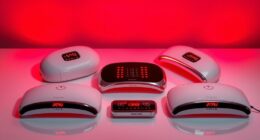

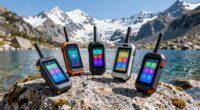
For classrooms seeking clearer teacher speech, my leading pick is the Venucast AuraPlex MX & AuraClip Bundle: its transmitter and 13 receivers give a school a shared listening setup for multiple students. The Edumic for Oticon hearing aids is the more focused alternative when one teacher needs a portable microphone that sends speech to compatible Oticon devices. These products serve different classroom needs, and neither should be confused with a conventional installed hearing loop: the Venucast uses Auracast Bluetooth LE Audio, while the Edumic is a personal microphone system. The main tradeoff is shared access and broader device reach versus a simpler, teacher-centered setup with strict hearing-aid compatibility.

Get everyday helpers delivered free with Prime
- Fast, free delivery on millions of items
- Prime Video, Amazon Music and more included
- Member-only deals all year
I rank the Venucast first for classrooms planning support for several listeners, but its benefits depend on compatible Auracast devices and a suitable room. The Edumic earns the second spot as a portable speech-focused option, not as a whole-class system. Before choosing, a school should check each student’s hearing technology, how many people need audio, and whether the room needs an installed loop or another assistive listening format.
Key Takeaways
- The Venucast bundle includes one transmitter and 13 receivers, making it the stronger choice when a classroom needs several venue-provided listening devices.
- Venucast uses Auracast Bluetooth LE Audio, not a traditional hearing loop; students need compatible Auracast hearing aids or devices to use personal-device access.
- The Edumic is a teacher-worn wireless microphone for compatible Oticon hearing aids, suited to direct speech support rather than distribution to a whole class.
- The products solve different problems: compare the number of listeners and hearing-aid models before comparing convenience or range.
- Neither listing supplies enough information to confirm classroom-specific installation, support, or full compatibility across every student’s equipment.
| Venucast AuraPlex MX & AuraClip Bundle – Auracast Assistive Listening System for Churches and Events |  | Best Overall for Shared Classroom Listening | System type: Auracast assistive listening system | Connectivity: Wireless Bluetooth LE Audio | Listed range: 328 ft | VIEW ON AMAZON | See Our Full Breakdown |
| Wireless Remote Microphone for Hearing Aids – Classroom Assistive Listening Device |  | Best for One Oticon Hearing-Aid User | Device type: Wireless remote microphone | Connectivity: Bluetooth; audio input connection also described | Compatible devices: Oticon Bluetooth hearing-aid devices | VIEW ON AMAZON | See Our Full Breakdown |
| hearing loop systems for classroom | Connectivity | System type | Listed range | Included receivers |
|---|---|---|---|---|
| Venucast AuraPlex MX & AuraCli | Wireless Bluetooth LE Audio | Auracast assistive listening system | 328 ft | 13 |
| Wireless Remote Microphone for | Bluetooth; audio input connection also described | — | — | — |
More Details on Our Top Picks
Venucast AuraPlex MX & AuraClip Bundle – Auracast Assistive Listening System for Churches and Events
The Venucast AuraPlex MX & AuraClip Bundle takes the top spot because it is the only option here described as a venue system with a transmitter and a set of 13 receivers. For a classroom supporting several students, that distinction matters more than a single-user microphone: the school can provide receivers to listeners who do not have a compatible personal device. The listing also names Auracast-enabled hearing aids and other devices as supported, giving it a broader potential audience than the Oticon-specific Edumic.
Its 328-foot stated range points toward use beyond a small desk-side setup, but I would not interpret that number as guaranteed coverage through classroom walls or in a crowded, equipment-heavy space. The product description itself cautions against outdoor or heavily obstructed environments. Before buying, I would ask the seller or an assistive-listening specialist how the system performs in the actual room and whether the 13 receivers are enough for the students who need access.
This is not a traditional hearing loop, despite the classroom search category. It uses Bluetooth LE Audio and Auracast, so students relying on personal hearing aids need compatible models; the listing names examples, including Oticon Intent, ReSound Nexia, and Starkey Edge AI. Compared with the Edumic, Venucast is better suited to shared access and mixed groups, but it also asks the school to manage a transmitter, receivers, charging or readiness, and compatibility checks. Warranty and support details are not specified, which makes procurement follow-up important.
I would choose Venucast when the classroom needs a shared listening resource for multiple students and the school can confirm device compatibility. I would skip it if a student’s hearing aids lack Auracast support, if the school needs an installed induction loop, or if staff want a one-microphone solution dedicated to a single Oticon user. Its multi-listener design wins this comparison, but its setup is more involved than the Edumic’s focused approach.
Pros:- Includes 13 receivers for supporting multiple listeners.
- Auracast access can work with compatible hearing aids and personal devices.
- Listed 328-foot range offers more flexibility than a teacher-worn microphone link alone.
- Designed as a venue-style setup for classrooms and other shared spaces.
Cons:- Requires compatible Auracast devices for personal hearing-aid access.
- Performance may be reduced in obstructed or equipment-heavy rooms.
- Warranty and support information is not specified.
Best for: Schools supporting several students who can use Auracast receivers or compatible hearing aids and want a shared classroom assistive listening setup.
Not ideal for: Classrooms needing a conventional installed induction loop, buyers whose students lack compatible Auracast devices, or teachers seeking only a simple microphone for one Oticon user.
- System type:Auracast assistive listening system
- Connectivity:Wireless Bluetooth LE Audio
- Listed range:328 ft
- Included receivers:13
- Transmitter:1
- Supported devices:Auracast-enabled hearing aids and devices
- Named hearing-aid examples:ReSound Nexia, Jabra Enhance Pro 20/30, Beltone Serene, Starkey Edge AI, Oticon Intent, Philips HearLink 9050
- Warranty:Not specified
Our verdict“I recommend Venucast for schools needing shared listening access for several compatible users, provided they verify classroom coverage and support before purchase.”
Wireless Remote Microphone for Hearing Aids – Classroom Assistive Listening Device
The Edumic wireless remote microphone makes the most sense when a classroom has a specific student using compatible Oticon hearing aids and the immediate problem is hearing the teacher clearly. Its lightweight, clip-on format lets the microphone stay near the speaker rather than relying only on sound reaching the student across a noisy room. That direct speech focus is a different proposition from the Venucast bundle, which is organized around a venue transmitter and multiple receivers.
Its strongest advantage is also its clearest limitation: the listing specifies Oticon Bluetooth hearing-aid compatibility. If a student uses another brand, or an Oticon model that does not support the connection, the Edumic may not serve their needs. By comparison, Venucast names several Auracast-compatible brands and includes receivers for users without compatible personal hearing aids. Schools should confirm the exact hearing-aid model and connection method before purchasing, rather than relying on brand name alone.
The portable, rechargeable design is attractive for a teacher moving between a classroom and other learning spaces. The description mentions Bluetooth and audio input connections, which may offer flexibility for different audio sources, but it does not provide detailed operating or classroom coverage specifications. The listing also identifies a nonstandard battery requirement, so staff should clarify what is rechargeable and what battery the device needs; the supplied details do not fully resolve that point. I would not assume its reference to hearing-loop compatibility makes it a standalone installed loop system.
Choose Edumic for a targeted, teacher-to-student listening link when the student has a verified compatible Oticon device. It is a poor substitute for the Venucast bundle if several students need receivers, or if a school wants a system that can serve different hearing-aid brands. Its lower complexity and portability give it a distinct classroom role, but its narrower compatibility keeps it behind Venucast as the broader shared option.
Pros:- Clip-on microphone design keeps the audio source near the teacher.
- Portable format suits classrooms and other learning settings.
- The listing describes wireless Bluetooth and audio-input connections.
- Rechargeable design is presented as suitable for regular educational use.
Cons:- Compatibility is limited to supported Oticon hearing-aid devices.
- The listing does not establish a multi-listener receiver setup or detailed range.
- Battery details are unclear, including the stated nonstandard battery requirement.
Best for: A student with a confirmed compatible Oticon Bluetooth hearing aid who needs a portable teacher microphone for speech clarity in class.
Not ideal for: Schools supporting multiple students on different hearing-aid brands, buyers needing venue-provided receivers, or anyone seeking a complete installed hearing loop.
- Device type:Wireless remote microphone
- Connectivity:Bluetooth; audio input connection also described
- Compatible devices:Oticon Bluetooth hearing-aid devices
- Microphone form:Wireless, clip-on
- Channels:1
- Power information:One nonstandard battery listed; rechargeable design described
- Color:Black
- Enclosure material:Plastic
Our verdict“I would choose Edumic for one verified Oticon user who needs a mobile teacher microphone, not as a whole-class listening system.”
How We Picked
I ranked these two products by how clearly each addresses a real classroom listening need: improving access to a teacher’s speech, accommodating the intended number of listeners, and matching the hearing devices students already use. Because the supplied options use different technologies, I do not treat them as interchangeable versions of a conventional hearing loop. The Venucast listing describes an Auracast assistive listening system; the Edumic description centers on a teacher microphone linked to compatible Oticon hearing aids.
For the top position, I favored the system that can support multiple students with included receivers while also offering access for compatible personal devices. That makes the Venucast bundle more adaptable for a shared classroom listening program, though its reach and usefulness depend on room conditions and device compatibility. The Edumic ranks second overall because the supplied details identify a narrower Oticon audience and do not establish a multi-receiver classroom setup. It can still be the better fit for a specific student who uses compatible Oticon hearing aids.
I also weighed setup implications, practical limitations, and missing details. Neither product listing provides a full classroom coverage plan, complete support information, or evidence that every hearing aid can connect. I treat the stated 328-foot range as a listed specification, not a guarantee for a room with walls, equipment, or interference. Buyers should verify compatibility with the school’s audiologist or hearing-care provider and confirm whether local accessibility requirements call for a permanently installed loop or another system.
| hearing loop systems for classroom | Connectivity |
|---|---|
| Venucast AuraPlex MX & AuraCli | Wireless Bluetooth LE Audio |
| Wireless Remote Microphone for | Bluetooth; audio input connection also described |
Factors to Consider When Choosing Hearing Loop Systems For Classrooms
I would start with the classroom’s hearing devices and the number of listeners, not with the product label. These two options address different needs: one creates a shared Auracast listening arrangement, while the other sends a teacher’s speech to compatible Oticon hearing aids. A conventional hearing loop uses a different approach, so a buyer searching for loop equipment should confirm the required technology before ordering either product.
Confirm the system type before buying
The phrase hearing loop system often refers to an induction loop that sends audio to a telecoil in a hearing aid. The Venucast listing instead describes Auracast Bluetooth LE Audio, and the Edumic is a personal microphone connection. They may support assistive listening in classrooms, but that does not make them interchangeable with an installed loop. If a school’s accessibility plan or building specification calls for a loop, verify that requirement with the school’s audiologist, facilities team, or accessibility specialist.
Match the product to the number of students
For a group, Venucast has the clearer case: it includes 13 receivers alongside one transmitter. That can help a school provide listening equipment without requiring every student to own a compatible hearing aid. Edumic is presented as a single-channel remote microphone for compatible Oticon hearing aids, so I would treat it as a focused one-student solution unless the seller confirms a wider configuration. Ask how many learners need support now and whether the system must serve new students later.
Verify exact hearing-aid compatibility
Do not assume that a product works with every device from a named manufacturer. Venucast requires Auracast-enabled hearing aids or other compatible devices for personal-device access, although its included receivers offer another route for listeners. Edumic is listed for Oticon Bluetooth hearing-aid devices. I would confirm the exact model, firmware, pairing process, and whether an audiologist must enable any setting before placing an order. This check is especially important when students use different hearing technology.
Think about room layout and daily handling
Venucast lists a 328-foot range, but the listing warns against heavily obstructed environments. Room walls, furniture, devices, and student seating can affect actual performance, so arrange a site-specific check where possible. Edumic’s clip-on design is easier to move with a teacher, but the supplied details do not give a comparable range. For either option, plan who stores, charges, distributes, cleans, and checks the equipment so it is ready for lessons and does not become an unused cabinet item.
Ask about support, power, and classroom trials
The Venucast listing does not specify warranty or support terms, so ask about replacement receivers, repairs, and staff help. Edumic’s description calls the design rechargeable but also lists a nonstandard battery; clarify how it is powered and what spares are needed. I would request a return policy and, if available, a classroom trial with the actual hearing aids and room layout. A short demonstration can reveal pairing, volume, and teacher-mobility issues that a feature list cannot answer.
Frequently Asked Questions
Are these products traditional hearing loop systems?
No. Venucast is described as an Auracast Bluetooth LE Audio system, while Edumic is a wireless microphone for compatible Oticon hearing aids. A traditional induction loop sends audio to a hearing aid’s telecoil. If a school needs a loop specifically, I would confirm the required technology with its accessibility or audiology team before choosing either product.
Which option is better for several students?
Venucast is the clearer fit for a group because the bundle includes 13 receivers and one transmitter. That gives a school a way to support several listeners, subject to the number of receivers needed and classroom coverage. Edumic is described as a teacher microphone for compatible Oticon hearing aids, not as a multi-receiver system.
Can students use Venucast with any hearing aid?
No. Personal-device use requires an Auracast-enabled hearing aid or another compatible device. The listing names several supported hearing-aid families, but that does not establish compatibility with every model or configuration. I would verify each student’s exact model with the manufacturer, seller, or audiologist; included receivers may provide a separate listening route for some users.
Does the Edumic work with hearing aids from other brands?
The supplied product details identify Oticon Bluetooth hearing-aid devices as compatible, so I would not assume support for other brands. A classroom should confirm the exact Oticon model and connection requirements before purchase. If students use a mix of brands or need shared receivers, Venucast may be a better starting point, provided their devices support Auracast or they can use included receivers.
What should a school verify before ordering?
Confirm the system type required, the exact hearing-aid models, how many students need access, and whether the room layout suits the stated connectivity. Ask about receiver management, charging and battery requirements, warranty, support, and return or trial arrangements. For a formal accessibility project, I would also check whether local building requirements call for an installed induction loop rather than either of these wireless options.
Conclusion
For a school supporting multiple students, I would start with the Venucast AuraPlex MX & AuraClip Bundle because it includes 13 receivers and is designed as a shared listening system. I would move forward only after confirming Auracast compatibility, room performance, and support arrangements. For one student with a compatible Oticon hearing aid, Edumic is the more focused portable microphone option, especially when the teacher moves around the room. If the requirement is a genuine installed hearing loop, neither listing is a clear match: confirm the needed system with the school’s audiologist or accessibility specialist before buying.