

This guide helps an older adult or caregiver choose and set up a personal hearing amplifier for everyday listening. You will compare device features, check the fit, adjust volume safely, and test the result in a quiet setting before using it in noisier places. It is for beginners; allow about 1-2 hours to compare and set up a device, then several days to get used to it.

Get everyday helpers delivered free with Prime
- Fast, free delivery on millions of items
- Prime Video, Amazon Music and more included
- Member-only deals all year

Williams AV Pocketalker Ultra Hearing Amplifier Earbud & Headphones
- ✔ Power: Two AAA alkaline batteries; not included
- ✔ Stated battery life: Up to 200 hours
- ✔ Controls: Button control with volume and tone knobs
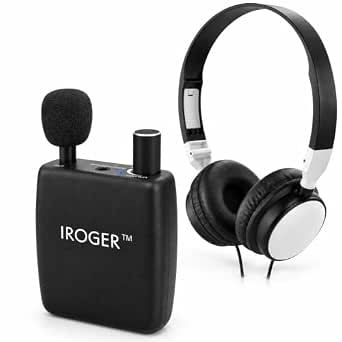
Rechargeable Hearing Amplifier with Up to 50 dB Gain and Automatic Gain Control
- ✔ Power source: Rechargeable lithium-ion battery
- ✔ Stated battery life: Up to 100 hours
- ✔ Charge time: Approximately one hour
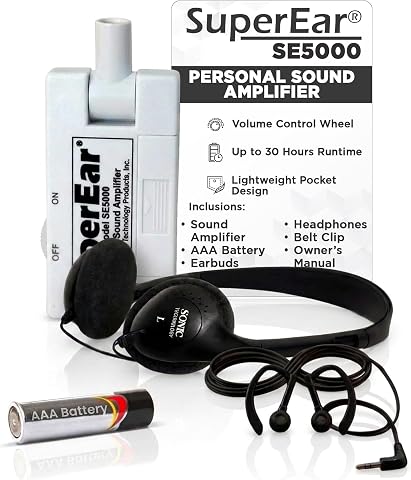
SuperEar SE5000 Personal Sound Amplifier with Headphones
- ✔ Model: SE5000
- ✔ Amplification: Up to 50+ dB
- ✔ Power: One AAA battery included
A hearing amplifier makes nearby sounds louder. It is not the same as a hearing aid, which is a regulated medical device fitted to address diagnosed hearing loss. Amplifiers may help with specific listening situations, but they do not diagnose or treat hearing loss. Arrange a hearing evaluation if hearing difficulty is ongoing or affects conversation, safety, or daily life.
Difficulty: Beginner | Time: 1-2 hours for selection and setup, followed by several days of gradual adjustment
What You’ll Need
Tools & Materials:
- A few minutes in a quiet room for testing
- The amplifier’s instructions and any included ear tips or batteries
- A phone, television, or familiar conversation partner for a listening test
- A notebook or phone note to record settings and problems
Knowledge:
- Basic ability to read product controls and follow the manufacturer’s fitting instructions
- A caregiver’s help if the user has difficulty handling small parts or controls
Check the return policy, warranty, battery type or charging method, and whether the device is intended for one ear or both before buying. Do not use an amplifier to delay medical care for sudden or one-sided hearing loss, ear pain, fluid, dizziness, or a blocked ear.
Williams AV Pocketalker Ultra Hearing Amplifier Earbud & Headphones
The Pocketalker Ultra earns our top spot because it arrives as a more complete listening kit than the other two picks. Its folding headphones, earbud, plug-in microphone, lanyard, battery clip, and 12-foot TV cord give seniors and caregivers options for conversation, appointments, meetings, and listening near a television. Unlike the iRoger’s mainly front-focused microphone or SuperEar’s ambient pickup without a direct TV connection, the Pocketalker can be arranged around the listening situation using its wired accessories.Its controls are straightforward but not quite as minimal as iRoger’s single knob: the Pocketalker has separate large volume and tone knobs. That separation can help someone adjust sound character without changing loudness, though it also means learning an extra control. The stated battery life of up to 200 hours is the longest in this group, but it uses two AAA batteries that are not included. Buyers who prefer not to keep spare batteries on hand may find iRoger’s rechargeable design easier to maintain.This is the strongest choice when accessory flexibility matters more than wireless convenience. It does not offer wireless connectivity, and its included TV cord means a wired setup rather than a direct wireless TV link. We would skip it for someone who wants a single, very simple rechargeable device with minimal accessories to manage.
Pros:
- Includes headphones, an earbud, plug-in microphone, and a 12-foot TV cord.
- Separate large volume and tone knobs support distinct adjustments.
- Stated battery life is up to 200 hours.
- Lanyard and battery clip support carrying and hands-free use.
Cons:
- Requires two AAA batteries, which are not included.
- Uses wired accessories rather than wireless connectivity.
- More controls and accessories may be less convenient for someone seeking a minimal setup.
Best for: Seniors who want one amplifier for nearby conversation and several wired listening setups, including use with the included TV cord.
Not ideal for: Buyers who want rechargeable power, wireless TV audio, or the fewest possible controls and accessories.
Bottom line: We recommend the Pocketalker Ultra for seniors who value adaptable wired listening more than rechargeable or wireless convenience.
“We recommend the Pocketalker Ultra for seniors who value adaptable wired listening more than rechargeable or wireless convenience.”
Rechargeable Hearing Amplifier with Up to 50 dB Gain and Automatic Gain Control
For seniors who would rather charge a device than replace batteries, the iRoger rechargeable amplifier offers the clearest everyday convenience in this lineup. Its one-knob control powers the unit on and adjusts volume, avoiding the Pocketalker’s separate tone and volume controls. The stated one-hour charge time and up to 100 hours of use may also suit someone who wants a predictable charging routine without frequent battery purchases.The directional microphone is an important tradeoff rather than an unconditional advantage. It focuses on sound from the front and is described as reducing background noise, which can help when the person and conversation partner are positioned clearly. But compared with the Pocketalker’s plug-in microphone and several included listening accessories, iRoger offers fewer ways to adapt the setup. A front-focused pickup can also make side conversations or other ambient cues easier to miss. SuperEar, by contrast, is described for amplifying ambient sound, which may fit a listener who wants to hear more of the surrounding space.We see iRoger as a good match for buyers who prioritize simple controls and rechargeable power over accessory flexibility. Its volume adjustment is limited to a single knob, and it has no Bluetooth or other wireless features. The provided information also does not specify included headphones or earbuds, so buyers should confirm the intended listening arrangement before choosing it.
Pros:
- One-knob operation keeps power and volume adjustment simple.
- Rechargeable lithium-ion battery is stated to provide up to 100 hours of use.
- Approximate one-hour charge time limits the wait before use.
- Directional microphone focuses on sound from the front.
Cons:
- Front-focused pickup may miss ambient cues or sounds from the side.
- One-knob control offers limited volume adjustment granularity.
- No Bluetooth or additional wireless features are specified.
Best for: Seniors who prefer a straightforward, rechargeable amplifier and usually listen with the sound source in front of them.
Not ideal for: People who need multiple wired listening arrangements, want wireless connectivity, or frequently need to hear sounds from different directions.
Bottom line: We favor iRoger for seniors who want simple, rechargeable operation and can accept a more directional, less accessory-rich setup.
“We favor iRoger for seniors who want simple, rechargeable operation and can accept a more directional, less accessory-rich setup.”
SuperEar SE5000 Personal Sound Amplifier with Headphones
The SuperEar SE5000 is the most clearly portable, handheld-style choice here. It includes a belt clip, stereo headphones, and earbuds, so a senior can choose between two listening accessories and carry the amplifier between rooms or out of the house. Its swivel microphone and adjustable volume wheel make it distinct from iRoger’s fixed, front-focused description and the Pocketalker’s broader wired accessory kit.That portability comes with a battery compromise. SuperEar uses one included AAA battery and is stated to run for up to 30 hours with moderate to heavy use, substantially less than the stated runtimes for iRoger and Pocketalker. Buyers who expect frequent or extended listening may prefer iRoger’s rechargeable setup or the Pocketalker’s long claimed battery life, while keeping in mind that Pocketalker’s batteries are sold separately.SuperEar can amplify nearby ambient sound for conversation and TV listening, but it does not connect directly or wirelessly to a television. That distinction matters: it listens to sound in the room rather than providing a direct TV audio feed. We would choose it for someone who wants a portable amplifier with included headphones and earbuds, not for someone seeking a dedicated television connection or the longest interval between power changes.
Pros:
- Includes both stereo headphones and stereo earbuds.
- Handheld design and belt clip make it easy to carry.
- Swivel microphone and tactile volume wheel provide adjustable positioning and control.
- One AAA battery is included.
Cons:
- Stated battery life is up to 30 hours with moderate to heavy use.
- Does not connect directly or wirelessly to a television.
- Requires a replaceable AAA battery rather than recharging.
Best for: Seniors who want a portable handheld amplifier with a belt clip and a choice of headphones or earbuds.
Not ideal for: People who need direct or wireless television audio, longer stated battery life, or a rechargeable power source.
Bottom line: We recommend the SuperEar SE5000 when portability and included listening accessories outweigh longer battery life or direct TV connection.
“We recommend the SuperEar SE5000 when portability and included listening accessories outweigh longer battery life or direct TV connection.”
As an Amazon Associate we earn from qualifying purchases.
Before You Start
Do not turn the volume up high to compensate for poor fit. Loud sound can be uncomfortable or harmful, and an amplifier may make background noise louder along with speech. Start in a quiet room and follow the device’s instructions. If hearing changed suddenly, especially in one ear, seek urgent medical advice rather than trying an amplifier.
Make sure the device is charged or has working batteries. Wash and dry your hands before handling ear tips. Keep small parts away from children and pets.
Step-by-Step Instructions
Step 1: Identify the listening problem
Write down where hearing is difficult and what sounds are hard to follow. Note whether the problem occurs during television, one-to-one conversation, group conversation, or outdoor activities. Record which ear seems affected and whether the difficulty has changed over time.
Use these notes to decide whether an amplifier fits a limited listening need or whether a hearing evaluation should come first. Ongoing difficulty across several settings is a reason to arrange a hearing test with an audiologist or other qualified hearing professional.
Tip: Do not assume that age alone explains a change in hearing. Earwax, infection, medication effects, and other health issues can also affect hearing.
Check: You have a short list of situations where hearing is difficult and can describe whether the issue is occasional, ongoing, or newly changed.
Step 2: Compare devices for fit and use
Compare amplifiers by wearing style, ear-tip sizes, battery or charging needs, controls, and intended use. Choose controls the user can operate comfortably, especially the power and volume buttons. Check that replacement tips, batteries, or chargers are available and that the seller states the return period clearly.
Read the device’s stated limits and instructions rather than relying only on product claims. If possible, choose a seller that allows a return after a careful home trial. Ask a hearing professional for advice if the user has significant hearing loss, uses hearing aids, or has difficulty in both ears.
Tip: A low price or a claim that a product is “like a hearing aid” does not establish that it is suitable for diagnosed hearing loss.
Check: The selected device matches the intended listening situation, feels manageable to operate, and has a clear return and support policy.
Step 3: Inspect and prepare the amplifier
Read the manufacturer’s fitting, cleaning, charging, and safety instructions before putting the device in the ear. Check the amplifier and ear tips for cracks, dirt, or loose parts. Charge the device fully or install the specified batteries, matching the polarity marks.
Choose an ear tip that fits securely without force. Do not trim or modify the tip. If the package contains several sizes, begin with the size recommended in the instructions and change it if it feels loose or uncomfortable.
Tip: Stop if a part is damaged, the device gets unusually hot, or the instructions do not match the controls on your model. Contact the seller or manufacturer for help.
Check: The amplifier is powered, undamaged, and ready to wear, with an appropriate ear tip attached.
Step 4: Fit the device and start at low volume
Place the amplifier in or on the ear by following the instructions. Do not push an ear tip deeply into the ear canal. Set the volume to its lowest level before switching the device on, then increase it slowly until speech is audible and comfortable.
Fit and adjust each amplifier according to its instructions if using two. Check that left and right devices are placed on the correct ears if the model is marked for each side. Remove the device if it causes pain, pressure, persistent whistling, or dizziness.
Tip: A secure fit should not require force. Persistent feedback often means the fit, position, or volume needs attention; raising the volume can make it worse.
Check: The amplifier stays in place without pain, and ordinary speech is clearer at a comfortable setting.
Step 5: Test speech in a quiet room
Ask a conversation partner to speak from a normal distance and at a normal volume. Listen first with the amplifier off, then switch it on at the low setting and adjust gradually. Try a few familiar sentences rather than asking the speaker to shout.
Test one change at a time: reposition the device, try a different ear tip, or adjust the volume slightly. Lower the volume or remove the device if speech sounds harsh, distorted, or tiring. Write down a comfortable setting and any fitting issue.
Tip: Do not judge the device by how loud it makes every sound. The aim is more comfortable access to speech, not maximum loudness.
Check: The user can follow familiar speech more easily without pain, harshness, or a strong increase in uncomfortable noise.
Step 6: Try the intended listening situation gradually
Use the amplifier for a short period in the situation it was chosen for, such as watching television or talking with one person. Keep the volume at the tested comfortable level. If the setting is noisy, move closer to the speaker and reduce competing sounds instead of immediately turning the amplifier up.
Limit the first session if the user feels tired or overwhelmed. Remove the device and rest; try again later for a shorter period. Increase wearing time gradually only if the device remains comfortable and useful.
Tip: Amplifiers can make background noise louder too. They may not make group conversation or crowded rooms easy to understand.
Check: The user can use the amplifier for its intended task without discomfort and can identify situations where it helps or does not help.
Step 7: Clean, store, and review the result
Switch the amplifier off after use and clean it only as the manufacturer directs. Keep moisture, sprays, and cleaning liquids away unless the instructions specifically permit them. Store the device in its case in a dry place, and charge it or replace batteries as directed.
Review your notes after several days: comfort, speech clarity, battery life, feedback, and useful settings. Keep using the amplifier only if it helps comfortably. Arrange a hearing evaluation if hearing remains difficult instead of increasing the volume or relying on the amplifier alone.
Tip: Do not share ear tips unless they have been cleaned as directed, and do not insert cotton swabs or tools into the ear canal to clean it.
Check: The device is clean and stored safely, and the user can describe when it helps and whether professional care is needed.
Common Mistakes to Avoid
- Turning the volume up quickly because speech is still unclear. — Start at the lowest setting, check placement and ear-tip fit, and raise volume in small increments. Stop if sound becomes harsh or uncomfortable.
- Choosing a device based only on loudness claims or price. — Compare fit, controls, power needs, support, and return terms. Treat an amplifier as a listening accessory, not a replacement for a hearing evaluation or prescribed hearing aid.
- Wearing an uncomfortable or poorly fitting ear tip. — Try only the included sizes and follow the fitting directions. Do not force the tip into the ear; stop if there is pain or persistent pressure.
- Expecting the amplifier to remove background noise or restore normal hearing. — Test in quiet first, move closer to the speaker, and reduce competing noise. Seek professional advice if conversation remains difficult.
Troubleshooting
Problem: The amplifier whistles or squeals.
Solution: Lower the volume, remove and refit the device, and check that the ear tip is clean and properly attached. Try another included tip size if the instructions allow it. If feedback continues, stop using it and contact the seller or manufacturer.
Problem: The sound is too loud, sharp, or distorted.
Solution: Turn the volume down or switch the amplifier off. Check the fit and battery or charge status, then retest at a low setting in a quiet room. Do not keep using a setting that causes discomfort.
Problem: Speech remains hard to understand even when louder.
Solution: Do not raise the volume further. Move closer to the speaker and reduce background noise for a brief test. If speech is still unclear, arrange a hearing assessment; amplification alone may not address the problem.
Problem: The device will not turn on or cuts out.
Solution: Check the charge, battery type, battery orientation, and power control against the manual. Inspect charging contacts for visible dirt and clean only as directed. Contact the manufacturer if the device still fails.
What Success Looks Like
The amplifier powers on, fits without pain, and makes the intended speech or listening task easier at a comfortable volume. The user can operate the basic controls, identify when the device is helpful, and knows to stop using it if discomfort or sudden hearing changes occur. A successful trial does not prove that hearing loss has been diagnosed or treated; ongoing difficulty still calls for professional hearing care.
Next Steps
Keep a brief record of comfortable settings, wearing time, and situations where the amplifier helps. Clean and charge or replace batteries according to the instructions. If the device does not provide useful, comfortable improvement during its return period, contact the seller about returning it and arrange a hearing evaluation. Seek urgent medical advice for sudden hearing loss, particularly in one ear, or for hearing changes with pain, fluid, dizziness, or other new symptoms.
Frequently Asked Questions
Are hearing amplifiers the same as hearing aids?
No. A personal amplifier makes sounds louder, while hearing aids are regulated medical devices intended for diagnosed hearing loss and may be selected or adjusted with a hearing professional. An amplifier is not a substitute for a hearing test or prescribed care.
Can a senior use an amplifier in both ears?
Use one or two devices only as the manufacturer directs. If hearing seems different between ears or one ear is much harder to hear with, arrange a professional assessment rather than guessing at a two-device setup.
How long should someone wear a hearing amplifier each day?
Follow the product instructions and begin with short sessions in a quiet place. Increase wearing time gradually only if the device stays comfortable. Remove it and rest if listening causes fatigue, irritation, or discomfort.
What should I do if an amplifier makes everything louder but speech is still unclear?
Lower the volume and check the fit, then test again with one speaker in a quiet room. If speech remains unclear, do not keep increasing the volume. Book a hearing assessment to identify the cause and discuss suitable options.