Digital whiteboards and document cameras make your classroom more accessible by enabling you to display multimedia, diagrams, and physical objects clearly to all students. They support collaboration, allowing everyone to participate actively and share ideas instantly. These tools also work well with assistive technologies, helping students with diverse needs engage fully. Plus, you can adapt lessons quickly and provide visual cues that enhance understanding. Keep exploring to discover even more ways these technologies can transform your teaching environment.

Get everyday helpers delivered free with Prime
- Fast, free delivery on millions of items
- Prime Video, Amazon Music and more included
- Member-only deals all year
Key Takeaways
- Digital whiteboards display multimedia and visual cues, making complex concepts more accessible to diverse learners.
- Document cameras instantly showcase physical materials, aiding students with visual processing challenges.
- Both tools support assistive technology integration, ensuring inclusive access for students with disabilities.
- They facilitate real-time annotations and highlights, enhancing understanding and engagement for all learners.
- Digital collaboration features promote shared participation and immediate feedback, fostering an inclusive classroom environment.
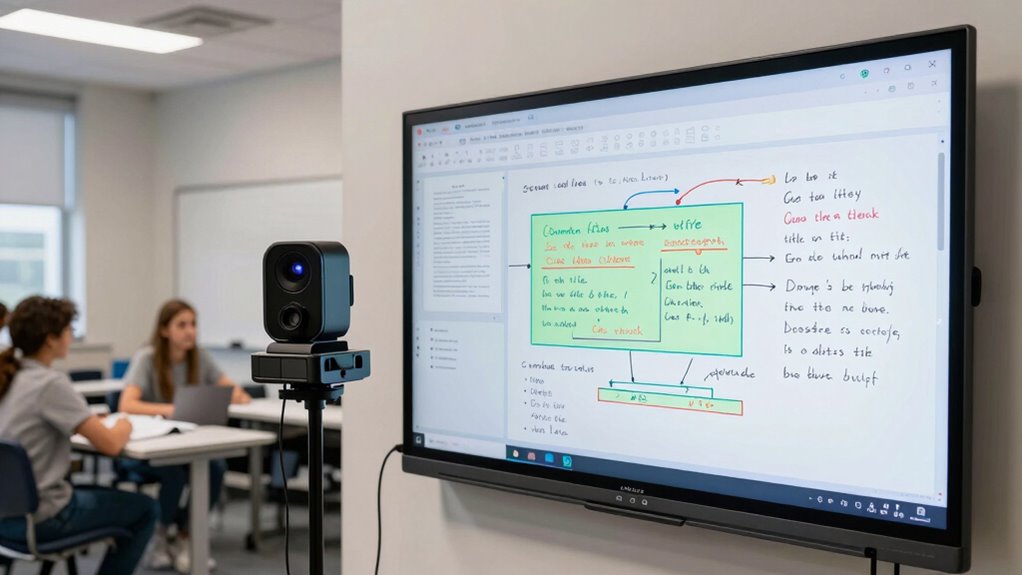
Using a digital whiteboard, you can easily incorporate multimedia elements into your lessons, making abstract or difficult concepts more accessible. For example, you can display diagrams or charts, then annotate or highlight specific sections to focus attention. This visual enhancement makes it easier for students to grasp challenging material, and they can see the connections between ideas unfold in real-time. When students can see content directly on the board and participate in its creation, it fosters a shared learning experience, breaking down traditional barriers of passive listening. This collaborative environment encourages questions, discussion, and immediate feedback, which enhances overall access to the material. Additionally, digital tools like whiteboards and document cameras support assistive technology integration, further expanding accessibility for students with diverse learning needs. Incorporating smart home devices into classroom technology can further personalize learning experiences and support accessibility features. Embracing these inclusive tools can help create a more equitable learning environment for all students. Integrating digital collaboration tools can also facilitate peer-to-peer learning and further enhance accessibility for various learners. These tools also enable teachers to quickly adapt content to meet individual needs, fostering a more flexible and responsive educational environment.
Document cameras further improve access by bringing physical materials into the digital space. You can instantly display homework, student work, or physical objects, making it easier for everyone to see details clearly. This is particularly beneficial for students with visual processing challenges or those who need additional support to understand finer details. With the camera, everyone has a front-row seat, regardless of where they’re seated. You’re not only improving access for students with special needs but also making your lessons more inclusive overall. Instead of passing around papers or relying solely on printed materials, you can showcase items on the spot, saving time and reducing confusion. The visual cues provided by these tools support diverse learning strategies and help accommodate different learning styles.
Together, digital whiteboards and document cameras create an environment where learning becomes more accessible for everyone. They bridge gaps by offering visual cues, real-time interaction, and immediate access to a wide range of content. These tools empower you to adapt lessons quickly, respond to student needs, and foster an inclusive classroom where every learner can participate fully. Ultimately, they’re changing the classroom dynamic, making education more participatory and accessible than ever before.
digital whiteboard for classroom
As an affiliate, we earn on qualifying purchases.
As an affiliate, we earn on qualifying purchases.
Frequently Asked Questions
Are Digital Whiteboards Compatible With All Operating Systems?
Digital whiteboards are generally compatible with most operating systems thanks to wide-ranging software integration options. They often support Windows, Mac, and sometimes Linux, guaranteeing device compatibility. However, you should check specific product details because compatibility can vary based on the model and software requirements. To ensure smooth use, verify that the digital whiteboard you choose integrates well with your existing OS and supports necessary drivers or applications.
How Durable Are Document Cameras for Daily Classroom Use?
Your document camera is built like a fortress, enduring daily classroom chaos with ease. Durability testing shows it withstands drops, spills, and constant use, thanks to high-quality materials like reinforced plastic and metal. Its robust construction guarantees it won’t break down after heavy use, making it a reliable tool for teachers. You can confidently rely on it, knowing it’s designed for the rigors of everyday classroom life.
Can Digital Whiteboards Save and Share Content Easily?
Yes, digital whiteboards save and share content easily, enhancing interactive collaboration in your classroom. You can instantly save notes, drawings, and multimedia files, making content preservation simple. Sharing becomes effortless—you can export files or display saved content to students, promoting ongoing engagement. This seamless process helps you maintain a dynamic learning environment where ideas are captured, stored, and shared with minimal effort, boosting overall teaching effectiveness.
What Is the Cost Difference Between Traditional and Digital Tools?
You’ll find digital tools like whiteboards and cameras often have a higher initial cost compared to traditional options, but the price analysis shows long-term savings. Digital whiteboards eliminate recurring costs like paper and markers, saving money over time. While traditional tools are cheaper upfront, they may incur ongoing expenses. The cost comparison highlights that investing in digital tools can be more economical in the long run, especially with their added educational benefits.
Do These Technologies Require Extensive Training to Operate?
No, these technologies don’t require extensive training to operate. You can quickly learn to use digital whiteboards and document cameras, which boosts user engagement in your lessons. Most devices come with user-friendly interfaces, and technical support is often available to help if needed. This ease of use allows you to focus more on teaching and less on troubleshooting, making these tools accessible and beneficial for all users.
Conclusion
By embracing digital whiteboards and document cameras, you open a world of accessibility and engagement in your classroom. These tools make lessons clearer and more inclusive, ensuring everyone stays on the same page. Don’t let tech hurdles hold you back—sometimes, you just have to bite the bullet and give it a try. With their help, you’ll see that teaching becomes more interactive and accessible for all, turning the tide in your favor.
Halloween Picks
halloween
As an affiliate, we earn on qualifying purchases.