
For callers who need written captions, the Hamilton CapTel 840i is the best overall pick in this lineup because it is designed to display captions during calls. The CapTel 2400iSPNBT stands out for its large touchscreen, while the Panasonic KX-TGM420W bundles suit households that want amplified cordless handsets around the home. The key tradeoff is that captioning and cordless convenience are not the same feature: several options amplify sound but do not provide call captions, and the caption phones may have different setup and connectivity needs. I compare those differences alongside button access, handset expansion, and everyday usability. Read on for the full breakdown and help choosing a phone that matches your hearing needs.

Get everyday helpers delivered free with Prime
- Fast, free delivery on millions of items
- Prime Video, Amazon Music and more included
- Member-only deals all year
Key Takeaways
- Captioning is the defining difference: the Hamilton CapTel 840i and 2400iSPNBT are the lineup’s captioned-phone options; the Panasonic and VTech models focus on amplified audio and accessibility features instead.
- The 840i is the clearest match for caption-first buyers: it uses a large-button layout, while the 2400iSPNBT offers a large touchscreen that may suit callers more comfortable with touch controls.
- The Panasonic KX-TGM420W handset bundles prioritize coverage around the home: the two-handset package adds another handset, while the single KX-TGMA44W bundle is a simpler fit for fewer calling locations.
- Amplification does not replace captions: the Panasonic KX-TGM450S and VTech amplified phone may help callers who prefer louder or clearer audio, but buyers who need text support should focus on the CapTel models.
- The basic Panasonic large-display phone is a simpler accessibility choice: it has big buttons and two handsets, but it is not a substitute for either captioning or the stronger amplification features found elsewhere in the lineup.


| cordless caption phones for hearing impaired | Expandable to | Call block capacity | Display |
|---|---|---|---|
| Panasonic KX-TGM420W + 2 KX-TG | 6 handsets | 250 numbers | White backlit LCD |
| Panasonic KX-TGM420W + KX-TGMA | 6 handsets | — | Backlit LCD |
| Hamilton CapTel 840i Large But | — | — | — |
| Panasonic KX-TGM450S Amplified | 6 handsets | 250 numbers | 1.8-inch LCD |
| VTech Amplified Cordless Senio | 4 handsets | 1,000 numbers | Large backlit display |
| Hamilton CapTel 2400iSPNBT Lar | — | — | — |
| Panasonic Cordless Phone with | — | Up to 1,000 numbers | — |
More Details on Our Top Picks
Panasonic KX-TGM420W + 2 KX-TGMA44W Amplified Cordless Phone with Digital Answering Machine, Expandable up to 6 Handsets, Voice Volume Booster 40 dB
This bundle makes the most sense when hearing support is needed in several rooms: it includes the base system and two additional handsets, with expansion available up to six. Its 40 dB volume boost, noise reduction, and Slow Talk function address audibility and speech clarity, while the backlit display and spoken controls can help when reading small text is difficult. Compared with the two-handset Panasonic KX-TGM420W package, this version arrives with more handsets, so fewer rooms are left without a nearby phone. It is not a captioning phone, though: calls are made clearer through amplification rather than displayed as text. The larger bundle also brings more setup and feature choices, and its bulkier design may suit a home phone station better than a compact space.
Pros:- Includes two additional handsets and can expand to six for coverage across a home.
- Up to 40 dB voice volume boost, noise reduction, and Slow Talk support clearer conversations.
- Backlit LCD, Talking Caller ID, and Talking Keypad offer both visual and spoken cues.
- Digital answering machine and call blocking add useful call-management options.
Cons:- Does not provide real-time captions, unlike the Hamilton CapTel 840i.
- Multiple features and handsets may take more effort to set up and learn.
- Bulkier system may be awkward in homes with limited space.
Best for: Households that want amplified cordless handsets in several rooms from the outset and can benefit from spoken keypad and caller information.
Not ideal for: Callers who need live text captions rather than louder audio, or buyers who want a simple, compact phone with minimal setup.
- Expandable to:6 handsets
- Included handsets:Base system plus 2 KX-TGMA44W handsets
- Voice volume booster:Up to 40 dB
- Ringer volume:Up to 100 dB
- Talk time:13 hours
- Standby time:9 days
- Answering machine capacity:17 minutes
- Call block capacity:250 numbers
- Display:White backlit LCD
Our verdict“Choose this Panasonic bundle when you want amplified cordless coverage in several rooms, but skip it if reading captions is necessary for understanding calls.”
Panasonic KX-TGM420W + KX-TGMA44W Amplified Cordless Phone with Digital Answering Machine and Voice Volume Booster
For a buyer who wants amplified cordless calling without starting with a larger multi-handset bundle, this Panasonic pairs its base with one additional handset. The up to 40 dB boost, noise reduction, and talking caller ID support users who benefit from louder speech and audible call information. It also includes a digital answering machine, intercom, and call blocking, giving it broader household utility than a basic amplified handset. Compared with the three-handset KX-TGM420W bundle, this package needs less room and has fewer handsets to configure, but it offers less coverage out of the box. Like that bundle, it improves access through sound and spoken prompts rather than captions; the Hamilton CapTel 840i is the better fit for callers who need words displayed during a conversation. Setup complexity and a bulky base are still possible drawbacks.
Pros:- Two-handset package offers a practical starting point and can expand to six handsets.
- Up to 40 dB volume boost and noise reduction support easier listening.
- Talking caller ID and talking keypad reduce reliance on the display.
- Digital answering machine, intercom, and call blocking support everyday call management.
Cons:- Provides no on-screen captions, unlike the Hamilton CapTel 840i.
- Only two handsets are included, fewer than the other KX-TGM420W bundle.
- Some buyers may find setup and the number of features difficult to manage.
Best for: Individuals or couples who want an amplified base phone and a second handset, with the option to add more later.
Not ideal for: People who need live captions, or larger households that want three or more handsets included from the start.
- Included handsets:2
- Expandable to:6 handsets
- Volume boost:Up to 40 dB
- Display:Backlit LCD
- Answering system:Digital answering machine
- Additional features:Noise reduction, Talking Caller ID, Talking Keypad, call block, intercom
Our verdict“Pick this Panasonic for a two-handset amplified setup that can grow, but choose a captioned model if louder audio alone is not enough.”
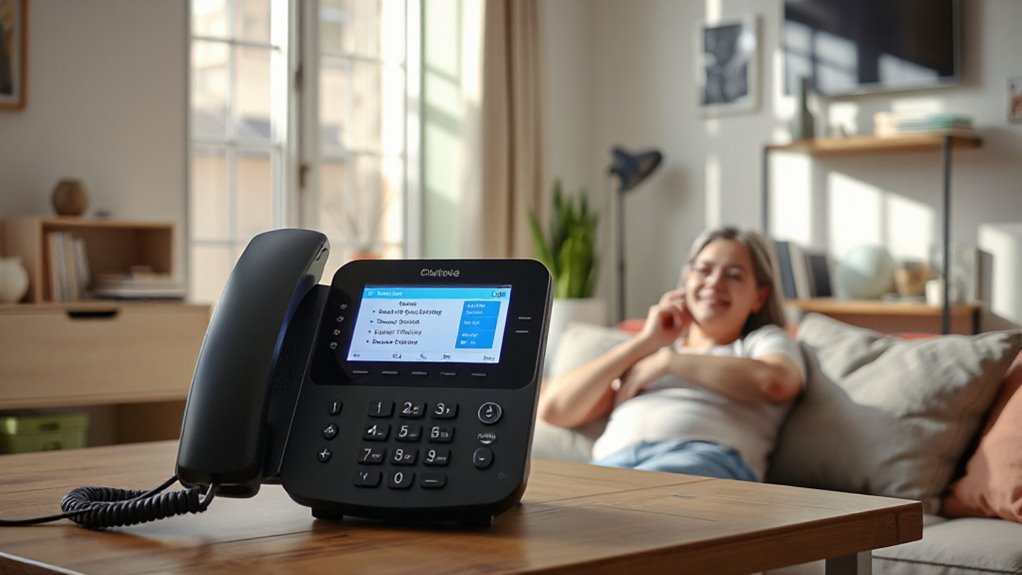
Hamilton CapTel 840i Large Button Navigated Captioned Telephone
Unlike the Panasonic amplified cordless models in this lineup, the Hamilton CapTel 840i is built around real-time captions: callers can read the conversation while listening, which can help when amplification alone does not make speech clear enough. It also offers up to 40 dB amplification, adjustable caption size and tone, and auto or assisted captioning, so users can tailor how calls are presented. Captioned voicemail makes messages available to read as well as hear. The tradeoff is a corded setup rather than cordless mobility, and the phone requires high-speed internet plus standard phone service. Its larger desktop footprint is also less flexible than the VTech amplified cordless phone. This is the strongest match here for text support, but not for someone who wants to carry a handset around the home.
Pros:- Displays real-time captions during calls, unlike the amplified cordless phones in this roundup.
- Up to 40 dB amplification offers audio support alongside the captions.
- Caption size and tone can be customized, with auto and assisted captioning options.
- Captioned voicemail helps users review messages in text form.
Cons:- Corded design does not offer the freedom to move around the home while talking.
- Requires high-speed internet and standard phone service.
- Desktop footprint is less compact than cordless options such as the VTech.
Best for: People with hearing loss who need to read live call captions and have both high-speed internet and standard phone service.
Not ideal for: Anyone seeking a cordless handset for calls around the home, or users without the required internet and phone connections.
- Power source:Corded electric
- Amplified sound:Up to 40 dB
- Captioning:Real-time captions with auto and assisted options
- Caption customization:Adjustable caption size and tone
- Answering system:Digital
- Recording capacity:18 minutes
- Dimensions:7.5 x 9 x 6.5 inches
- Weight:2 pounds
Our verdict“Choose the Hamilton CapTel 840i when live captions matter more than cordless mobility and you have the required connections.”
Panasonic KX-TGM450S Amplified Cordless Phone with Hearing Aid Compatibility
The KX-TGM450S is the audio-first choice among these cordless options, with a 50 dB volume boost compared with the 40 dB limit on both Panasonic KX-TGM420W bundles. That extra amplification may suit callers who need a stronger listening aid, while Slow Talk and noise reduction work to make speech easier to follow. Enlarged memory-dial buttons, a backlit 1.8-inch LCD, Talking Caller ID, and a Talking Keypad add accessibility beyond raw volume. It also expands to six handsets, giving it room to grow much like the larger KX-TGM420W package. The key limitation is shared across the amplified cordless models: it does not put spoken words on screen. Its feature-rich controls may also take time to learn, so a buyer wanting a simpler phone—or the Hamilton CapTel 840i’s captions—should look elsewhere.
Pros:- Up to 50 dB volume boost exceeds the 40 dB amplification listed for the KX-TGM420W models.
- Slow Talk and noise reduction support speech clarity as well as loudness.
- Enlarged memory-dial buttons and talking features provide multiple access cues.
- Expandable to six handsets for use in multiple rooms.
Cons:- Does not provide real-time captions like the Hamilton CapTel 840i.
- Feature-rich controls may be difficult for some users to learn.
- Cordless operation depends on rechargeable batteries.
Best for: Cordless-phone users who need stronger audio amplification than the 40 dB Panasonic KX-TGM420W models provide.
Not ideal for: People who need live captions, or buyers who prefer a simple interface with fewer controls and features.
- Volume boost:Up to 50 dB
- Display:1.8-inch LCD
- Expandable to:6 handsets
- Memory dial:Enlarged buttons
- Call block capacity:250 numbers
- Additional features:Noise reduction, Talking Caller ID, Talking Keypad, intercom, speakerphone
Our verdict“Choose the KX-TGM450S if maximum listed audio boost is your priority, but pick a captioned phone if you need text alongside speech.”
VTech Amplified Cordless Senior Phone with Answering Machine, Call Blocking, 90dB Ringer, Audio Assist, Big Buttons
The VTech puts emphasis on getting attention and making basic controls accessible: its 90 dB ringer, large buttons, and bright display can help users notice and answer incoming calls. Audio Assist provides up to 50 dB volume support, while spoken caller ID, photo speed dial, and hearing aid compatibility make routine calling more approachable. Its call blocker handles up to 1,000 numbers, a larger capacity than the 250-number limit on the Panasonic KX-TGM420W and KX-TGM450S. The tradeoff is that this is a single-line, amplified cordless phone—not a captioning device. Compared with the Hamilton CapTel 840i, it offers mobility and easier physical dialing but no text transcription. It supports up to four handsets, fewer than the Panasonic systems that expand to six, and battery performance can vary with use.
Pros:- 90 dB ringer and visual indicator help make incoming calls easier to notice.
- Large buttons, backlit display, and photo speed dial simplify routine calls.
- Call blocker holds up to 1,000 numbers, exceeding the Panasonic models listed here.
- Answering machine stores up to 22 minutes of messages.
Cons:- No live captions, unlike the Hamilton CapTel 840i.
- Single-line operation may not suit homes that need multiple phone lines.
- Expandable to four handsets, fewer than the Panasonic systems that support six.
Best for: Older adults who prioritize a very loud ringer, large dialing buttons, photo speed dial, and extensive call blocking.
Not ideal for: Callers who need real-time captions or households that need a system expandable beyond four handsets.
- Expandable to:4 handsets
- Ringer volume:90 dB
- Audio Assist volume:Up to 50 dB
- Answering machine capacity:22 minutes
- Call block capacity:1,000 numbers
- Display:Large backlit display
- Caller ID:Spoken
- Dimensions:8.46 x 7.28 x 4.72 inches
- Weight:1.5 pounds
Our verdict“Choose the VTech for loud call alerts, accessible dialing, and strong call blocking, but not if you need captions or more than four handsets.”
Hamilton CapTel 2400iSPNBT Large Touch Screen Captioned Telephone
For buyers who need to read speech as well as hear it, the Hamilton CapTel 2400iSPNBT is the more directly hearing-accessible choice in this pair. Its large touchscreen and real-time captions put spoken conversation on screen, while sound amplification up to 40 dB and hearing aid compatibility add an audio option. The built-in answering machine also provides captioned voicemail, so missed calls can be easier to understand. Compared with the Panasonic cordless phone, this Hamilton is designed around captioning rather than large controls and boosted audio alone. The tradeoff is setup and placement: it requires high-speed internet and electrical power, and its corded design is not for callers who need to move around during a conversation. Its larger footprint may also be inconvenient on a crowded desk.
Pros:- Large touchscreen displays real-time captions
- Sound amplification up to 40 dB and hearing aid compatibility
- Built-in answering machine with captioned voicemail
- Three-way calling capability
Cons:- Requires high-speed internet and electrical power
- Corded design does not provide cordless mobility
- Larger footprint may not suit limited desk space
Best for: People who rely on readable live captions and captioned voicemail, and who can keep a phone beside a power outlet and high-speed internet connection.
Not ideal for: Callers who need a genuinely cordless handset, lack high-speed internet, or want to carry the phone between rooms.
- Power source:Corded electric
- Amplification:Up to 40 dB
- Hearing aid compatible:Yes
- Answering system:Digital; captioned voicemail
- Recording capacity:18 minutes
- Conference calling:3-way
- Line operation:Single-line
- Dimensions:3.64 x 12.56 x 9.54 inches
Our verdict“Choose this Hamilton if seeing live captions matters more than cordless mobility; choose the Panasonic if large buttons and moving around with a handset matter more.”
Panasonic Cordless Phone with Large Display and Big Buttons, 2 Handsets
The Panasonic stands out for buyers who want a cordless handset with two included handsets, a large display, and controls that are easier to locate. Its +12 dB volume boost can help with audibility, while talking caller ID and call blocking add practical support for everyday calls. The flashlight and favorites key are useful touches for people who want quick access to a contact or a light at hand. Unlike the Hamilton CapTel 2400iSPNBT, this Panasonic does not provide live captions; it is an amplified conventional phone, not a caption phone. That makes it a better fit for users who can follow speech by listening but benefit from larger controls. The boost is also much lower than the Hamilton’s listed 40 dB amplification, and extra handsets beyond the two included require a separate purchase.
Pros:- Two included cordless handsets for use in separate rooms
- Large 2.1-inch display and big buttons
- +12 dB volume boost with talking caller ID
- Call blocking capacity of up to 1,000 numbers
Cons:- Does not provide live captions or captioned voicemail
- Listed volume boost is lower than the Hamilton CapTel’s up-to-40 dB amplification
- Additional handsets are sold separately
Best for: People who can understand calls through audio but want cordless flexibility, larger buttons, a readable display, and two handsets for different rooms.
Not ideal for: People who need live captions, captioned voicemail, or stronger amplification than the listed +12 dB boost.
- Handsets included:2
- Display size:2.1 inches
- Volume boost:+12 dB
- Call block capacity:Up to 1,000 numbers
- Talk time:10 hours
- Standby time:5 days
- Expandable:Up to 6 handsets
- Power and batteries:Battery powered; 4 AAA batteries included
Our verdict“Choose the Panasonic for cordless convenience and easier-to-use controls if amplified audio is enough; choose the Hamilton CapTel if you need captions to follow speech.”

How We Picked
I ranked these phones by how directly they answer the needs behind the search for cordless caption phones: readable call captions, amplified listening, accessible controls, and practical use around the home. Captioning receives the most weight because it is the clearest distinction in this roundup. That puts the Hamilton CapTel models ahead for buyers who need text support, while amplified-only phones rank as alternatives for people whose main need is louder or more adjustable audio.
I also compared button and screen access, handset count, answering and call-management features, and setup demands. The rankings distinguish products with similar core functions by use case: large physical buttons versus a touchscreen, one handset versus a multi-handset arrangement, and specialized accessibility features versus a simpler everyday phone. No amplified-only model is treated as a caption phone, and every pick has a tradeoff that buyers should weigh against their hearing needs and home setup.
Factors to Consider When Choosing Cordless Caption Phones For Hearing Impaired
Before choosing a model, separate the hearing support you need from the convenience features you want. A phone can be cordless and loud without showing captions, while a captioned phone may ask for different setup or network access than a standard handset. These factors can help narrow the field beyond the individual product features.
Decide Whether You Need Captions or Louder Audio
Start with the moment that causes calls to break down: missing spoken words, difficulty hearing volume, or trouble following a conversation in noise. Captions provide a text aid; amplification changes how loudly or clearly audio reaches the listener. They address different needs, so do not assume an advertised volume boost gives you captions. If both hearing and reading support matter, check whether the specific model provides captions and whether its audio features also suit you. A family member’s preferred solution may not match the caller’s own needs, so involve the person who will use the phone in the choice.
Check Setup and Connection Requirements Before Buying
Captioning services can depend on network access and other setup steps that a basic cordless phone may not require. Confirm the exact connection requirements for the model and service where the phone will be used, including whether the intended home has a suitable internet connection. Ask who will handle initial setup and what happens if the network is interrupted. Avoid treating a caption phone as a simple handset swap until those details are clear. If setup support is a concern, choose a seller or service provider that can explain installation in plain language.
Match Controls to Vision, Dexterity, and Comfort
Large buttons can be easier to locate by touch, while a large touchscreen may offer a spacious visual interface but depends on tapping and on-screen menus. Choose controls the caller can use independently, not just those that look modern or prominent in a product image. Consider button spacing, display readability, menu complexity, and whether familiar physical controls matter. If possible, compare the layout in person or check the return terms before committing. A phone with extensive functions can be less accessible if its everyday calling controls are hard to find.
Plan Handset Placement Around the Home
Count the places where calls are commonly answered, such as a bedroom, kitchen, or living area. More handsets can reduce missed calls, but only if the system supports the needed number and the handsets can be placed where they are useful. Check whether the model is expandable and whether additional compatible handsets are available; included handset count and maximum capacity are not the same thing. A multi-handset set can be practical for a household, while a single handset may keep setup simpler. Do not buy extra handsets as a substitute for checking whether the base unit and phone service fit the home.
Compare Call Management and Answering Needs
Think about how calls are handled when the user cannot reach the phone. An answering machine, call blocking, and an audible ringer solve different problems, and the feature that matters most depends on the household’s routine. Someone who misses calls across rooms may value a loud ringer or additional handsets, while someone screening unwanted calls may prioritize call-blocking controls. Check how messages are retrieved and whether the controls are easy for the intended user to operate. Avoid paying attention only to headline amplification figures if call management is the daily frustration.
Choose for Current Needs Without Overbuying
Pay more for a specialized feature only when it solves a real communication barrier, such as the need to read captions or to place accessible handsets in several rooms. Do not confuse a long feature list with a better fit: a basic large-button phone may be enough for someone who hears calls adequately but struggles with small controls. At the other end, an amplified phone may still fall short for a caller who needs written support. Think about who will maintain the system, whether the user may need more help later, and how easy it will be to change settings. A good choice fits the caller’s present abilities and leaves a practical path if needs change.
Frequently Asked Questions
Do all the cordless phones in this roundup show captions?
No. The Hamilton CapTel 840i and CapTel 2400iSPNBT are the captioned models in this lineup. The Panasonic and VTech options are standard phones with features such as amplification, large buttons, or call handling, but those features do not create on-screen captions. If reading the spoken conversation is necessary, choose a captioning model and check its service and connection requirements before purchase. If louder audio is the main need, an amplified phone may be a better match.
Can an amplified phone replace a caption phone?
Only if the caller’s needs are met by louder or clearer audio alone. Amplification and captioning support different communication needs, and one should not be assumed to include the other. A person who still misses words despite increased volume may benefit more from captions, while someone who hears speech well once it is louder may prefer an amplified handset. If needs vary by caller or situation, discuss the choice with the intended user and, when appropriate, a hearing-care professional. Check the product’s actual features rather than relying on a general label such as senior or hearing support.
What should I check before choosing a Hamilton CapTel model?
Compare the interface first: the 840i uses large physical buttons, while the 2400iSPNBT has a large touchscreen. The easier control style is the one the caller can operate confidently, including when answering, dialing, and reading captions. Confirm the exact service, connection, and setup requirements for the model in the intended home. Also check whether the display is comfortable to read from the user’s usual seating position. A touchscreen may appeal to someone comfortable with menus, while physical buttons may feel more familiar to another caller.
Is the Panasonic KX-TGM420W bundle with two extra handsets worth choosing over the one-handset bundle?
The two-handset bundle makes more sense when calls need to be answered from several rooms or by more than one household member. Extra handsets add reach, not captioning, so they will not solve a need to read conversation text. The one-handset bundle may be a simpler choice when the phone will stay near one main calling area. Before selecting either package, check the total handset count, system expansion limits, and where the charging bases can be placed. Choose the larger set for a clear household use, rather than assuming more handsets automatically improve accessibility.
Which type of phone is a better choice for someone who struggles with small buttons?
Look for a layout the caller can identify and operate reliably, then compare large physical buttons with a large touchscreen. Big controls help only when they suit the user’s vision and dexterity; some people prefer tactile buttons, while others find a spacious screen easier to read. The Hamilton CapTel 840i and the basic Panasonic large-display model emphasize large-button access, while the CapTel 2400iSPNBT uses a touchscreen. If captions are also needed, keep that requirement in the decision rather than choosing a large-button phone solely for its control layout. A hands-on demonstration can reveal usability issues that specifications cannot.
Conclusion
Best overall for caption-first buyers: I would start with the Hamilton CapTel 840i, which pairs captioning with a large-button interface. Best premium-style interface: choose the CapTel 2400iSPNBT if the large touchscreen suits the caller and its setup requirements fit the home. Best value for amplified cordless coverage: the Panasonic KX-TGM420W bundle with two KX-TGMA44W handsets suits households needing more than one handset, while the single-handset bundle is a simpler alternative. Best for beginners: the Panasonic large-display, big-button phone is a straightforward option when captions and stronger amplification are not required. For specific needs, choose the VTech for its listed call-blocking and loud-ringer features, or the Panasonic KX-TGM450S for an amplified phone with hearing-aid compatibility. The deciding question is simple: if the caller needs text, choose a CapTel; if the need is louder audio or easier controls, compare the amplified and large-button phones instead.
Halloween Picks

10 ft Halloween Inflatable Archway with Built-in LEDs

Pumpkin Halloween Fog Machine with 12-Color LED Lights, Bluetooth Speaker, and Remote

10ft Halloween Inflatable Archway – Pumpkin Skeleton Yard Décor
As an affiliate, we earn on qualifying purchases.