
Choosing the best smart hub for accessibility automations means finding a device that seamlessly integrates with your existing smart home setup and offers robust accessibility features. The Homey Pro stands out as the overall top pick thanks to its extensive protocol support and customization options. The Lutron Caséta Hub excels for those prioritizing ease of use and compatibility with popular voice assistants. Meanwhile, the Home Assistant Green offers a flexible, open-source approach for tech-savvy users. The main tradeoffs involve balancing advanced functionality against ease of setup and cost. Keep reading to see a detailed breakdown of these options and what makes each suitable for different needs.
Key Takeaways
- Top hubs like Homey Pro provide broad protocol support, making them ideal for complex accessibility automations.
- Ease of setup and user interface vary, with some hubs better suited for beginners and others for advanced users.
- Compatibility with major voice assistants and smart home platforms remains a key factor influencing choice.
- Multi-protocol support (Zigbee, Z-Wave, Thread, Matter) significantly enhances accessibility automation flexibility.
- Price ranges vary widely, with more advanced, protocol-rich hubs generally costing more but offering greater customization.
| Flic Hub LR – Long Range Smart Home Hub with Matter, Alexa, and HomeKit Support |  | Best Overall for Multi-Protocol Flexibility and Long-Range Control | Wireless Standards: Bluetooth 5.0 Long Range, Dual-band Wi-Fi | Bluetooth Range: Up to 200m (line-of-sight), 50m indoor | Power Consumption: 2.5W average / 5W max | VIEW LATEST PRICE | See Our Full Breakdown |
| Aqara Smart Hub M100 for Home Automation |  | Best Value for Local Automation in a Compact, Multi-Protocol Hub | Maximum Zigbee Devices Supported: 20 | Maximum Thread Devices Supported: 20 | Power Requirement: 5V⎓0.5A (adapter not included) | VIEW LATEST PRICE | See Our Full Breakdown |
| Aqara Smart Hub M200 – Multi-Protocol Matter Controller with Thread, Zigbee, and Home Automation |  | Best for Versatile Ecosystem Support and Wired Connectivity | Hardware Interface: Ethernet, USB 2.0, USB 3.0 | Compatible Devices: Matter devices, Aqara Zigbee devices | Total USB Ports: 2 | VIEW LATEST PRICE | See Our Full Breakdown |
| Lutron Caséta Smart Hub for Alexa, HomeKit & Google Assistant (75 Device Capacity) |  | Best for Large-Scale, Easy Integration with Popular Platforms | Model Number: L-BDG2-WH | Color: White | Device Capacity: 75 devices | VIEW LATEST PRICE | See Our Full Breakdown |
| Homey Pro Smart Hub for Home Automation |  | Best Premium for Extensive Protocol Support and Customization | RAM: Double that of previous versions | Supported Technologies: Z-Wave Plus, Zigbee, Wi-Fi, BLE, Infrared, Matter, Thread | Device Compatibility: 50,000+ devices from 1,000+ brands | VIEW LATEST PRICE | See Our Full Breakdown |
| Homey Bridge Smart Home Hub for Z-Wave, Zigbee, Wi-Fi & Infrared Automation |  | Best Overall for Multi-Protocol Flexibility | Supported Protocols: Z-Wave, Zigbee, Wi-Fi, BLE, Infrared | Device Compatibility: Over 30 major brands | Subscription: Homey Premium after 3 months | VIEW LATEST PRICE | See Our Full Breakdown |
| Aqara Smart Home Hub M3 – Multi-Protocol Matter Controller with Thread, Zigbee, and IR Blaster |  | Best for Privacy-Conscious Local Automation | Supported Protocols: Zigbee, Thread, Wi-Fi, Bluetooth, IR | Device Capacity: 127 Zigbee/Thread devices | Storage: 8GB encrypted local storage | VIEW LATEST PRICE | See Our Full Breakdown |
| Homey Pro (Early 2023) Smart Home Hub with Z-Wave Plus, Zigbee, Wi-Fi, BLE, Infrared, Matter & Thread |  | Best for Extensive Protocol Support and Large Device Ecosystems | Supported Technologies: Z-Wave, Zigbee, Wi-Fi, BLE, Infrared, Matter, Thread | Device Compatibility: Over 50,000 devices | Processing: Local | VIEW LATEST PRICE | See Our Full Breakdown |
| Tapo H500 CentralHub for Smart Home Devices |  | Best for Security-Centric Camera and Sensor Integration | Max Cameras Supported: 16 | Max Sensors Supported: 64 | Built-in Storage: 16GB | VIEW LATEST PRICE | See Our Full Breakdown |
| Hubitat Elevation C-8 Pro Smart Home Automation Hub |  | Best for Local Control Without Cloud Dependency | Supported Protocols: Matter 1.5, Z-Wave 800 LR, Zigbee 3.0, Bluetooth | Device Compatibility: Over 1,000 devices | Control Type: Local | VIEW LATEST PRICE | See Our Full Breakdown |
| SmartThings Hub 3rd Generation – Smart Home Automation Controller |  | Best Overall for Robust Automation Integration | Model Number: GP-U999SJVLGDA | Compatibility: Alexa, Google Home | Protocols Supported: Zigbee, Z-Wave | VIEW LATEST PRICE | See Our Full Breakdown |
| Amazon Echo Hub 8-Inch Smart Home Control Panel | 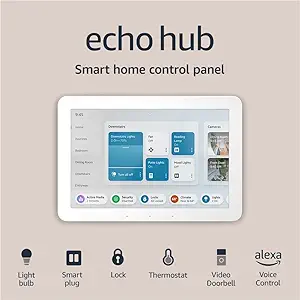 | Best for User-Friendly Accessibility and Customization | Size: 8-inch display | Compatibility: WiFi, Bluetooth, Zigbee, Matter, Sidewalk, Thread | Security Features: Arming/disarming security systems | VIEW LATEST PRICE | See Our Full Breakdown |
| Tapo Smart Hub H100 with Built-in Chime | 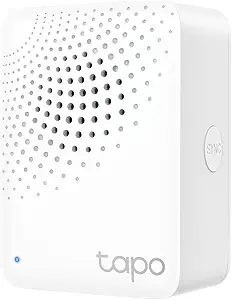 | Best for Long-Range Sensor Connectivity and Security Alerts | Wireless Protocol: Sub-1G Low-Power | Max Connection Distance: 30m (98ft) | Device Capacity: Up to 64 devices | VIEW LATEST PRICE | See Our Full Breakdown |
| Home Assistant Green Smart Home Hub – Official Hardware |  | Best for Advanced Custom Automation and Local Control | RAM Memory Installed: 4 GB | Storage Capacity: 32 GB | Connectivity Technology: Ethernet, USB | VIEW LATEST PRICE | See Our Full Breakdown |
More Details on Our Top Picks
Flic Hub LR – Long Range Smart Home Hub with Matter, Alexa, and HomeKit Support
The Flic Hub LR stands out for its exceptional Bluetooth 5.0 Long Range and dual-band Wi-Fi, making it ideal for larger or multi-room setups. Compared to the Aqara M200, it offers broader support for device ecosystems, including native integrations with Alexa, HomeKit, and Matter, which simplifies compatibility. Its support for up to 63 buttons and an IR blaster port enhances automation possibilities, though the IR blaster is sold separately, adding a small extra cost. Its reliance on additional setup for Apple HomeKit (requiring an Apple TV or HomePod) can be a hurdle, but overall, it offers a phone-free control option that’s highly versatile for users needing extensive device coverage. The tradeoff is that it doesn’t include an IR blaster, and setup complexity might deter casual users.Pros:- Long-range Bluetooth and Wi-Fi for multi-room coverage
- Native support for Alexa, HomeKit, and Matter
- Supports up to 63 Flic Buttons or Twists
- IR blaster port (sold separately) for legacy device control
Cons:- Requires Apple TV or HomePod for HomeKit integration
- IR blaster sold separately, adding to cost
- No built-in IR blaster included
Best for: Tech-savvy homeowners seeking a robust, multi-platform hub with long-range Bluetooth coverage.
Not ideal for: Casual users who prefer plug-and-play setups or who don’t want to manage multiple integrations and additional accessories.
- Wireless Standards:Bluetooth 5.0 Long Range, Dual-band Wi-Fi
- Bluetooth Range:Up to 200m (line-of-sight), 50m indoor
- Power Consumption:2.5W average / 5W max
- Dimensions:0.49″ H x 3.34″ W x 2.55″ D
- Warranty:2 years
- Certifications:IP44, FCC, IC, CE, WEEE, RoHS, REACH
Bottom line: This pick is best for users who need extensive device control across multiple protocols and long-range coverage, despite some additional setup complexity.
Aqara Smart Hub M100 for Home Automation
The Aqara M100 excels by supporting Zigbee (Aqara-branded), Thread, and Matter ecosystems, providing reliable local automation without reliance on cloud services. It’s more affordable than the Homey Pro but has a narrower ecosystem scope, limited to Aqara Zigbee devices, which might restrict expansion for some users. Its support for Apple HomeKit and Alexa offers broad platform compatibility, making it a practical choice for those who prioritize privacy and local control. However, the need for a specific 5V power adapter (not included) and the requirement to keep the hub within 6-19 feet of the router can limit flexibility. Compared with the Aqara M200, it’s more cost-effective but less versatile with third-party Zigbee devices.Pros:- Supports Zigbee, Thread, and Matter ecosystems
- Local automation ensures privacy and reliability
- Compatible with HomeKit and Alexa
- Flexible placement with adjustable angle
Cons:- Requires specific 5V power adapter (not included)
- Limited to Aqara-branded Zigbee devices
- Placement restrictions near the router
Best for: Homeowners seeking a budget-friendly, reliable local automation hub with multi-protocol support and simple setup.
Not ideal for: Power users who want support for third-party Zigbee devices or more advanced customization options.
- Maximum Zigbee Devices Supported:20
- Maximum Thread Devices Supported:20
- Power Requirement:5V⎓0.5A (adapter not included)
- Wi-Fi Version:2.4GHz Wi-Fi 6
- Security Protocol:WPA3
- Adjustable Placement:210 degrees
Bottom line: Ideal for users who want a dependable, budget-friendly hub focused on local automation with straightforward setup.
Aqara Smart Hub M200 – Multi-Protocol Matter Controller with Thread, Zigbee, and Home Automation
The Aqara M200 shines with support for Matter, Thread, Zigbee, Bluetooth, Wi-Fi, and IR, making it one of the most versatile hubs for integrating diverse smart devices. It surpasses the M100 in ecosystem support, offering wired PoE and dual-band Wi-Fi for flexible, reliable installation. Its support for local automation enhances privacy, yet it limits integration to Aqara Zigbee devices and lacks third-party Zigbee support, which could be a drawback for expanding beyond Aqara products. The built-in IR blaster with real-time feedback helps control ACs and other IR devices seamlessly. However, it requires a separate USB power adapter and supports a maximum of 40 Zigbee or Thread devices each, which might be limiting for larger setups. Compared with the Homey Pro, it’s simpler but less expansive.Pros:- Supports Matter, Thread, Zigbee, Bluetooth, Wi-Fi, IR
- Local automation with reliable performance
- PoE support for wired connectivity
- 360° IR blaster with feedback for AC control
Cons:- Limited to 40 Zigbee and Thread devices each
- No support for third-party Zigbee devices outside Aqara
- Requires separate USB power adapter (not included)
Best for: Tech-savvy users who want a multi-protocol hub with wired options and broad ecosystem support for a cohesive smart home.
Not ideal for: Beginners or users with larger device counts who need support for extensive third-party Zigbee devices or a more scalable system.
- Hardware Interface:Ethernet, USB 2.0, USB 3.0
- Compatible Devices:Matter devices, Aqara Zigbee devices
- Total USB Ports:2
- Item Dimensions:3.94″ x 3.94″ x 1.22″
- Item Weight:0.29 Pounds
- Color:Black
Bottom line: A flexible, wired-compatible hub ideal for users seeking broad ecosystem support and local automation, with some device count limitations.
Lutron Caséta Smart Hub for Alexa, HomeKit & Google Assistant (75 Device Capacity)
The Lutron Caséta hub offers a straightforward way to manage up to 75 devices, including lights, shades, and thermostats, across multiple platforms like Alexa, HomeKit, and Google Assistant. Its strength lies in its simplicity and ease of setup—users can quickly automate scenes and schedules without complex configurations. Unlike the more expansive Homey Pro or Aqara hubs, it’s focused on lighting and shades, making it less suitable for comprehensive device ecosystems. The need to purchase compatible Lutron dimmers or switches separately for full functionality can add to the cost, but its reliability and seamless integration make it appealing for larger, less tech-heavy homes. Compared with the Homey Pro, it’s less flexible but more user-friendly for specific automation needs.Pros:- Supports up to 75 devices including lights and shades
- Compatible with Alexa, HomeKit, and Google Assistant
- Easy setup via Wi-Fi and mobile app
- Reliable and stable platform for lighting control
Cons:- Requires separate purchase of Lutron-compatible switches/dimmers
- Limited to Lutron ecosystem for full functionality
- Primarily focused on lighting and shading, less on device diversity
Best for: Homeowners who want a reliable, scalable hub primarily for lighting, shades, and basic automation across major voice platforms.
Not ideal for: Power users seeking support for hundreds of devices or complex multi-protocol automation beyond lighting and shading.
- Model Number:L-BDG2-WH
- Color:White
- Device Capacity:75 devices
- Compatibility:Amazon Alexa, Apple HomeKit, Google Assistant
- Additional Integrations:Ecobee, Ring, Samsung SmartThings, Sonos
Bottom line: A solid choice for users seeking a large-scale, easy-to-use hub focused on lighting and shades with broad platform compatibility.
Homey Pro Smart Hub for Home Automation
The Homey Pro stands out for supporting seven major home automation protocols—Z-Wave Plus, Zigbee, Wi-Fi, BLE, Infrared, Matter, and Thread—making it one of the most comprehensive hubs available. It surpasses the others in device compatibility, managing over 50,000 devices from more than 1,000 brands, which is ideal for users with highly diverse or expanding ecosystems. Its local-first processing enhances privacy and responsiveness, while features like energy monitoring add value. However, this level of versatility comes with a higher price and a steeper learning curve; setting up advanced automations might require some technical familiarity. Compared to the Aqara M200 or the other hubs, it’s more configurable but less straightforward for casual users.Pros:- Supports seven home automation protocols
- Works with over 50,000 devices from numerous brands
- Local-first processing for privacy and speed
- Includes energy monitoring and advanced automation features
Cons:- Higher price point than basic hubs
- May require technical knowledge for setup and customization
- Larger and more complex interface may intimidate newcomers
Best for: Enthusiasts or professionals seeking a highly flexible, all-in-one automation hub capable of managing extensive device arrays and protocols.
Not ideal for: Casual users or those with modest device counts who prefer plug-and-play solutions or less complex setups.
- RAM:Double that of previous versions
- Supported Technologies:Z-Wave Plus, Zigbee, Wi-Fi, BLE, Infrared, Matter, Thread
- Device Compatibility:50,000+ devices from 1,000+ brands
- Voice Assistants:Siri, Alexa, Google Home
Bottom line: Best suited for power users who prioritize broad protocol support and extensive device compatibility despite increased complexity and cost.
Homey Bridge Smart Home Hub for Z-Wave, Zigbee, Wi-Fi & Infrared Automation
The Homey Bridge stands out for its extensive protocol support, including Z-Wave Plus, Zigbee, Wi-Fi, BLE, and infrared, making it a versatile choice for complex accessibility automations. Compared with the Aqara M3, which excels in local automation and IR control, Homey offers broader compatibility with over 30 major brands, simplifying integration for diverse needs. Its privacy-first design is appealing, but the mandatory paid Homey Premium subscription after three months and a mixed customer rating suggest potential reliability issues. This hub is ideal for users who want a comprehensive, all-in-one solution but are prepared for ongoing costs and a learning curve.
Pros:- Supports multiple protocols (Z-Wave, Zigbee, Wi-Fi, BLE, infrared)
- Works with over 30 major smart home brands
- Privacy-focused with no third-party data sharing
Cons:- Requires paid Homey Premium subscription after initial three months
- Customer satisfaction is mixed, with a 3.5/5 rating
Best for: Tech-savvy households needing multi-protocol support for complex automations and broad device compatibility.
Not ideal for: Casual users seeking a straightforward setup or those unwilling to pay for ongoing subscriptions.
- Supported Protocols:Z-Wave, Zigbee, Wi-Fi, BLE, Infrared
- Device Compatibility:Over 30 major brands
- Subscription:Homey Premium after 3 months
- Weight:11.2 ounces
- Dimensions:5 x 5 x 3 inches
- Color:Black/Grey
Bottom line: This hub suits advanced users who value protocol versatility and privacy but are comfortable with ongoing costs and complexity.
Aqara Smart Home Hub M3 – Multi-Protocol Matter Controller with Thread, Zigbee, and IR Blaster
The Aqara M3 excels in local automation, supporting Matter, Thread, Zigbee, Bluetooth, Wi-Fi, and IR, which makes it a compelling choice for accessibility setups that prioritize privacy and reliable operation. Unlike the Homey Bridge, which relies on cloud services and subscriptions, M3 emphasizes local control with encrypted storage and PoE connectivity, reducing latency and dependence on internet stability. However, it doesn’t support third-party Zigbee devices and requires extra hardware for Thread device setup, which could complicate a seamless experience. This device is best suited for users who want a flexible, privacy-focused hub with strong local automation capabilities.
Pros:- Multi-protocol support including Thread, Zigbee, Wi-Fi, Bluetooth, IR
- Local automation with encrypted storage enhances privacy
- IR blaster provides AC control with feedback
Cons:- Does not support third-party Zigbee devices
- Thread setup needs additional repeaters
- Power supply not included
Best for: Homeowners who prioritize local processing and want to avoid ongoing subscription fees, especially those integrating Thread and Zigbee devices.
Not ideal for: Users seeking a simple plug-and-play hub or planning to incorporate a wide range of third-party Zigbee devices without additional hardware.
- Supported Protocols:Zigbee, Thread, Wi-Fi, Bluetooth, IR
- Device Capacity:127 Zigbee/Thread devices
- Storage:8GB encrypted local storage
- Connectivity:Wi-Fi, PoE, USB-C
- IR Blaster:360° with AC control
- Matter Compatibility:Yes
Bottom line: This hub is perfect for privacy-focused users who want robust local automation with Thread support but are comfortable with some hardware setup.
Homey Pro (Early 2023) Smart Home Hub with Z-Wave Plus, Zigbee, Wi-Fi, BLE, Infrared, Matter & Thread
The Homey Pro makes a strong case for advanced smart home users with its support for seven technologies, including Z-Wave Plus, Zigbee, Wi-Fi, BLE, Infrared, Matter, and Thread. Unlike the Hubitat Elevation, which emphasizes local control, Homey Pro offers a more user-friendly interface and a massive device compatibility pool—over 50,000 devices from 1,000+ brands—making it ideal for comprehensive accessibility automations. The downside is its steeper learning curve and higher price, which might deter casual users. This hub is best for those who want to create elaborate automations across many device types without sacrificing privacy or reliability.
Pros:- Supports seven smart home protocols
- Massive device compatibility (50,000+ devices)
- Local processing ensures privacy and operation during outages
- Advanced automation via Homey Flow
Cons:- Higher price point
- Steeper learning curve for complex automations
Best for: Power users or tech enthusiasts managing large, diverse device collections needing advanced automation features.
Not ideal for: Beginners or users seeking a low-cost, simple automation setup with minimal configuration.
- Supported Technologies:Z-Wave, Zigbee, Wi-Fi, BLE, Infrared, Matter, Thread
- Device Compatibility:Over 50,000 devices
- Processing:Local
- Automation Features:Advanced flows
- Price:Premium
- Connectivity:Multiple protocols
Bottom line: This hub best serves experienced users who need broad device support and sophisticated automation capabilities.
Tapo H500 CentralHub for Smart Home Devices
The Tapo H500 offers a focused approach for security and sensor automation, supporting up to 16 cameras and 64 sensors. Its ability to expand storage with a SATA drive brings flexibility, and features like facial recognition help filter alerts for accessible automation scenarios. Compared to multi-protocol hubs like Homey or Hubitat, Tapo emphasizes surveillance and security, making it ideal for automating security alerts and monitoring in accessibility setups. However, its limited camera capacity and need for external power for storage expansion introduce some constraints. This device is best for users prioritizing security and centralized sensor management over broad device compatibility.
Pros:- Supports up to 16 cameras and 64 sensors
- Expandable storage without cloud subscriptions
- Facial recognition for alert filtering
- Offline storage ensures operation during outages
Cons:- Expandable storage requires separate SATA drive purchase
- Limited to 4 cameras for continuous recording
- External power needed for SATA drive
Best for: Homeowners focused on security automation, especially integrating cameras and sensors for accessible safety alerts.
Not ideal for: Users wanting a general-purpose smart home hub or support for more than 4 continuous recording cameras.
- Max Cameras Supported:16
- Max Sensors Supported:64
- Built-in Storage:16GB
- Expandable Storage:SATA HDD/SSD
- Facial Recognition:Yes
- HDMI Port:Yes
Bottom line: This hub is ideal for security-conscious users wanting centralized control for cameras and sensors in accessible automation.
Hubitat Elevation C-8 Pro Smart Home Automation Hub
The Hubitat Elevation C-8 Pro is designed for those who prefer their automation to run entirely locally, avoiding reliance on cloud services. Its support for Matter 1.5, Z-Wave 800 LR, Zigbee 3.0, and Bluetooth offers a robust set of protocols, comparable to the Homey Pro, but with a focus on privacy and reliability. Its external antennas enhance signal strength, critical for ensuring accessibility automations work seamlessly in larger or complex setups. The tradeoff is a steeper learning curve, especially for beginners, and initial setup may require troubleshooting. This makes it a strong choice for users who value independence from the internet and ongoing costs.
Pros:- Supports Matter 1.5, Z-Wave, Zigbee, Bluetooth
- Reliable local processing with no cloud dependency
- High-performance external antennas for strong signal coverage
- Supports over 1,000 devices across 100+ brands
Cons:- Steep learning curve for beginners
- Initial setup may require troubleshooting
Best for: DIY enthusiasts or smart home owners who want a reliable, local-only hub for accessibility automations with minimal cloud reliance.
Not ideal for: Casual users or those unfamiliar with smart home technology who prefer plug-and-play solutions.
- Supported Protocols:Matter 1.5, Z-Wave 800 LR, Zigbee 3.0, Bluetooth
- Device Compatibility:Over 1,000 devices
- Control Type:Local
- Antennas:External high-performance
- No cloud required:Yes
Bottom line: This hub is perfect for users who prioritize privacy and local control over ease of use, especially in complex automation environments.
SmartThings Hub 3rd Generation – Smart Home Automation Controller
The SmartThings Hub 3rd Generation stands out for its ability to centralize control over a wide range of compatible smart devices through a single app, making it ideal for users seeking a comprehensive automation backbone. Unlike the Amazon Echo Hub, which excels in user-friendly interfaces and customizable dashboards, the SmartThings Hub offers broader protocol support, including Zigbee and Z-Wave, for more device variety. However, its setup can be complex for newcomers, requiring a learning curve that might deter less tech-savvy users. This hub makes the most sense for those who want extensive device compatibility and are comfortable with a slightly steeper setup process.
Pros:- Supports Zigbee and Z-Wave protocols for wide device compatibility
- Automates devices based on real-time events like door openings or motion detection
- Works seamlessly with Alexa and Google Home ecosystems
Cons:- Setup can be challenging for users without technical experience
- Requires compatible smart devices to function effectively
Best for: Homeowners who need a versatile, protocol-agnostic hub capable of integrating multiple smart ecosystems with advanced automation features
Not ideal for: Beginners or users seeking a plug-and-play solution that requires minimal setup and technical knowledge
- Model Number:GP-U999SJVLGDA
- Compatibility:Alexa, Google Home
- Protocols Supported:Zigbee, Z-Wave
- Color:White
Bottom line: This pick is best suited for users who want a flexible, powerful hub capable of supporting complex automations across multiple protocols.
Amazon Echo Hub 8-Inch Smart Home Control Panel
The Amazon Echo Hub 8-Inch offers an intuitive, touchscreen interface that simplifies managing Alexa-compatible devices, making it a top choice for those prioritizing ease of use. Compared with the Home Assistant Green, which offers deep automation capabilities but requires more technical setup, the Echo Hub provides a straightforward, visually accessible dashboard. Its support for a vast array of protocols like Zigbee, WiFi, and Thread means it can manage diverse devices, but it does require a separate purchase of power-over-ethernet and a stand, adding to initial costs. This device makes the most sense for users who want quick setup, integrated privacy features, and a visually engaging control panel.
Pros:- Easy-to-use Alexa-enabled interface with a touchscreen
- Customizable dashboard for quick device control
- Supports thousands of devices and protocols, including Zigbee and Matter
- Privacy-focused with a mic off button
Cons:- Requires separate purchase of power-over-ethernet adapter and stand
- No built-in Wi-Fi, relies on external network setup
Best for: Families or individuals who want a visually accessible, Alexa-enabled hub with simple device management
Not ideal for: Power users seeking advanced automation scripting or those who prefer a wired-only setup without extra accessories
- Size:8-inch display
- Compatibility:WiFi, Bluetooth, Zigbee, Matter, Sidewalk, Thread
- Security Features:Arming/disarming security systems
- Materials:Recycled materials
Bottom line: This device is ideal for users wanting a simple, visually accessible smart home control panel with broad device support.
Tapo Smart Hub H100 with Built-in Chime
The Tapo Smart Hub H100 emphasizes reliable long-range connectivity and security, making it a strong choice for larger homes or environments with many sensors. Its ability to connect up to 64 devices over a 30-meter range with minimal interference sets it apart from hubs like the SmartThings Hub, which may have more limited range depending on setup. The built-in 90dB siren enhances security response, but requiring a 2.4GHz Wi-Fi network for smart plugs and lighting adds complexity, especially if your network setup is less flexible. This hub is best suited for those prioritizing security and extensive sensor coverage over device protocol diversity.
Pros:- Extends battery life of sensors by up to 10 times
- Long-range connectivity up to 30 meters with minimal interference
- Built-in 90dB siren for security alerts
- Supports up to 64 devices
Cons:- Requires separate 2.4GHz Wi-Fi for smart device connection
- Environmental factors may impact effective range
Best for: Homeowners needing long-range sensor coverage and integrated security alerts in larger spaces
Not ideal for: Users who want multi-protocol support beyond 2.4GHz Wi-Fi or have a limited Wi-Fi setup
- Wireless Protocol:Sub-1G Low-Power
- Max Connection Distance:30m (98ft)
- Device Capacity:Up to 64 devices
- Siren Volume:90 dB
Bottom line: This hub is best for users prioritizing security and long-distance sensor connectivity over multi-protocol flexibility.
Home Assistant Green Smart Home Hub – Official Hardware
The Home Assistant Green is designed for users who want a robust, customizable home automation system with local control. Its quad-core processor, 4GB RAM, and 32GB storage deliver strong performance for complex automations without relying on cloud services, unlike the SmartThings Hub. Its fanless, compact design fits discreetly into any home environment, but its exclusive Ethernet connectivity limits flexibility compared to Wi-Fi-based hubs like the Amazon Echo Hub. While its support for advanced automation and device integration is unmatched, the limited USB ports and absence of battery backup may restrict expansion and resilience during outages. This makes it ideal for tech-savvy users who value privacy and custom automation over plug-and-play simplicity.
Pros:- Supports advanced automation with Home Assistant OS
- Compact, silent, fanless design fits unobtrusively
- Strong local control with no dependency on cloud services
- Pre-installed and supported by Nabu Casa
Cons:- Limited to Ethernet connectivity, no Wi-Fi support
- Only 2 USB ports for expansion
Best for: Power users and tinkerers who want a fully customizable, local-control hub with advanced automation capabilities
Not ideal for: Users who prefer simple setup with Wi-Fi connectivity or need battery backup during outages
- RAM Memory Installed:4 GB
- Storage Capacity:32 GB
- Connectivity Technology:Ethernet, USB
- Operating System:Home Assistant OS
- Processor Brand:ARM
- Total USB Ports:2
Bottom line: This pick suits experienced users seeking a customizable, privacy-focused hub with local automation control.

How We Picked
I evaluated these smart hubs based on their protocol support, ease of use, integration capabilities, build quality, and ability to support accessibility automations. Devices that support multiple protocols like Zigbee, Z-Wave, Thread, and Matter were prioritized, as they enable more comprehensive automation setups. I also considered user interface design, setup simplicity, and the breadth of compatible voice assistants and platforms. Devices that balance performance with value and cater to accessibility needs earned higher rankings. This approach ensures that each selected hub offers a meaningful advantage for users seeking accessible smart home automation.Factors to Consider When Choosing Best Smart Hubs For Accessibility Automations
When choosing a smart hub for accessibility automations, it’s vital to consider several factors that influence usability, compatibility, and future-proofing. A well-chosen hub can dramatically improve the ease of managing smart devices for users with accessibility needs, but overlooking key features might limit your setup’s potential. Here are the main factors to keep in mind:Protocol Support and Compatibility
Look for hubs that support multiple protocols like Zigbee, Z-Wave, Thread, and Matter, as these enable integration with a wider range of devices. Compatibility with popular voice assistants such as Alexa, Google Assistant, and Siri ensures that automations can be accessed hands-free. Devices supporting diverse protocols often offer more flexibility for custom accessibility routines, but they may come at a higher cost or complexity. Avoid hubs with limited protocol support if you plan to expand your smart home or require specific devices for accessibility.
Ease of Use and Setup
For users with accessibility needs, intuitive interfaces and straightforward setup are critical. Some hubs feature dedicated apps or physical controls designed to minimize frustration, whereas others may require technical knowledge. A user-friendly hub reduces barriers to initial setup and ongoing management, making automation more accessible. Conversely, more complex systems might offer greater customization but could require assistance or a learning curve that deters less tech-savvy users.
Platform Integration and Ecosystem
Consider how well the hub integrates with your existing ecosystem—whether that’s Apple HomeKit, Google Home, Amazon Alexa, or open-source platforms like Home Assistant. Compatibility ensures that automations can be controlled via your preferred voice assistant or app. Some hubs excel in bridging multiple ecosystems, which is especially valuable for accessibility, as it allows diverse devices to work together seamlessly. Be cautious of hubs that lock you into proprietary systems or limit third-party integrations.
Future-Proofing and Software Support
Technology evolves rapidly, so selecting a hub with ongoing firmware updates and active developer support can extend its lifespan and capabilities. Multi-protocol hubs with support for emerging standards like Matter are better positioned to adapt to future device releases. Avoid hubs with limited or outdated software support, as this can hinder compatibility and security over time. Investing in a future-proof device ensures your accessibility automations remain functional and secure for years to come.
Price and Value
Accessibility automations can range from simple routines to complex multi-device setups, so consider your budget carefully. While premium hubs offer extensive features and protocol support, they also come with higher costs. Budget-friendly options may suffice for basic automations but could lack advanced integrations or ease of use. Balance your needs for accessibility features with cost, aiming for a device that delivers reliable performance without unnecessary extras that don’t add value for your specific use case.
Frequently Asked Questions
Can I use these hubs with my existing accessibility devices?
Most of these hubs support a wide range of devices, including those designed specifically for accessibility, such as smart switches, voice control devices, and automated lighting. Compatibility depends on the protocols supported by your devices and the hub. It’s important to verify that your existing accessibility gadgets are compatible with the hub’s supported standards, ensuring smooth integration and automation. Many hubs also support custom routines, which can help tailor automation to individual needs.
Is it better to choose a hub with multi-protocol support for accessibility?
Yes, opting for a hub that supports multiple protocols like Zigbee, Z-Wave, Thread, and Matter provides greater flexibility in connecting a diverse array of devices. This is especially important for accessibility, as it allows users to incorporate various device types and brands into a single system. Multi-protocol hubs reduce the need for multiple controllers and simplify managing complex automations. However, they may come at a higher price and require more initial setup effort.
Are premium hubs worth the extra cost for accessibility automation?
Premium hubs often provide broader protocol support, better build quality, and more robust software updates, which can be valuable for reliable accessibility automations. If you need advanced customization, integration with multiple ecosystems, or future-proofing, investing in a higher-end model makes sense. However, if your automation needs are basic, a more affordable hub may suffice. Evaluate what features are essential for your accessibility goals before committing to a premium device.
How important is voice assistant compatibility for accessibility?
Voice assistant compatibility is often critical for accessibility, as it enables hands-free control and easier interaction with smart devices. Hubs that support multiple assistants like Alexa, Google Assistant, and Siri offer greater flexibility and convenience. This compatibility allows users to operate routines, control devices, and receive feedback verbally, which can be a game-changer for those with mobility or visual impairments. Choosing a hub with broad voice support maximizes automation accessibility.
Should I prioritize hub size or physical controls for accessibility?
For users with mobility or visual impairments, physical controls like buttons or switches integrated into the hub can enhance usability. Conversely, compact hubs that rely solely on apps or voice commands might be less accessible if the user struggles with these interfaces. Consider your specific needs—if physical interaction is difficult, prioritize hubs with tactile controls or easy-to-activate features. The best choice aligns with your abilities and preferences for managing automations comfortably.
Conclusion
For the most comprehensive experience, the Homey Pro remains the top overall choice, offering extensive protocol support and customization suited for complex accessibility setups. Those new to smart home automation or seeking straightforward solutions will appreciate the Lutron Caséta Hub for its simplicity and reliable integration. If budget is a concern, the Tapo H500 CentralHub and similar models provide decent functionality at a lower cost. Tech-savvy users aiming for maximum flexibility should consider the Home Assistant Green for its open-source, highly customizable platform. Your ideal pick depends on your specific accessibility needs and familiarity with smart home technology.