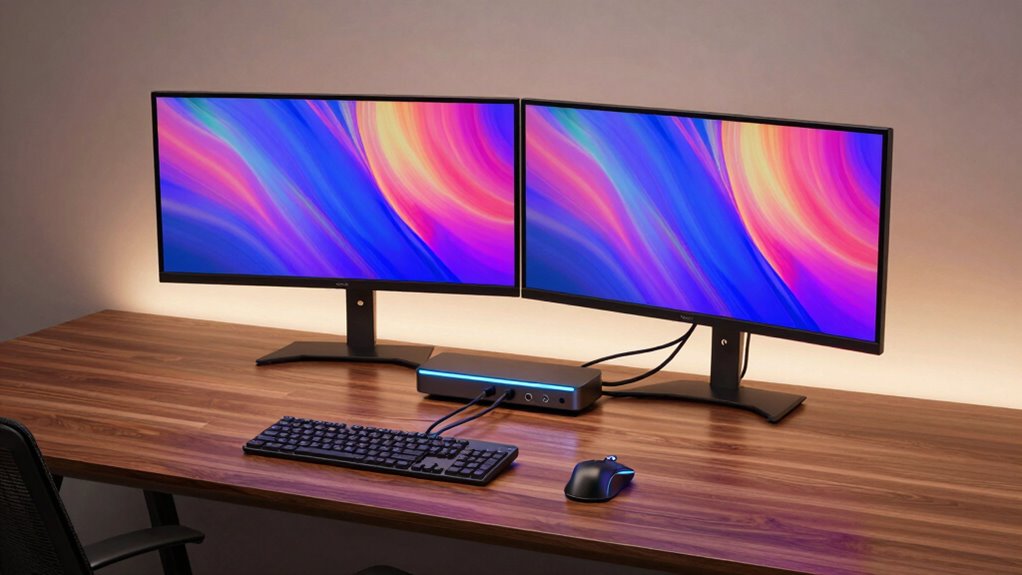

For those building multi monitor accessibility workstations, the right docking station can transform your setup into a seamless, productive environment. The best options support multiple high-resolution displays, provide ample power delivery, and connect effortlessly to a variety of laptops and devices. The best overall pick, the TobenONE 18-in-1 Docking Station, excels with three 4K monitors and extensive port options, making it ideal for demanding multi screen workflows. Meanwhile, the Kensington SD4760P offers a balanced mix of features and reliability at a slightly lower price, perfect for professional users who need robust support without excess complexity. Readers face tradeoffs between port variety, resolution support, and price—more ports usually mean higher cost, and some docks excel at multi monitor support but lack other features. Continue reading for a detailed breakdown of each option and find the best fit for your multi monitor accessibility workstation.
Complete the kit



Key Takeaways
- High port counts and multiple 4K support are common among top-tier docking stations, but they often come at a premium price.
- Compatibility with a wide range of laptops and devices is critical; some docks are optimized for specific brands like Dell or HP.
- Power delivery capacity varies, impacting whether a dock can charge your laptop while connected to multiple monitors.
- Design and build quality influence long-term reliability, especially in multi monitor setups where stability matters.
- More affordable options often limit resolution support or port variety, requiring buyers to prioritize features based on their needs.
| TobenONE 18-in-1 Laptop Docking Station with 3 Monitors and Triple 4K HDMI |  | Best Overall for High-Performance Multi-Monitor Setups | Hardware Interface: 3.5mm Audio, HDMI, USB 2.0 Type A, USB 3.0 Type A, USB 3.0 Type C, USB Type C | Compatible Devices: Full-featured USB C, USB4, Thunderbolt 3 and Thunderbolt 4 | Supported Operating Systems: Windows 10 or later, ChromeOS 100.x or later, Android 7.1 or later, Ubuntu 20.04 or later | VIEW ON AMAZON | See Our Full Breakdown |
| Kensington SD4760P 11-in-1 USB-C Docking Station with Triple Monitor Support |  | Best for Cross-Platform Compatibility and Space Saving | Display Support: Up to 3 external monitors (1x 4K at 30Hz, 2x 1080p at 60Hz) | Power Delivery: Up to 100W | USB Ports: 6x USB-A 3.2 Gen1 5Gbps | VIEW ON AMAZON | See Our Full Breakdown |
| MOKiN USB C Docking Station with 3 Monitors and Weather Display |  | Best for Innovative Workstations with Real-Time Monitoring | Hardware Interface: USB Type C | Display Outputs: 3 HDMI & 2 DisplayPort | Max Monitors Supported: 3 | VIEW ON AMAZON | See Our Full Breakdown |
| Dell WD19DCS Docking Station with Dual 4K Display Support and 240W Power (Renewed) |  | Best for High-Performance Dual 4K Visuals with Reliable Power | Hardware Interface: USB-C | Total USB Ports: 4 | Total HDMI Ports: 1 | VIEW ON AMAZON | See Our Full Breakdown |
| UGREEN USB C Docking Station Dual Monitor 7-in-1 Aluminum Dock with 2 HDMI, Dual 4K@60Hz, 4x10Gbps USB Ports, 100W PD, Compatible with HP, ThinkPad, Dell |  | Best Budget Dual 4K Dock for Versatile Connectivity | Number of HDMI ports: 2 | HDMI resolution: 4K@60Hz | USB-A ports: 2 | VIEW ON AMAZON | See Our Full Breakdown |
| USB C Docking Station Dual DisplayPort Monitor USB C Hub with 2 DP, HDMI, VGA, 100W PD Charging, USB-A/C 2.0 Ports, Multi Monitor Adapter for Dell, HP, Lenovo and More |  | Best Overall Multi-Monitor Docking Station | Display Outputs: 2×DisplayPort (4K@60Hz), 1×HDMI (4K@60Hz), 1×VGA (1080p@60Hz) | Charging Power: 100W PD charging | USB Ports: USB-C 2.0, USB-A 2.0 | VIEW ON AMAZON | See Our Full Breakdown |
| TobenONE DisplayLink Docking Station with 4 Monitors and 20 Ports |  | Best for Extensive Connectivity and Multimonitor Power | Number of Monitors: 4 | Resolution: 4K@60Hz | Ports: 4 HDMI, 4 DisplayPort, 3 USB 3.2, 2 USB-C 3.2, 1 USB 2.0, SD/micro SD, Ethernet, audio | VIEW ON AMAZON | See Our Full Breakdown |
| Selore 16-in-1 Triple HDMI Docking Station for Laptops and MacBooks | 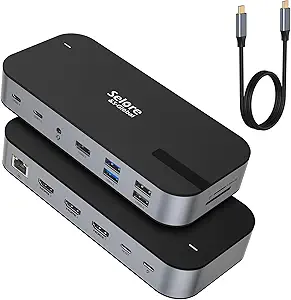 | Best for Triple 4K HDMI Display Support | HDMI Ports: 3 (4K@60Hz) | USB Ports: 1 x USB A 3.1, 2 x USB-C 3.1, 2 x USB A 3.0, 2 x USB A 2.0 | Charging Power: 100W PD | VIEW ON AMAZON | See Our Full Breakdown |
| Anker 8-in-1 USB-C Hub with Dual 4K HDMI, Ethernet, and Card Reader for Laptops |  | Best Compact Dual 4K Monitor Hub | HDMI Ports: 2 (4K@60Hz) | USB Ports: 3 USB 3.0 | Ethernet: 1 Gbps | VIEW ON AMAZON | See Our Full Breakdown |
| TobenONE 19-in-1 Laptop Docking Station Dual Monitor with Ethernet, USB-C/A, 4K HDMI, PD 3.0 for Windows/HP/Dell Laptops |  | Best for Full-Feature Windows Workstations | Ports: 10 USB, 2 HDMI, Ethernet, SD/micro SD | Video Output: Dual 4K HDMI | Power Delivery: Up to 100W | VIEW ON AMAZON | See Our Full Breakdown |
| Anker Nano Laptop Docking Station, 13-in-1 Dock with Detachable 6-in-1 USB-C Hub, 3 Display USB-C Dock (2 HDMI + 1 DisplayPort), 10 Gbps USB-C, 3 USB-A, Audio, SD/TF, Ethernet, 100W Max Power Delivery for Dell, Lenovo, HP |  | Best Overall Multi-Monitor Dock with Portable Flexibility | Hardware Interface: DisplayPort, Ethernet, HDMI, USB Type C | Compatible Devices: Full functional USB C/Thunderbolt 3/4/5 laptops, MacBook | Total USB Ports: 5 | VIEW ON AMAZON | See Our Full Breakdown |
| WAVLINK DisplayLink Docking Station Dual 4K@60Hz Monitor for Mac and Windows |  | Best for High-Quality Dual 4K Display Support | Monitor Support: Dual 4K@60Hz | Ports: 2 HDMI, 2 DisplayPort, 6 USB 3.0, Gigabit Ethernet, 3.5mm audio | Compatibility: Windows 10+, macOS 11+, ChromeOS 100+ | VIEW ON AMAZON | See Our Full Breakdown |
| Selore USB C Docking Station Dual Monitor with 3 Display Support, 2 HDMI + DP + VGA, 100W Power Delivery, Ethernet, USB-A/C Hub |  | Best for Versatile Multi-Display Configurations with High Resolution | Number of Ports: 10 | HDMI Ports: 2 | DisplayPort: 1 | VIEW ON AMAZON | See Our Full Breakdown |
| MOKiN Laptop Docking Station with 3 Monitors, 14-in-1 USB C Hub for Dell, HP, Mac |  | Best for Flexible Multi-Monitor Configurations at a Competitive Price | Number of Ports: 14 | HDMI Ports: 2 | DisplayPort Ports: 2 | VIEW ON AMAZON | See Our Full Breakdown |
| Plugable USB-C Triple Display Docking Station with 100W Power Delivery |  | Best for Seamless Multi-Monitor Expansion with Universal Compatibility | Display Outputs: 3 HDMI (1x 4K 30Hz, 2x 1080p 60Hz) | USB Ports: 6 USB 3.0 | Ethernet: Gigabit Ethernet | VIEW ON AMAZON | See Our Full Breakdown |
| docking stations for multi monitor accessibility workstation | Compatibility | Power Delivery |
|---|---|---|
| TobenONE 18-in-1 Laptop Dockin | — | — |
| Kensington SD4760P 11-in-1 USB | Thunderbolt 5, Thunderbolt 4, USB4, USB-C, MacBook M1/M2/M3/M4, Windows 10+, Chrome OS 114+ | Up to 100W |
| MOKiN USB C Docking Station wi | — | — |
| Dell WD19DCS Docking Station w | — | — |
| UGREEN USB C Docking Station D | HP, ThinkPad, Dell, ZenBook, Chromebook, Surface | 100W |
| USB C Docking Station Dual Dis | Laptop must support DP Alt Mode or Thunderbolt 3/4 | — |
| TobenONE DisplayLink Docking S | Windows 10+, MacBook, Chrome OS | — |
| Selore 16-in-1 Triple HDMI Doc | Windows, macOS (mirror mode only) | — |
| Anker 8-in-1 USB-C Hub with Du | Windows, macOS (mirror only) | 85W |
| TobenONE 19-in-1 Laptop Dockin | Windows, Chrome OS | Up to 100W |
| Anker Nano Laptop Docking Stat | — | — |
| WAVLINK DisplayLink Docking St | Windows 10+, macOS 11+, ChromeOS 100+ | Does not support charging |
| Selore USB C Docking Station D | — | 100W PD input, 85W output |
| MOKiN Laptop Docking Station w | — | 100W PD input, 85W output |
| Plugable USB-C Triple Display | Windows, macOS, ChromeOS | Supports 100W charging |
More Details on Our Top Picks
TobenONE 18-in-1 Laptop Docking Station with 3 Monitors and Triple 4K HDMI
This docking station stands out for supporting triple 4K@60Hz displays, making it ideal for users who need maximum screen real estate and professional multitasking. Compared with the Kensington SD4760P, it offers more ports—totaling 18—which helps reduce cable clutter and connect a wide array of peripherals. Its 100W fast charging keeps laptops powered through intense work sessions, but the need for an external power supply over 65W adds complexity and extra cost, and it lacks Mac compatibility. The design favors Windows and Chrome OS users who prioritize extensive connectivity. However, the absence of an included power adapter means additional purchase is necessary, and the requirement for a compatible high-wattage supply can be a hurdle for some setups.
Pros:- Supports triple 4K@60Hz displays for advanced multitasking
- Includes 18 ports, greatly expanding connectivity options
- Provides 100W fast charging for laptops
Cons:- Power supply not included, requiring an additional purchase
- Limited Mac compatibility, reducing versatility for Apple users
- Requires over 65W power supply for stable operation
Best for: Power users and professionals who need to run multiple 4K displays simultaneously and connect many peripherals with fast charging capabilities.
Not ideal for: Mac users or those with limited desk space, as the dock’s Windows/Chrome-focused design and larger size may be less compatible or space-efficient.
- Hardware Interface:3.5mm Audio, HDMI, USB 2.0 Type A, USB 3.0 Type A, USB 3.0 Type C, USB Type C
- Compatible Devices:Full-featured USB C, USB4, Thunderbolt 3 and Thunderbolt 4
- Supported Operating Systems:Windows 10 or later, ChromeOS 100.x or later, Android 7.1 or later, Ubuntu 20.04 or later
- Total USB Ports:9
- Number of HDMI Ports:3
- Wattage:100 watts
- Item Dimensions:4.9″L x 3.5″W x 1.6″H
- Item Weight:10.88 ounces
Our verdict“This dock is best suited for tech-savvy professionals who need maximum display support and extensive peripheral connectivity in a Windows-centric environment.”
Kensington SD4760P 11-in-1 USB-C Docking Station with Triple Monitor Support
This model makes the most sense for users who value broad device compatibility and a clean workspace, supporting up to three monitors—including 4K and 1080p—across Windows, macOS, and Chrome OS. Compared with the TobenONE, it offers fewer ports but emphasizes universal compatibility and a compact form factor, making it ideal for shared workstations or users with mixed devices. Its 100W power delivery ensures laptops stay charged during demanding tasks, though it requires driver installation for DisplayLink functionality, which could delay setup. The optional mounting bracket adds flexibility for space-saving configurations, but the need for a separate mounting accessory and potential driver issues make it less plug-and-play than some alternatives.
Pros:- Universal compatibility across Windows, macOS, and Chrome OS
- Supports up to three external monitors, including a 4K display
- Compact design with optional mounting for space efficiency
Cons:- Requires driver installation for full functionality, adding setup time
- Mounting bracket sold separately, increasing total cost
- Ethernet speeds may vary depending on network conditions
Best for: Workplaces with diverse device ecosystems needing reliable, multi-platform docking without sacrificing desk space.
Not ideal for: Users who require extensive port options beyond 11 or need plug-and-play simplicity, as driver setup and fewer ports could limit flexibility.
- Display Support:Up to 3 external monitors (1x 4K at 30Hz, 2x 1080p at 60Hz)
- Power Delivery:Up to 100W
- USB Ports:6x USB-A 3.2 Gen1 5Gbps
- Video Ports:3x HDMI
- Ethernet:Gigabit Ethernet (1Gbps max)
- Compatibility:Thunderbolt 5, Thunderbolt 4, USB4, USB-C, MacBook M1/M2/M3/M4, Windows 10+, Chrome OS 114+
- Mounting:Optional mounting bracket (sold separately)
- Environmental:FSC certified packaging
Our verdict“Ideal for multi-device users seeking versatile, space-efficient docking with broad compatibility, despite some setup complexity.”
MOKiN USB C Docking Station with 3 Monitors and Weather Display
This dock’s standout feature is its built-in LCD screen and weather display, providing instant system status and local forecasts, which can enhance workflow for users who benefit from real-time info. It supports triple 4K monitors via HDMI and DisplayPort, matching the visual performance of the UGREEN but adding a unique smart display. Compared with the Dell WD19DCS, it offers more interactive features, though it might be less reliable for complex multi-display setups on Windows due to system limitations. Its extensive connectivity—Ethernet, SD card reader, USB ports—makes it suitable for creative and technical professionals. However, some features are limited to Windows, and the power supply is not included, which can complicate setup for some.
Pros:- Supports triple 4K monitor setup for enhanced multitasking
- Built-in LCD screen displays system and weather info in real time
- Multiple connectivity options including Ethernet, SD card reader, and USB ports
Cons:- Requires Windows for full multi-display functionality with different content
- Charger not included, needs separate purchase
- Some features may be OS-limited, impacting versatility
Best for: Tech-savvy professionals who value real-time system info and a multifunctional workstation, especially on Windows.
Not ideal for: Mac users or those seeking a straightforward dual or triple monitor setup without extra features, as some capabilities are OS-specific.
- Hardware Interface:USB Type C
- Display Outputs:3 HDMI & 2 DisplayPort
- Max Monitors Supported:3
- Resolution Support:4K@60Hz
- Additional Features:Weather display, smart LCD screen, privacy lock button
- Wattage:100W
Our verdict“Best suited for Windows users who want a multifunctional dock with real-time monitoring and innovative features.”
Dell WD19DCS Docking Station with Dual 4K Display Support and 240W Power (Renewed)
The Dell WD19DCS excels for users prioritizing dual 4K displays with high wattage support, especially in high-performance environments. Its support for dual 4K monitors via HDMI and DisplayPort makes it comparable to the UGREEN and TobenONE but with a focus on reliable, professional-grade visuals. The 240W power delivery supports power-hungry devices, making it well-suited for workstation setups. Compared to the TobenONE 18-in-1, it offers fewer ports but emphasizes robust display support and power, ideal for users who need a simple yet powerful dual-monitor solution. Being a renewed product, it carries potential warranty and condition concerns, and its bulkier profile requires ample desk space.
Pros:- Supports dual 4K monitors for crisp, detailed visuals
- High 240W power delivery supports demanding devices
- Includes necessary HDMI and DisplayPort cables for immediate setup
Cons:- Being a renewed product, it may have limited warranty or unknown condition
- Bulkier design requires substantial desk space
- Requires compatible USB-C or Thunderbolt ports, limiting some setups
Best for: Professionals seeking dependable dual 4K display support in a high-wattage, high-performance docking station, particularly in high-demand environments.
Not ideal for: Those who need extensive port variety beyond dual 4K support or prefer new, unrefurbished equipment for critical workflows.
- Hardware Interface:USB-C
- Total USB Ports:4
- Total HDMI Ports:1
- Wattage:240W
- Supports Dual 4K Displays:Yes
- Color:Black
Our verdict“Ideal for users needing high-power, dual 4K visual output with reliable performance in a professional setting, accepting the risks of a refurbished device.”
UGREEN USB C Docking Station Dual Monitor 7-in-1 Aluminum Dock with 2 HDMI, Dual 4K@60Hz, 4x10Gbps USB Ports, 100W PD, Compatible with HP, ThinkPad, Dell
The UGREEN dual HDMI dock offers a balanced mix of performance and affordability, supporting two 4K@60Hz displays, making it suitable for users who want crisp visuals without the premium price. Compared to the MOKiN, it provides similar dual-monitor support but with a more compact, aluminum chassis that fits well in professional environments. Its 100W charging and multiple USB ports support fast data transfer and device charging, yet macOS users may find that extended displays are limited to mirroring, which can hinder workflow. The need for specific cables to support 10Gbps transfer speeds could complicate setup, and it doesn’t support more than two monitors, narrowing its suitability for highly demanding multi-monitor workflows.
Pros:- Supports dual 4K@60Hz monitors for sharp visuals
- Multiple USB ports, including 10Gbps transfer support
- 100W power delivery for fast charging
Cons:- macOS may only support mirrored displays, limiting productivity
- Requires compatible cables for full 10Gbps speeds
- Limited to two external monitors, not suitable for extensive multi-monitor setups
Best for: Budget-conscious professionals or students seeking a reliable dual 4K setup with fast data and charging in a compact form factor.
Not ideal for: Power users needing three or more monitors or those on macOS who require true extended desktop support beyond mirroring.
- Number of HDMI ports:2
- HDMI resolution:4K@60Hz
- USB-A ports:2
- USB-C ports:2
- Power Delivery:100W
- Compatibility:HP, ThinkPad, Dell, ZenBook, Chromebook, Surface
Our verdict“A cost-effective choice for dual 4K display users wanting fast data transfer and charging in a compact, versatile dock.”
USB C Docking Station Dual DisplayPort Monitor USB C Hub with 2 DP, HDMI, VGA, 100W PD Charging, USB-A/C 2.0 Ports, Multi Monitor Adapter for Dell, HP, Lenovo and More
This model stands out for supporting up to four monitors with a flexible array of video outputs, including dual DisplayPort, HDMI, and VGA, making it ideal for professionals who need extensive screen real estate. Compared with TobenONE’s 4-monitor support, this station offers broader compatibility and a more straightforward setup, though it doesn’t support macOS MST mode. Its 100W pass-through charging keeps laptops powered during long work sessions, a key advantage over many simpler docks. However, it requires a laptop that supports DP Alt Mode or Thunderbolt 3/4, which can limit compatibility for some users. The lack of an included charger is a minor inconvenience, but its broad Windows support makes it a reliable choice for business environments.
Pros:- Supports up to four monitors, boosting multitasking capacity
- Fast 100W charging maintains power during use
- Plug-and-play setup with no drivers needed
- Broad compatibility with Windows laptops
Cons:- Dependent on laptop support for DP Alt Mode or Thunderbolt 3/4
- MST mode not supported on macOS
- Charger not included, requiring an additional purchase
Best for: IT professionals or content creators needing multiple high-resolution displays connected via a single dock on Windows laptops.
Not ideal for: Mac users expecting full macOS multi-monitor support without additional configuration, as MST mode isn’t supported on macOS.
- Display Outputs:2×DisplayPort (4K@60Hz), 1×HDMI (4K@60Hz), 1×VGA (1080p@60Hz)
- Charging Power:100W PD charging
- USB Ports:USB-C 2.0, USB-A 2.0
- Compatibility:Laptop must support DP Alt Mode or Thunderbolt 3/4
- Warranty:18 months
Our verdict“This dock is ideal for Windows users who need multiple high-resolution displays and reliable power delivery in a professional setting.”
TobenONE DisplayLink Docking Station with 4 Monitors and 20 Ports
This docking station makes a compelling case for users needing maximum port variety and support for four 4K displays, surpassing Selore’s triple HDMI setup in both connectivity options and performance. The 20 ports include HDMI, DisplayPort, Ethernet, USB, and SD card slots, catering to complex workflows. The 150W power supply offers robust charging, ideal for power-hungry setups. However, it requires DisplayLink drivers, which adds complexity and may introduce compatibility issues, especially with M1 Macs that only extend to three monitors. The lack of a included power adapter could be a drawback for those seeking an all-in-one package. Overall, this pick suits tech-savvy professionals managing multiple peripherals and displays simultaneously.
Pros:- Supports four 4K monitors for extensive multitasking
- Wide range of ports including Ethernet, SD, and multiple USB types
- High 150W power supply enables fast charging for multiple devices
- Versatile compatibility across many operating systems
Cons:- Requires installation of DisplayLink drivers, potentially complicating setup
- M1 MacBooks only extend to three monitors, limiting full capacity
- No included power adapter, adding extra cost
Best for: Power users and IT specialists managing extensive peripherals and multiple 4K displays on Windows or Chrome OS devices.
Not ideal for: Casual users or Mac owners who prefer driver-free, simple plug-and-play solutions, particularly with M1 Macs due to monitor limitations.
- Number of Monitors:4
- Resolution:4K@60Hz
- Ports:4 HDMI, 4 DisplayPort, 3 USB 3.2, 2 USB-C 3.2, 1 USB 2.0, SD/micro SD, Ethernet, audio
- Power Supply:150W
- Charging Power:100W for laptops, 18W for phones
- Compatibility:Windows 10+, MacBook, Chrome OS
Our verdict“Best suited for power users needing maximum connectivity and multi-monitor support on Windows or Chrome OS devices, with some driver management considerations.”
Selore 16-in-1 Triple HDMI Docking Station for Laptops and MacBooks
This docking station excels at supporting three 4K HDMI monitors simultaneously, making it an excellent choice for users who prioritize high-quality video output. Unlike TobenONE’s 4-monitor support with DisplayLink, Selore relies on HDMI outputs exclusively, which simplifies setup for HDMI-only workflows. Its 100W PD charging and high-speed data transfer up to 10Gbps add to its appeal. However, it falls short on compatibility with Mac devices, which only support mirror mode, and it lacks an included power adapter, requiring users to supply their own. This station is best suited for Windows or compatible systems that are primarily HDMI-based, offering a streamlined experience without driver dependencies.
Pros:- Supports three 4K HDMI monitors for high-quality visuals
- High-speed data transfer up to 10Gbps
- 100W PD charging for laptops
- Multiple USB ports for peripherals
Cons:- Requires an 87W+ charger for full functionality
- No included power adapter, increasing setup cost
- Limited Mac compatibility—mirror mode only
Best for: Professionals who need three high-resolution HDMI displays with simple, driverless setup on Windows or compatible systems.
Not ideal for: Mac users seeking extended desktop support or those with multiple USB peripherals requiring more diverse port options, as it only supports mirror mode on Mac.
- HDMI Ports:3 (4K@60Hz)
- USB Ports:1 x USB A 3.1, 2 x USB-C 3.1, 2 x USB A 3.0, 2 x USB A 2.0
- Charging Power:100W PD
- Ethernet:1 Gbps
- Compatibility:Windows, macOS (mirror mode only)
- Power Adapter:Not included
Our verdict“Ideal for Windows users needing triple HDMI 4K displays with straightforward, driver-free operation and high data transfer speeds.”
Anker 8-in-1 USB-C Hub with Dual 4K HDMI, Ethernet, and Card Reader for Laptops
This compact hub offers dual 4K HDMI outputs, Ethernet, and a card reader, making it a convenient upgrade for users with limited desk space. Compared to the larger TobenONE or Selore docks, it prioritizes a slim profile and portability, ideal for mobile professionals. Its 85W power delivery supports fast charging, though it falls short of the 100W+ capacity found in more robust stations, which might limit its use with power-hungry laptops. It supports dual monitors at 60Hz but only mirrors on macOS, which could be a drawback for Mac users seeking extended displays. Its lightweight aluminum enclosure offers durability without bulk, perfect for on-the-go setups.
Pros:- Supports dual 4K HDMI displays at 60Hz
- High-speed data transfer up to 5120 MB/s
- Compact, lightweight aluminum design
- Supports 85W charging for most laptops
Cons:- Displays are mirrored only on macOS
- Charger and C-to-C cable not included, adding to cost
- Limited to 85W power delivery, less suitable for high-power laptops
Best for: Travelers and remote workers who need reliable dual 4K output and high-speed data transfer in a small form factor.
Not ideal for: Power users requiring extensive peripherals or multiple extended monitors, especially on Mac, due to mirrored display limitations.
- HDMI Ports:2 (4K@60Hz)
- USB Ports:3 USB 3.0
- Ethernet:1 Gbps
- Power Delivery:85W
- Form Factor:Aluminum, compact
- Compatibility:Windows, macOS (mirror only)
Our verdict“This hub is well-suited for mobile professionals who want dual 4K displays and fast data transfer in a portable package, primarily on Windows or Chrome OS devices.”
TobenONE 19-in-1 Laptop Docking Station Dual Monitor with Ethernet, USB-C/A, 4K HDMI, PD 3.0 for Windows/HP/Dell Laptops
This comprehensive docking station excels at transforming a single connection into a full workstation, supporting dual 4K HDMI monitors and an extensive array of USB ports, Ethernet, and SD slots. Compared to the more limited features of Anker’s hub, this model offers the most versatile connectivity for demanding users. Its 100W power delivery ensures laptops stay charged, and the plug-and-play setup simplifies deployment. However, it is tailored primarily for Windows and Chrome OS, lacking Mac compatibility, and the absence of a included power adapter means additional expense. Its bulkier design makes it less portable but highly functional for fixed workstations with extensive peripheral needs.
Pros:- Supports dual 4K HDMI outputs for high-quality visuals
- Extensive port selection including 10 USB ports and Ethernet
- Supports up to 100W charging for laptops
- Plug-and-play with no driver installation needed
Cons:- Designed mainly for Windows and Chrome OS, not recommended for Mac
- No included power adapter, requiring an additional purchase
- Size and weight may limit portability
Best for: Professionals and students seeking a fully featured dual-monitor setup on Windows or Chrome OS laptops, with extensive peripheral connectivity.
Not ideal for: Mac users or those needing a lightweight portable dock, due to its size and limited Mac support.
- Ports:10 USB, 2 HDMI, Ethernet, SD/micro SD
- Video Output:Dual 4K HDMI
- Power Delivery:Up to 100W
- Compatibility:Windows, Chrome OS
- Dimensions:Not specified
- Weight:Not specified
Our verdict“This dock is ideal for Windows or Chrome OS users needing a highly versatile, full-feature workstation expansion with dual 4K display support.”
Anker Nano Laptop Docking Station, 13-in-1 Dock with Detachable 6-in-1 USB-C Hub, 3 Display USB-C Dock (2 HDMI + 1 DisplayPort), 10 Gbps USB-C, 3 USB-A, Audio, SD/TF, Ethernet, 100W Max Power Delivery for Dell, Lenovo, HP
This dock stands out for its detachable 6-in-1 portable hub, making it a versatile choice for users who need both a fixed desk setup and on-the-go connectivity. Its support for a triple monitor setup with 4K and dual 2K resolutions delivers crisp visuals, surpassing many single- or dual-monitor options. Compared with the Plugable USB-C Triple Display Docking Station, it offers more extensive port options and a detachable feature, though it requires a connection to a laptop to activate its ports—potentially complicating the setup. For users who prioritize portability alongside a robust desktop experience, this makes a compelling choice. However, macOS users should be aware that external monitor support is limited to mirroring, not extended displays. The dock’s power delivery of up to 100W supports fast charging, reducing clutter and cable management.
Pros:- Detachable design offers portability and flexibility
- Supports triple monitor setup with 4K and dual 2K resolutions
- Extensive connectivity including multiple USB ports, HDMI, DisplayPort, Ethernet, and SD/TF slots
- Delivers up to 100W power for fast laptop charging
Cons:- Requires laptop connection to activate ports and lights, limiting standalone use
- macOS supports only mirrored displays on multiple monitors, restricting extended desktop use
- Setup can be complex due to multiple ports and configuration options
Best for: Professionals needing a flexible, portable dock capable of supporting multi-monitor setups and high power delivery.
Not ideal for: Mac users seeking full multi-monitor support without mirroring or those wanting a plug-and-play experience without setup complexities.
- Hardware Interface:DisplayPort, Ethernet, HDMI, USB Type C
- Compatible Devices:Full functional USB C/Thunderbolt 3/4/5 laptops, MacBook
- Total USB Ports:5
- Number of Ports:13
- Total HDMI Ports:2
- Wattage:100W
- Item Dimensions:3.74″L x 1.57″W x 5.51″H
- Color:Black
- Warranty:18 months
Our verdict“This dock suits professionals seeking a portable yet powerful multi-monitor solution with extensive connectivity and charging capabilities.”
WAVLINK DisplayLink Docking Station Dual 4K@60Hz Monitor for Mac and Windows
This docking station excels in delivering dual 4K monitors at 60Hz, making it ideal for creative professionals or detailed multitasking. Its broad system compatibility with Windows, macOS, and ChromeOS ensures versatile use, matching the needs of mixed-device environments. Compared with the Plugable USB-C Triple Display Docking Station, it offers superior display resolution and refresh rate but lacks power delivery, meaning laptops must be charged separately. Its reliance on DisplayLink drivers introduces additional setup steps and potential compatibility issues, especially with macOS updates. For users prioritizing high-resolution, high-refresh-rate displays without requiring laptop charging through the dock, this option provides a compelling balance of quality and compatibility.
Pros:- Supports dual 4K monitors at 60Hz for crisp, fluid visuals
- Compatible with a wide range of systems and OS versions
- Multiple USB ports and Ethernet for comprehensive connectivity
Cons:- Does not support laptop charging, requiring separate power adapters
- Requires DisplayLink driver installation, which can be a hassle for some users
- Limited suitability for gaming or high-frame-rate video tasks
Best for: Creative professionals or power users needing crisp dual 4K displays at 60Hz on multiple operating systems.
Not ideal for: Gamers or video editors requiring high-frame-rate gaming or high-performance editing, as this dock is designed more for productivity than high-frame-rate tasks.
- Monitor Support:Dual 4K@60Hz
- Ports:2 HDMI, 2 DisplayPort, 6 USB 3.0, Gigabit Ethernet, 3.5mm audio
- Compatibility:Windows 10+, macOS 11+, ChromeOS 100+
- Supported Systems:USB-A, USB-C, Thunderbolt 3/4/5
- Power Delivery:Does not support charging
Our verdict“This dock is well-suited for users needing reliable, high-resolution dual monitors across multiple platforms without the need for integrated charging.”
Selore USB C Docking Station Dual Monitor with 3 Display Support, 2 HDMI + DP + VGA, 100W Power Delivery, Ethernet, USB-A/C Hub
This docking station stands out for supporting up to three displays with 4K or 8K resolution, ideal for users needing maximum screen real estate and flexible configurations. Its dedicated monitor control button simplifies switching between modes, a feature often missing in similar docks like the MOKiN USB C Docking Station. While it offers broad compatibility and reliable gigabit Ethernet, its limitation to mirror mode on macOS restricts extended desktop use, and setup can be complex due to multiple ports and modes. The inclusion of VGA, HDMI, and DisplayPort makes it adaptable, but the need for a compatible Thunderbolt 3/4 or USB-C port is essential for full functionality. This dock suits those who value high resolution and multiple display modes but are comfortable with a more involved setup process.
Pros:- Supports up to three monitors with 4K or 8K resolutions
- Includes a dedicated monitor control button for quick mode changes
- Broad compatibility with Thunderbolt 3/4 and USB-C devices
- Reliable gigabit Ethernet and high-speed data transfer
Cons:- MacOS only supports mirror mode, limiting extended desktop options
- Setup can be complex due to numerous ports and configuration modes
- Requires a Thunderbolt 3/4 or USB-C port for full features
Best for: Users requiring multi-monitor setups with high resolutions and flexible display options, especially Windows users with advanced display needs.
Not ideal for: Mac users seeking full extended desktop support or those preferring a plug-and-play solution with minimal configuration.
- Number of Ports:10
- HDMI Ports:2
- DisplayPort:1
- VGA Port:1
- USB 3.0 Ports:2
- Ethernet:Gigabit Ethernet
- Power Delivery:100W PD input, 85W output
- Display Support:Triple 4K or single 8K display
Our verdict“This dock suits advanced Windows users needing high-resolution multi-monitor support with flexible display configurations.”
MOKiN Laptop Docking Station with 3 Monitors, 14-in-1 USB C Hub for Dell, HP, Mac
This docking station offers support for three monitors with various configurations, including 2 HDMI and 2 DisplayPort outputs, making it versatile for different workspace setups. Its high-speed data transfer and 100W power delivery make it suitable for demanding users who need both connectivity and charging. Compared to the Selore USB C Docking Station, it provides a broader range of port options and additional features like a screen-off button. However, it supports only MST mode on Windows, with limited multi-display functionality on macOS, which may frustrate Mac users expecting full multi-monitor support from a single dock. Its compatibility with Thunderbolt 3/4 and USB-C ensures broad device support, but the need for a higher wattage adapter (110W) for full charging can be inconvenient.
Pros:- Supports up to three monitors with flexible configuration options
- Includes a dedicated screen off button for convenience
- High-speed data transfer with multiple USB ports
- Supports 100W power delivery for fast charging
Cons:- Limited multi-monitor support on macOS, only mirror mode
- Requires a 110W power adapter for full charging capacity
- Setup can be complex, requiring familiarity with multiple ports and modes
Best for: Power users on Windows needing flexible, multi-monitor setups with high data transfer and charging capacity.
Not ideal for: Mac users who require seamless multi-monitor support and prefer a straightforward, plug-and-play setup.
- Number of Ports:14
- HDMI Ports:2
- DisplayPort Ports:2
- VGA Port:1
- Ethernet:Gigabit Ethernet
- Power Delivery:100W PD input, 85W output
- Display Support:Triple 4K or 8K
- Material:Aluminum chassis
Our verdict“This dock is ideal for Windows users needing versatile, multi-monitor support with high data and power capabilities.”
Plugable USB-C Triple Display Docking Station with 100W Power Delivery
This dock is designed for users who want to support up to three HDMI monitors, including a 4K at 30Hz option, making it suitable for general productivity and multi-monitor workflows. Its broad compatibility with Windows, macOS, and ChromeOS, along with 6 USB 3.0 ports and gigabit Ethernet, provides a comprehensive connectivity package. Compared with the WAVLINK Dual 4K@60Hz Dock, it offers more USB ports and supports more monitors, though it sacrifices higher refresh rates for wider system compatibility. Its main drawback is that it is not compatible with Linux and requires driver installation on macOS, which may be a barrier for some users. For those who prioritize multi-monitor support across different operating systems with a focus on simple setup, this dock is a reliable choice.
Pros:- Supports up to three HDMI monitors, including 4K at 30Hz
- Universal compatibility with Windows, macOS, and ChromeOS
- Includes 6 USB 3.0 ports and gigabit Ethernet
Cons:- Limited refresh rate (30Hz at 4K), not ideal for fast-paced visuals
- Requires driver installation on some systems, adding setup steps
- Not compatible with Linux systems
Best for: Users seeking a straightforward, multi-platform dock that expands to three HDMI monitors with sufficient USB and network connectivity.
Not ideal for: High-end gamers or video editors needing high refresh rates or HDCP support, as this dock emphasizes compatibility over performance for high-frame-rate content.
- Display Outputs:3 HDMI (1x 4K 30Hz, 2x 1080p 60Hz)
- USB Ports:6 USB 3.0
- Ethernet:Gigabit Ethernet
- Compatibility:Windows, macOS, ChromeOS
- Supported Systems:USB-C, USB4, Thunderbolt
- Power Delivery:Supports 100W charging
Our verdict“This dock suits users needing multi-monitor support across multiple OS platforms with straightforward connectivity and ample USB ports.”

How We Picked
Products were evaluated based on their ability to support multiple monitors with high resolution, compatibility across different laptops and operating systems, and overall build quality. Performance in handling high data transfer rates and power delivery was also key, as these influence daily usability. The inclusion of versatile ports, such as HDMI, DisplayPort, and USB-C, was another factor, along with user-friendly design and reliability. Rankings reflect a balance of these criteria, emphasizing value for demanding multi monitor environments while considering budget-conscious options.Factors to Consider When Choosing Docking Stations For Multi Monitor Accessibility Workstations
Choosing the right docking station for a multi monitor setup involves several important considerations. Beyond simply supporting multiple screens, you need to evaluate compatibility, power delivery, and port options that match your workflow. Failing to align these factors can lead to connectivity issues or limited performance. Understanding tradeoffs, like price versus feature set, helps ensure you select a dock that fits your specific needs without overspending or sacrificing essential capabilities.Display Support and Resolution
The core function of a docking station is supporting multiple monitors, but not all docks handle high resolutions equally. If you’re working with 4K or higher displays, verify that the dock explicitly supports dual or triple 4K at 60Hz, not just 30Hz, to ensure smooth visual performance. Failing to check resolution support can lead to laggy or choppy visuals, especially in productivity or creative workflows. Consider your current and future display needs—buying a dock with higher support than your current monitors provides headroom for upgrades.
Port Variety and Compatibility
A versatile array of ports is essential for connecting peripherals, external drives, and network cables. Look for docks offering a mix of HDMI, DisplayPort, USB-C, and USB-A, as well as Ethernet and SD card readers if needed. Compatibility with your laptop brand and operating system also matters—some docks perform better with Windows, others with MacBooks. Avoid docks that lack necessary ports or have proprietary connectors, as this can limit expandability and flexibility over time.
Power Delivery Capacity
Power delivery (PD) allows your dock to charge your laptop while connected, reducing cable clutter and ensuring uninterrupted workflow. Check the wattage—most modern laptops need at least 65W, but high-performance machines may require 90W or more. A dock with insufficient PD capacity can mean slow charging or no charging at all, hampering productivity. Keep in mind that higher PD ratings often come with a higher price, so balance your power needs with budget considerations.
Build Quality and Ease of Use
Durability and design influence long-term performance, especially in busy work environments. Look for docks with sturdy construction and well-designed ports that prevent wear and tear. Ease of setup and connection also matter—some docks feature plug-and-play design, while others require driver installations. A cluttered or poorly designed dock can hinder workflow, so prioritize models with clear labeling, accessible ports, and a compact form factor suitable for your workspace.
Cost and Value
Affordable docks may support fewer monitors or lower resolutions, but they can still be suitable for basic multi monitor setups. Conversely, premium models offer extensive port options, higher resolutions, and better build quality but at a higher price. Assess your specific needs—if you require intensive multi monitor support with high resolutions, investing in a higher-end dock pays off. For lighter use, a budget-friendly option may suffice, but beware of potential limitations that could hinder your workflow over time.
Frequently Asked Questions
Can a docking station support three 4K monitors at 60Hz?
Yes, some docking stations are specifically designed to support three 4K monitors at 60Hz, but not all. When choosing a dock for this purpose, verify its specifications to confirm it can handle high-resolution displays simultaneously without compromises. Features like DisplayPort 1.4 or HDMI 2.0+ support are typical indicators of high-resolution support at 60Hz. Keep in mind that achieving this performance might also depend on your laptop’s graphics capabilities and the docking station’s overall bandwidth capacity.
Is it better to buy a dock with more ports or fewer ports with higher quality?
This depends on your specific needs. If you require extensive peripheral connectivity, a dock with a larger port array is advantageous, but ensure those ports are high quality and support your data and display requirements. Conversely, a smaller dock with high-quality ports may be more reliable and easier to use if your needs are simpler. Overloading a dock with many ports can sometimes lead to performance issues or reduced lifespan if the build quality isn’t robust. Match the port quantity and quality to your workflow for the best results.
How important is power delivery in a multi monitor docking station?
Power delivery is a key feature for maintaining a clean, clutter-free workspace by allowing your dock to charge your laptop while connected to multiple monitors and peripherals. Without sufficient PD capacity, your laptop might not charge adequately during extended work sessions, which can be disruptive. The importance of PD depends on your laptop’s power needs; high-performance machines often require 90W or more. Investing in a dock with adequate power delivery ensures uninterrupted productivity and reduces cable clutter.
Are docking stations compatible with both Windows and MacOS?
Many modern docking stations are designed to work seamlessly with both Windows and MacOS, but compatibility can vary based on the model and features. Check the manufacturer’s specifications to verify OS support, especially for advanced features like high-resolution display support or Ethernet. Some docks may require driver installations for Mac, while others are plug-and-play. Confirming compatibility before purchase avoids issues with connectivity or performance, particularly if you switch between operating systems regularly.
Should I prioritize resolution support or port quantity when choosing a dock?
This depends on your primary needs. If your workflow involves high-resolution displays, prioritize resolution support to ensure visual clarity and smooth performance. If you connect many peripherals, port quantity becomes more critical to avoid disconnecting devices or using multiple hubs. Ideally, aim for a dock that balances both, but if forced to choose, select based on whether your work relies more on high-quality visuals or peripheral expandability. Clarifying your main use case guides the best investment.