When selecting teleprompter rigs for captioned presentations, the primary challenge is balancing optical clarity with seamless digital integration. My top recommendation is the Elgato Prompter because it eliminates the need for external tablets by embedding a high-resolution screen directly into the rig, ensuring text remains legible even under bright studio lights. For those preferring traditional glass setups, the Desview T5 offers exceptional value with its coated glass and broad device compatibility, while the Glide Gear TMP 1000 stands out for professionals needing large-format readability without distortion. The main tradeoff you will face is between portability and screen size; larger rigs improve readability for long scripts but demand more studio space and careful lighting management. Continue reading to see how these options stack up against each other and which one fits your specific workflow.

Get everyday helpers delivered free with Prime
- Fast, free delivery on millions of items
- Prime Video, Amazon Music and more included
- Member-only deals all year
Key Takeaways
- Integrated screen rigs like the Elgato Prompter significantly reduce setup time by eliminating tablet-to-rig calibration issues.
- Coated beam splitter glass is non-negotiable for captioned presentations, as uncoated glass creates ghosting that breaks eye contact.
- App compatibility varies widely; ensure your chosen rig supports the specific teleprompter software you already use or plan to buy.
- Larger glass sizes (12 inches and up) are superior for long-form speeches but require careful camera lens positioning to avoid vignetting.
- Collapsible designs are ideal for hybrid presenters but often sacrifice the rigidity needed for perfectly stable text alignment.
| Desview T5 Teleprompter for Smartphone & Tablet |  | Best for Flexible Camera and Phone Setups | Compatibility: Smartphones, tablets under 11 inches, and DSLR cameras | Adapter rings: 49, 52, 55, 58, 62, 67, 72, 77, and 82mm | Remote control: Bluetooth remote included | VIEW ON AMAZON | See Our Full Breakdown |
| Moman MT12 Teleprompter 12-inch with App Control |  | Best for Larger Tablets | Display: 12-inch HD optical glass | Maximum tablet size: Up to 12.9 inches | Reading range: Up to 15 feet | VIEW ON AMAZON | See Our Full Breakdown |
| TX12 13-inch Metal Teleprompter with Remote App Control |  | Best for Collapsible Portability | Display size: 13 inches | Maximum tablet size: 9.84 inches | Light transmittance: Up to 97% | VIEW ON AMAZON | See Our Full Breakdown |
| Elgato Prompter with Built-in Screen |  | Best for Desktop Captioned Presentations | Built-in display: 9 inches | Maximum display resolution: FHD | Connectivity: USB | VIEW ON AMAZON | See Our Full Breakdown |
| Proaim Professional Speech Teleprompter for Tablets, Laptops & Monitors |  | Best for Studio and Large-Device Presentations | Device compatibility: Devices up to 17 inches | Beam splitter glass: 60/40 | Stand: Adjustable telescopic stand | VIEW ON AMAZON | See Our Full Breakdown |
| NEEWER X11 2-in-1 Teleprompter with 11-inch Monitor and Screen Mirroring Support |  | Best for Captioned Presentations with a Built-In Monitor | Screen: 11-inch HD LCD | Resolution: 1024 × 768 | Connectivity: USB-C, HDMI, screen mirroring | VIEW ON AMAZON | See Our Full Breakdown |
| NEEWER X12 14 Inch Aluminum Alloy Teleprompter for iPad, Tablet, Phone, Camera |  | Best for Tablet-Based Caption Prompts | Display size: 14 inches | Material: Aluminum alloy | Beam-splitter glass: 75% light transmittance; text reflection up to 10 feet | VIEW ON AMAZON | See Our Full Breakdown |
| NEEWER X1 Pro II Teleprompter 9-inch All Metal with Remote/App Control, Quick Switch Lock, Arca QR Plate, Magnetic Phone Clamp, Assembly Free |  | Best Compact Rig for Camera-and-Phone Setups | Screen size: 9 inches | Beamsplitter glass: HD, 75% light transmission | Reading range: 6.6 feet / 2 meters | VIEW ON AMAZON | See Our Full Breakdown |
| SmallRig Teleprompter for iPad up to 11 inch, Not for Smartphone |  | Best for Tablet-Only Camera Workflows | Tablet compatibility: iPad up to 11 inches | Phone compatibility: Not compatible with smartphones | Mounting type: Tabletop mount | VIEW ON AMAZON | See Our Full Breakdown |
| 13-inch Wide-Angle Teleprompter for Camera with Remote & App Support |  | Best for Wide Viewing and Larger Caption Layouts | Size: 13 inches | Material: Aluminum alloy | Weight: 7.41 pounds | VIEW ON AMAZON | See Our Full Breakdown |
| Neewer Teleprompter Kit for iPhone & Android with Double Phone Holder, Collapsible Design, 20″ Desk Version | 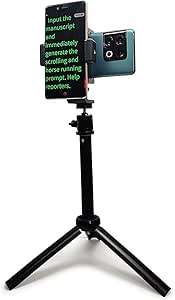 | Best Budget Phone Rig | Model: PPG-2206-SJZJ | Weight: 0.61 lbs (280g) | Length: 17 inches | VIEW ON AMAZON | See Our Full Breakdown |
| NEEWER Basics X12B Aluminum Alloy Teleprompter 12″ for Tablet DSLR Camera |  | Best Mid-Range Tablet Rig | Display Size: 12 inches | Material: Aluminum alloy | Light Transmittance: 75% | VIEW ON AMAZON | See Our Full Breakdown |
| Teleprompter for Smartphone, LENSGO TC12P 14.5-Inch HD Wide-Angle Beam Splitter Glass, Supports iPad/Tablet with Bluetooth Remote for YouTube, Zoom, TikTok & Vlogging |  | Best for Hybrid Creators | Screen Size: 14.5 inches | Max Device Width: 7.3 inches | Material: Coated glass, foam padding | VIEW ON AMAZON | See Our Full Breakdown |
| Glide Gear TMP 1000 Teleprompter for Cameras and Smartphones, 17-Inch Glass, Portable with Hard Case |  | Best Professional Portability | Beam-Splitting Glass: 17 inches | Item Weight: 12 pounds | Max Weight Support: 25 pounds | VIEW ON AMAZON | See Our Full Breakdown |
| Glide Gear TMP 75 Teleprompter – Compatible with Smartphone, DSLR, Webcam – Includes Carry Case |  | Best Compact Studio Rig | Material: All-metal | Weight: 3.6 pounds | Max Weight Support: 2 pounds | VIEW ON AMAZON | See Our Full Breakdown |
| teleprompter rigs for captioned presentation | Weight |
|---|---|
| Desview T5 Teleprompter for Sm | — |
| Moman MT12 Teleprompter 12-inc | 6.05 pounds |
| TX12 13-inch Metal Teleprompte | 6.49 pounds |
| Elgato Prompter with Built-in | 0.69 kg |
| Proaim Professional Speech Tel | 18.5 pounds |
| NEEWER X11 2-in-1 Teleprompter | — |
| NEEWER X12 14 Inch Aluminum Al | — |
| NEEWER X1 Pro II Teleprompter | 3.35 pounds |
| SmallRig Teleprompter for iPad | — |
| 13-inch Wide-Angle Teleprompte | 7.41 pounds |
| Neewer Teleprompter Kit for iP | 0.61 lbs (280g) |
| NEEWER Basics X12B Aluminum Al | — |
| Teleprompter for Smartphone | — |
| Glide Gear TMP 1000 Teleprompt | — |
| Glide Gear TMP 75 Teleprompter | 3.6 pounds |
More Details on Our Top Picks
Desview T5 Teleprompter for Smartphone & Tablet
The Desview T5 is my pick for presenters who want one rig to move between a phone and a DSLR without changing the basic workflow. Its 49–82mm adapter rings cover a broad range of lens threads, while the included Bluetooth remote lets a presenter adjust script playback without reaching toward the camera. That flexibility is useful for captioned presentations recorded in different setups, though captions themselves need to be prepared or displayed through a separate workflow; the supplied app is for prompting. Compared with the Elgato Prompter, the T5 relies on a phone or tablet as its script display rather than providing a built-in screen, so it is less integrated but more adaptable to camera hardware. The tradeoff is app setup and a device-size ceiling: tablets and phones must be under 11 inches.
Pros:- Works with smartphones, tablets under 11 inches, and DSLR cameras
- Includes adapter rings spanning 49–82mm lens threads
- Bluetooth remote supports hands-free script control
- Coated glass and adjustable front panel support flexible camera positioning
Cons:- Requires app setup for full functionality
- Does not include a dedicated script display
- Tablet and phone support is limited to devices under 11 inches
Best for: Presenters who alternate between smartphone and DSLR recording and want to use a phone or tablet they already own for script playback.
Not ideal for: People seeking a built-in display or a tablet-based rig larger than 11 inches; the T5 depends on a separate device and app.
- Compatibility:Smartphones, tablets under 11 inches, and DSLR cameras
- Adapter rings:49, 52, 55, 58, 62, 67, 72, 77, and 82mm
- Remote control:Bluetooth remote included
- App compatibility:iOS and Android
- Glass:Coated glass
- Materials:Coated glass and foam cushions
- Warranty:One-year free warranty and lifetime maintenance
Our verdict“Choose the T5 if you want a versatile phone-to-DSLR prompting rig and are comfortable supplying the display device and app.”
Moman MT12 Teleprompter 12-inch with App Control
The Moman MT12 suits presenters who want a generous reading area and plan to use an iPad or other tablet as the script source. Its 12-inch optical glass and support for tablets up to 12.9 inches make long captions and scripts easier to read at a distance than on the smaller-device setup of the Desview T5, which tops out below 11 inches. The aluminum construction and adjustable angles also suit a more settled desk or studio rig. The listed reading range reaches 15 feet, giving speakers more room to stand back from the camera. The compromise is portability: at 6.05 pounds, it is heavier than a compact phone-first option, and full control depends on the Moman app and remote. It is a prompting rig, not a caption-generation system.
Pros:- 12-inch optical glass provides a roomy script display
- Supports tablets up to 12.9 inches
- Specified reading range of up to 15 feet
- Aluminum body has adjustable angles
Cons:- At 6.05 pounds, it is less convenient to transport than a compact rig
- Requires a separate tablet and app-based workflow
- Its tablet support does not extend beyond 12.9 inches
Best for: Presenters using an iPad or tablet up to 12.9 inches who need readable scripts from farther back in a studio or fixed presentation space.
Not ideal for: Mobile creators who pack light or need a self-contained display; the MT12 is relatively heavy and relies on a separate tablet and app.
- Display:12-inch HD optical glass
- Maximum tablet size:Up to 12.9 inches
- Reading range:Up to 15 feet
- Compatibility:iPad, tablets, DSLR cameras, and smartphones
- Material:Aluminum
- Weight:6.05 pounds
- Dimensions:13.66 × 11.1 × 0.55 inches
Our verdict“Pick the MT12 if a large tablet and longer reading distance matter more than keeping your presentation rig lightweight.”
TX12 13-inch Metal Teleprompter with Remote App Control
The TX12 pairs a 13-inch display area with a collapsible build and carry case, making it a practical choice for presenters who need to move a camera rig between locations. Its aluminum-alloy construction and adjustable glass angle up to 45 degrees offer more positioning flexibility than the simpler phone-first Desview T5. The listed light transmittance of up to 97% is intended to keep the camera view usable while text reflects toward the speaker. There is a size caveat hidden in the broad compatibility wording: the specified tablet limit is 9.84 inches, despite the larger glass, so the 13-inch figure describes the prompting area rather than supported tablet size. App control adds convenience, but setup and fit may take more attention than a built-in-screen option such as the Elgato.
Pros:- Collapsible design and included carry case support transport
- 13-inch display area provides room for script text
- Adjustable reflective glass angle up to 45 degrees
- Aluminum-alloy construction with listed light transmittance up to 97%
Cons:- Tablet support is limited to 9.84 inches
- App control and adjustable positioning can add setup steps
- At 6.49 pounds, it is not a particularly light travel rig
Best for: Traveling presenters and small production teams who want a collapsible camera-mounted rig and use a tablet no larger than 9.84 inches.
Not ideal for: Presenters with larger tablets or anyone who wants a simple integrated display; the tablet limit is relatively small and the rig requires app setup.
- Display size:13 inches
- Maximum tablet size:9.84 inches
- Light transmittance:Up to 97%
- Glass angle:Adjustable up to 45 degrees
- Material:Aluminum alloy
- Weight:6.49 pounds
- Dimensions:32 × 32 × 7 inches
- Design:Collapsible; carry case included
Our verdict“Choose the TX12 if you need a collapsible camera teleprompter and your tablet fits its 9.84-inch limit.”
Elgato Prompter with Built-in Screen
The Elgato Prompter stands apart because its built-in 9-inch display removes the need to position a separate phone or tablet behind the glass. For a desktop presenter who reads a script while keeping eye contact with a camera, that integrated approach can simplify the setup compared with the Moman MT12, which depends on a separate tablet. Its drag-and-drop display feature also supports placing on-screen content in the prompting view, a useful fit for a workflow that mixes spoken copy with presentation material. This is still a teleprompter, not a tool that generates or burns in captions; caption creation and delivery need their own software or platform. The main tradeoff is computer dependence: USB connectivity and Camera Hub software for Mac or PC make it less suitable for standalone or mobile filming.
Pros:- Built-in 9-inch display avoids supplying a separate prompting tablet
- Drag-and-drop display supports flexible on-screen content
- Connects over USB and works with Mac and PC
- Compact form factor at 0.69 kg
Cons:- Requires computer software and a connected computer for its workflow
- Not water resistant, limiting suitability for exposed outdoor setups
- The 9-inch display is smaller than the TX12’s listed 13-inch display area
Best for: Desktop presenters and streamers who work from a Mac or PC and want an integrated script display with drag-and-drop screen content.
Not ideal for: Phone-only creators, outdoor crews, or users who need a stand-alone rig; it depends on computer software and is not water resistant.
- Built-in display:9 inches
- Maximum display resolution:FHD
- Connectivity:USB
- Display software:Camera Hub
- Supported operating systems:Mac and PC
- Special feature:Drag-and-drop display
- Weight:0.69 kg
- Dimensions:11.1 × 8.82 × 8.62 inches
- Water resistance:Not water resistant
Our verdict“Choose the Elgato if you present from a computer and value an integrated display over a more portable, tablet-based rig.”
Proaim Professional Speech Teleprompter for Tablets, Laptops & Monitors
The Proaim is the most substantial option here, built for presentations where a larger source device and stand-based positioning matter more than quick packing. It supports devices up to 17 inches and includes 60/40 beam splitter glass, giving it a different role from compact rigs such as the Desview T5 or the computer-connected Elgato. That capacity can suit a studio team using a laptop or monitor to display scripts and captioned presentation material, with the telescopic stand helping set the reading height. The cost of that scale is practical rather than financial: its 18.5-pound weight and large dimensions call for a sturdy setup and more transport planning. The supplied details do not specify app control or a remote, so buyers should not assume a hands-free software workflow is included.
Pros:- Supports tablets, laptops, and monitors up to 17 inches
- 60/40 beam splitter glass is specified for script visibility and eye contact
- Telescopic stand allows height adjustment
- Designed for studio and on-location professional setups
Cons:- At 18.5 pounds, it requires a sturdy support and is cumbersome to move
- Large dimensions make it less suitable for compact desks and travel
- Provided product details do not specify app or remote control
Best for: Studio presenters and production teams using a tablet, laptop, or monitor up to 17 inches who need adjustable stand height.
Not ideal for: Solo creators who frequently travel, have limited setup space, or want a light camera-mounted rig; the Proaim weighs 18.5 pounds and has a large footprint.
- Device compatibility:Devices up to 17 inches
- Beam splitter glass:60/40
- Stand:Adjustable telescopic stand
- Included components:Teleprompter, holder, beam splitter glass, and warranty
- Weight:18.5 pounds
- Dimensions:31.5 × 21.75 × 6.75 inches
Our verdict“Choose the Proaim for a fixed or carefully planned production setup that needs large-device support, not for frequent lightweight travel.”
NEEWER X11 2-in-1 Teleprompter with 11-inch Monitor and Screen Mirroring Support
For presenters who need to see captions or script text without relying on a separate tablet, the NEEWER X11’s built-in 11-inch LCD monitor is its defining advantage. Its 1024 × 768 display accepts USB-C or HDMI input and supports screen mirroring, so it can serve live video calls and presentations as well as camera-based recording. That makes it a different kind of pick from the NEEWER X12, which reflects text from a separate tablet and offers remote-and-app control instead. The X11’s adjustable mounting and compatibility with cameras, phones, and computers give it room to fit varied rigs, but buyers should check their device ports before committing. Some connections require driver installation, and there is no voice-sync feature, so it is less suited to hands-free script pacing.
Pros:- Built-in 11-inch LCD provides a dedicated screen for mirrored presentation content.
- USB-C, HDMI, and screen mirroring support a range of source devices.
- Works with cameras, smartphones, and computers.
- Horizontal and vertical mounting adjustments help accommodate different rigs.
Cons:- Does not support voice synchronization for hands-free pacing.
- Some connections require driver installation.
- USB-C and HDMI requirements may limit compatibility with some devices.
Best for: Presenters who want a dedicated monitor for mirrored captions or scripts across camera, computer, or phone setups.
Not ideal for: Speakers who need voice-following prompts or want a connection that works without checking ports and possible driver requirements.
- Screen:11-inch HD LCD
- Resolution:1024 × 768
- Connectivity:USB-C, HDMI, screen mirroring
- Supported devices:Camera, smartphone, computer
- Lens thread support:Up to 72 mm
- Focal length:35–200 mm
- Mount adjustments:10 cm horizontal, 3 cm vertical
- Maximum load:2 kg
- Tripod mounting:1/4-inch and 3/8-inch holes
Our verdict“Choose the X11 if a built-in mirrored display matters more than app-based prompting or voice-synced script control.”
NEEWER X12 14 Inch Aluminum Alloy Teleprompter for iPad, Tablet, Phone, Camera
The NEEWER X12’s 14-inch beam-splitter glass gives tablet-based scripts or caption text a larger reflection area than the 9-inch NEEWER X1 Pro II. Its stated 75% light transmittance and reflection range of up to 10 feet are useful when the presenter needs to keep their gaze near the lens while reading from farther back. The aluminum-alloy build and included carrying case also make it a more travel-friendly choice than a rig centered on a built-in monitor, such as the NEEWER X11. Remote and app controls support script adjustments without reaching toward the tablet. The tradeoff is camera-lens fit: wide-angle lenses are not supported, and the stated focal-length requirement is above 28 mm. App setup or remote pairing may also take extra attention.
Pros:- 14-inch display area suits larger tablet-based scripts.
- Beam-splitter glass has 75% light transmittance and reflects text up to 10 feet away.
- Remote and app support allow script control without touching the tablet.
- Lightweight aluminum-alloy construction and a carrying case support transport.
Cons:- Not compatible with wide-angle lenses.
- Camera lens focal length must be more than 28 mm.
- App setup or remote pairing may be challenging for some users.
Best for: Tablet-using teachers, trainers, and video presenters who want a large reflected script area and remote control.
Not ideal for: Presenters using wide-angle lenses or camera setups that cannot meet the stated focal-length requirement.
- Display size:14 inches
- Material:Aluminum alloy
- Beam-splitter glass:75% light transmittance; text reflection up to 10 feet
- Tablet compatibility:iPad, iPad Air, and iPad Pro 11-inch
- Smartphone compatibility:Up to 9.84 × 8.68 inches
- Camera lens requirement:Focal length over 28 mm; not compatible with wide-angle lenses
- Controls:Remote control and app; iOS 11.0+ and Android 6.0+
- Included accessories:Remote control, phone holder, carrying case
Our verdict“Pick the X12 for a large, portable tablet-based prompting setup, provided your camera lens meets its fit requirements.”
NEEWER X1 Pro II Teleprompter 9-inch All Metal with Remote/App Control, Quick Switch Lock, Arca QR Plate, Magnetic Phone Clamp, Assembly Free
The NEEWER X1 Pro II is the compact pick for captioned presentations built around a phone or a smaller tablet. Its 9-inch, 75%-transmission beamsplitter and assembly-free design favor quick setup, while the Arca-type quick release makes it easier to move the camera between compatible supports than with a more involved rig such as the SmallRig Teleprompter 3646. Bluetooth remote and app control help with script pacing without requiring a built-in monitor like the NEEWER X11. The compact footprint has a clear limit: tablets must be no wider than 6.9 inches, so larger caption layouts fit better on the NEEWER X12 or the 13-inch wide-angle model. The stated reading range is 6.6 feet, and the remote’s batteries are not included.
Pros:- Assembly-free design supports quick setup and packing.
- Bluetooth remote and app control provide script-management options.
- Arca-type quick-release camera mount speeds compatible rig changes.
- Foldable design and carry case support portability.
Cons:- The 9-inch screen and 6.9-inch device-width limit exclude larger tablets.
- Specified reading range is 6.6 feet.
- Remote batteries are not included.
Best for: Mobile presenters and small-crew creators who prioritize fast setup, phone compatibility, and an Arca-style camera release.
Not ideal for: Presenters who need a broad tablet-sized text area, a reading distance beyond 6.6 feet, or a remote ready to use without sourcing batteries.
- Screen size:9 inches
- Beamsplitter glass:HD, 75% light transmission
- Reading range:6.6 feet / 2 meters
- Camera mount:Arca-type quick release
- Device compatibility:Listed iPhone 16/15/14/13/12 and Samsung Galaxy S24/S23/S22 Ultra
- Tablet width limit:Up to 6.9 inches
- Vertical adjustment:0.9 inches / 2.3 cm
- Weight:3.35 pounds
- Controls:Bluetooth remote and app
Our verdict“Choose the X1 Pro II for a compact, quick-to-deploy phone rig, but choose a larger model if your captions need more screen area.”
SmallRig Teleprompter for iPad up to 11 inch, Not for Smartphone
The SmallRig Teleprompter 3646 fits presenters who already build their caption or script workflow around an iPad up to 11 inches and a dedicated camera. Its modular design, app control, and glare-prevention flag support a more configurable tablet rig than the NEEWER X1 Pro II, which is smaller and accepts phones as well as limited-width tablets. That flexibility comes with a sharper compatibility boundary: this SmallRig is explicitly not for smartphones, and the listed setup requires a 15 mm LWS baseplate. Its 898 g maximum capacity and tabletop mounting also make camera-support planning relevant before purchase. Compared with the NEEWER X11’s built-in monitor, it relies on the user’s own tablet and does not provide the same all-in-one display approach; it is also not water resistant.
Pros:- Supports tablets up to 11 inches for a larger script surface than compact phone rigs.
- App control allows text adjustments from the prompting workflow.
- Modular design includes a quick-release lens hood and glare-prevention flag.
- Designed to pair with DSLR, mirrorless, and camcorder setups.
Cons:- Not compatible with smartphones.
- Requires a 15 mm LWS baseplate for proper use.
- Not water resistant, limiting use in rain or wet outdoor settings.
Best for: Tablet-based presenters using an iPad up to 11 inches with a camera rig that already has, or can accept, a 15 mm LWS baseplate.
Not ideal for: Phone-first creators, presenters seeking a self-contained monitor, or anyone who needs a rig suitable for wet outdoor conditions.
- Tablet compatibility:iPad up to 11 inches
- Phone compatibility:Not compatible with smartphones
- Mounting type:Tabletop mount
- Maximum weight capacity:898 g
- Item weight:898 g
- Dimensions:7.64 × 10.24 × 9.61 inches
- Materials:ABS, aluminum, glass, and polycarbonate
- Weather protection:Not water resistant
Our verdict“Choose the SmallRig for a configurable iPad-and-camera workflow if you already have the required baseplate and do not need phone support.”
13-inch Wide-Angle Teleprompter for Camera with Remote & App Support
For presenters who need a broader text reflection area, this 13-inch wide-angle teleprompter sits between the compact NEEWER X1 Pro II and the larger 14-inch NEEWER X12. Its wide-angle beamsplitter is intended to keep script text visible across a broader viewing area, while the 50°–90° angle adjustment gives more flexibility when matching the rig to camera height or a seated presentation position. An aluminum-alloy frame and included remote and app support make it a capable choice for tablet-led studio and livestream setups. The listed compatibility is narrower than the X11’s: it supports DSLR cameras and tablets, and the description says full functionality depends on compatible tablets and smartphones. At 7.41 pounds, it is also heavier than the lightweight portability pitch suggests, and durability details are limited.
Pros:- 13-inch wide-angle beamsplitter offers a broader script-viewing area than compact models.
- Viewing angle adjusts from 50° to 90° to suit different camera and presenter positions.
- Aluminum-alloy frame supports a camera-and-tablet presentation setup.
- Remote and iOS/Android app support provide script-control options.
Cons:- At 7.41 pounds, it is heavier than a compact travel-oriented rig.
- Full functionality depends on compatible tablets and smartphones.
- Product details provide limited information about durability and long-term use.
Best for: Studio presenters using a DSLR and tablet who want a wide script area and flexible viewing-angle adjustment.
Not ideal for: Highly mobile presenters who need a light kit, or buyers seeking detailed durability information before choosing a rig.
- Size:13 inches
- Material:Aluminum alloy
- Weight:7.41 pounds
- Viewing-angle adjustment:50°–90°
- Compatibility:DSLR cameras and tablets
- Remote control:Included
- App support:iOS and Android
- Beam-splitter glass:HD wide-angle
Our verdict“Pick this model for a wide tablet-based script view and adjustable positioning, but not if low carry weight is your main priority.”
Neewer Teleprompter Kit for iPhone & Android with Double Phone Holder, Collapsible Design, 20″ Desk Version
This kit stands out for its ultra-lightweight design and immediate usability for smartphone shooters. Unlike the Glide Gear TMP 75, which requires more assembly and supports heavier gear, this Neewer model collapses flat and weighs under a pound, making it ideal for creators who travel light. The dual phone clamp allows for simultaneous vertical and horizontal recording, a feature the LENSGO TC12P lacks in its single-device focus. However, the tradeoff is clear: it strictly rejects tablets and foldables. If you need to read from an iPad, skip this for the NEEWER X12B. For pure phone-based captioned presentations, it offers unmatched portability and ease of setup.Pros:- Collapses to a slim profile for easy storage
- Dual clamp supports horizontal and vertical shooting
- Extremely lightweight at just 0.61 lbs
Cons:- Incompatible with tablets and foldable phones
- Tripod stability may struggle with heavy phone cases
- Limited size range for modern large-screen phones
Best for: Mobile journalists and TikTokers who need a collapsible rig that fits in a backpack and works instantly with phones.
Not ideal for: Users with tablets or large phones; the clamp range is too narrow for devices wider than standard smartphones.
- Model:PPG-2206-SJZJ
- Weight:0.61 lbs (280g)
- Length:17 inches
- Rotation:360-degree
- Tilt:90-degree
- Compatibility:iPhone & Android phones
Our verdict“A practical, ultra-portable choice for phone-only presenters who prioritize speed and size over compatibility.”
NEEWER Basics X12B Aluminum Alloy Teleprompter 12″ for Tablet DSLR Camera
The NEEWER X12B bridges the gap between basic phone rigs and professional studio units. Its aluminum alloy construction feels more durable than the plastic-heavy Neewer Phone Kit, yet it remains foldable for transport. Compared to the Glide Gear TMP 1000, this unit is significantly lighter and includes a Bluetooth remote, eliminating the need for manual scrolling during captioned presentations. The 75% light transmittance ensures text remains readable even in bright conditions, a key advantage over cheaper glass options. However, it does not support smartphones directly, forcing users to buy adapters or use tablets exclusively. This makes it a strong contender for tablet-based presenters but less versatile than all-in-one competitors.Pros:- Durable aluminum alloy build outlasts plastic competitors
- Bluetooth remote allows hands-free script control
- Foldable design simplifies travel and storage
Cons:- No native smartphone support without adapters
- Remote requires separate batteries
- Cannot be used as a direct monitor for self-viewing
Best for: Presenters using iPads or Android tablets who want a balance of portability and professional build quality.
Not ideal for: Smartphone-only users; this rig is designed for larger devices and lacks native phone clamps.
- Display Size:12 inches
- Material:Aluminum alloy
- Light Transmittance:75%
- Compatibility:iPad, tablets, DSLR cameras
- Remote Control:Bluetooth and app compatible
- Warranty:1 year
Our verdict“A solid middle-ground option for tablet users who need durability and remote control without the bulk of studio rigs.”
Teleprompter for Smartphone, LENSGO TC12P 14.5-Inch HD Wide-Angle Beam Splitter Glass, Supports iPad/Tablet with Bluetooth Remote for YouTube, Zoom, TikTok & Vlogging
This LENSGO unit targets the sweet spot for creators who switch between phones and small tablets. Its 14.5-inch HD glass offers a larger viewing area than the NEEWER X12B, reducing eye strain during long captioned readings. The wide-angle beam splitter minimizes glare, providing clearer text than the standard glass found on the Neewer Phone Kit. While it supports devices up to 7.3 inches wide, this limit excludes larger iPads, a drawback compared to the Glide Gear TMP 1000 which handles iPad Pros. The Bluetooth remote is a major plus for solo vloggers, though the requirement for specific app integration adds a slight learning curve compared to simpler mechanical rigs.Pros:- Wide-angle HD glass reduces glare for clearer text
- Bluetooth remote enables hands-free scrolling
- Fits both smartphones and small tablets
Cons:- Device width limit of 7.3 inches excludes large tablets
- Dependent on specific app for remote functionality
- Not water-resistant for outdoor use
Best for: Vloggers and streamers who use both smartphones and small tablets and need glare-free text visibility.
Not ideal for: Users with large tablets; the 7.3-inch width limit rules out most standard iPads.
- Screen Size:14.5 inches
- Max Device Width:7.3 inches
- Material:Coated glass, foam padding
- Remote Control:Yes
- Warranty:1 Year
- Model Number:TC12P
Our verdict“An excellent hybrid rig for mixed-device creators who value optical clarity and remote control.”
Glide Gear TMP 1000 Teleprompter for Cameras and Smartphones, 17-Inch Glass, Portable with Hard Case
The Glide Gear TMP 1000 is built for those who need professional reliability on the move. Its 17-inch beam-splitting glass dwarfs the LENSGO TC12P, offering superior readability for long scripts. Unlike the NEEWER X12B, this unit includes a hard case, protecting the delicate glass during travel—a critical feature for touring speakers. It supports a wide array of devices, from smartphones to iPad Pros, making it more versatile than the phone-only Neewer Kit. The tradeoff is weight; at 12 pounds, it is far heavier than the aluminum competitors. However, the robust mounting options and ability to handle up to 25 pounds of gear justify the bulk for studio-to-location workflows.Pros:- Large 17-inch glass ensures excellent text visibility
- Hard case provides superior protection during transport
- Supports a wide range of devices including iPad Pros
Cons:- Heavy at 12 pounds compared to aluminum rivals
- Assembly is not included and may take time
- 25-pound weight limit restricts very heavy lens setups
Best for: Professional speakers and videographers who transport their gear frequently and need maximum device compatibility.
Not ideal for: Budget-conscious hobbyists; the weight and cost exceed the needs of simple home studio setups.
- Beam-Splitting Glass:17 inches
- Item Weight:12 pounds
- Max Weight Support:25 pounds
- Compatibility:Camera, Cellphone, Tablet
- Dimensions:14.5″D x 14.5″W x 12.5″H
- Color:Black
Our verdict“The go-to choice for professionals who prioritize glass size and protective packaging over weight savings.”
Glide Gear TMP 75 Teleprompter – Compatible with Smartphone, DSLR, Webcam – Includes Carry Case
The Glide Gear TMP 75 occupies a niche for users needing a small, metal-built rig for DSLRs and webcams. Its all-metal construction feels more substantial than the plastic components in the LENSGO TC12P, offering better longevity. However, the small 5″ x 5.4″ glass is a significant limitation compared to the 17-inch pane on the TMP 1000, making it better suited for short scripts or close-up shots. It lacks the tablet support of the NEEWER X12B, restricting it to smartphones and cameras. This rig is ideal for desk-based presenters using webcams, but the 2-pound weight limit excludes larger DSLRs with heavy lenses, a constraint not present in the bulkier TMP 1000.Pros:- Durable all-metal frame resists wear and tear
- Compact size saves desk space in studio setups
- Includes a carry case for basic transport
Cons:- Small glass size limits script readability
- Low 2-pound weight limit excludes heavy lenses
- No tablet compatibility without workarounds
Best for: Desk-based presenters using webcams or lightweight DSLRs who want a durable, space-saving metal rig.
Not ideal for: Users with tablets or heavy camera gear; the small glass and low weight limit are restrictive.
- Material:All-metal
- Weight:3.6 pounds
- Max Weight Support:2 pounds
- Beam-splitting Glass:5″ x 5.4″
- Folded Size:18″ x 4″ x 4″
- Compatibility:Smartphone, DSLR, Webcam
Our verdict“A durable, space-efficient option for webcam and light-DSLR users who don’t need large glass.”
How We Picked
I evaluated these teleprompter rigs by prioritizing optical fidelity and workflow efficiency. The most important factor was the quality of the beam splitter glass; I looked for multi-layer coatings that minimize ghosting and color casting, which are fatal to captioned presentations where precise text alignment matters. Next, I assessed mounting versatility and compatibility. A rig is only as good as its ability to fit your existing camera or webcam setup without requiring expensive, proprietary adapters. I also examined software integration, giving preference to systems that offer native app support or seamless mirroring capabilities, as friction in the digital setup phase distracts from the presentation itself.
Build quality and portability were the final tie-breakers. For professional presenters, a rig must remain stable during long sessions without drifting out of alignment. However, for creators who move between locations, I weighed the convenience of collapsible designs against the structural integrity of fixed-frame aluminum or metal rigs. Products that failed to maintain text clarity at standard viewing distances or lacked robust app ecosystems were excluded from this final list.
Factors to Consider When Choosing Teleprompter Rigs For Captioned Presentations
Choosing the right teleprompter involves more than just picking the largest screen. You need to consider how the rig interacts with your lighting, your camera choice, and your software ecosystem. Here are the critical factors that will determine which rig serves you best.
Glass Quality and Coating Technology
The beam splitter glass is the heart of any teleprompter. For captioned presentations, you need glass that reflects text sharply while allowing the camera to see through clearly. Uncoated or cheaply coated glass introduces ghosting, where the text appears doubled or blurred, forcing the presenter to squint or lose eye contact. Look for multi-layer coated glass that specifies high transmission rates and low reflection loss. This ensures your audience sees a natural gaze while you read comfortably. If you are presenting in a brightly lit studio, higher-end coatings become even more vital to prevent ambient light from washing out the text reflection.
Screen Size vs. Text Readability
Larger glass generally means better readability, but it comes with optical challenges. A 12-inch or larger screen allows for larger fonts, which reduces eye strain during long speeches. However, larger glass requires a specific distance between the camera lens and the glass to prevent vignetting or edge distortion. If you use a wide-angle lens, a large rig might capture the edges of the glass frame. Conversely, smaller rigs like 9-inch models are more forgiving with lens choices but force you to use smaller fonts, which can lead to faster reading speeds and higher anxiety. Match your glass size to your typical script length and camera lens focal length.
Software Ecosystem and App Control
Hardware is useless without reliable software. Some rigs come with proprietary apps that lock you into their ecosystem, while others rely on third-party solutions like Teleprompter Premium or Echo. Consider whether you prefer a native app with built-in scrolling or a rig that simply mirrors your existing tablet. If you are a solo creator, an integrated system with Bluetooth remote control is invaluable for starting and stopping the scroll without leaving the chair. For team productions, web-based control that allows a producer to manage the speed from a separate laptop is often more practical than handheld remotes.
Mounting Stability and Lens Compatibility
A teleprompter that vibrates or tilts is a disaster during a live captioned presentation. Check the mounting mechanism: does it use a standard cold shoe, a heavy-duty clamp, or a proprietary plate? For DSLR and mirrorless cameras, ensure the rig supports the specific lens diameter you use most often. Adapters can introduce wobble. If you use webcams, look for rigs with universal phone mounts or specific webcam brackets. Stability is also affected by weight distribution; top-heavy rigs can strain camera necks over time, so consider the total weight of the rig plus your tablet or phone.
Portability vs. Studio Rigidity
If you present from multiple locations, a collapsible rig is a lifesaver. Models like the Desview T5 or Neewer X1 Pro II fold down into compact cases, making them easy to transport. However, folding mechanisms can introduce slight misalignments over time, affecting the angle of the glass. Fixed-frame rigs, like the Elgato Prompter, are built for permanence and offer superior stability but are difficult to move. Decide if your primary need is mobile agility or studio-grade precision. For most hybrid workers, a collapsible aluminum alloy frame offers the best compromise between durability and transportability.
Frequently Asked Questions
Can I use a teleprompter with a webcam for Zoom or Teams?
Yes, but you need a rig designed for small form factors or one that allows the webcam to sit behind or below the glass. Many standard DSLR teleprompters are too large for standard webcams. Look for rigs with specific webcam mounts or small phone/tablet holders that position the glass just above the webcam lens. Ensure the glass is small enough (9-12 inches) to fit within the webcam’s field of view without capturing the frame edges. Testing the setup beforehand is critical to ensure your eyes appear aligned with the camera.
How does glass size affect my presentation style?
Glass size directly impacts your reading speed and eye contact. Larger glass allows for bigger fonts, which lets you read more naturally and maintain better eye contact because your eyes move less. Smaller glass forces smaller fonts, which often leads to faster reading and noticeable eye scanning movements. For captioned presentations where you need to look engaged and natural, larger glass is generally better. However, larger rigs require more distance from the camera and specific lens focal lengths to avoid distortion, so consider your studio space constraints.
Do I need a dedicated tablet or can I use my phone?
While phones can work, dedicated tablets or integrated screens offer a much better experience. Phone screens are small, requiring you to hold the device very close to the glass or use extremely large fonts that cut off at the edges. Tablets provide a larger canvas for text, allowing for comfortable line breaks and easier tracking. Integrated screens, like those in the Elgato Prompter, eliminate the need for a separate device entirely, simplifying the setup and ensuring the screen is perfectly calibrated to the glass angle.
What is ghosting and how do I fix it?
Ghosting is a double-image effect on the text, caused by reflections from the front and back surfaces of the glass. It makes reading difficult and looks unprofessional. To fix or prevent ghosting, you must use high-quality multi-layer coated beam splitter glass. Cheap, uncoated glass is the primary culprit. Additionally, ensure that no strong lights reflect off the glass surface toward the presenter. Adjusting your key light angle and using matte black cloth around the rig can also minimize stray reflections that contribute to ghosting.
Is it better to have a built-in screen or use a tablet?
Built-in screens offer simplicity and reliability. They eliminate the need to sync devices, charge tablets, or manage app compatibility issues. You get a unified system where the screen is always perfectly aligned with the glass. Tablets offer flexibility; you can use your existing device and switch between different teleprompter apps easily. For solo creators who want a plug-and-play solution, built-in screens are superior. For teams that already have a workflow involving iPads and specific software licenses, a tablet-based rig might integrate more smoothly.
Conclusion
Selecting the right teleprompter rig for captioned presentations depends on your workflow complexity and environment. If you want the most seamless, professional experience with minimal setup friction, the Elgato Prompter is the best overall choice due to its integrated screen and compact footprint. For those who need a versatile, budget-friendly option that works with existing tablets, the Desview T5 offers excellent value and reliable optics. Professionals requiring large-format readability for long speeches should consider the Glide Gear TMP 1000 for its superior glass quality and stability. Beginners or mobile presenters will find the NEEWER X1 Pro II ideal for its quick assembly and compact design, while the Proaim Professional Speech Teleprompter suits those who need to connect larger monitors for maximum text visibility. Match the rig’s strengths to your specific presentation needs to ensure your captions are read smoothly and your eye contact remains natural.
Fall Picks
fall essentials
As an affiliate, we earn on qualifying purchases.