
To create an accessible hybrid meeting setup, prioritize inclusive technology like captioning, screen readers, and hearing aid-compatible devices. Choose platforms with built-in accessibility features and arrange seating to guarantee clear sightlines and space for assistive devices. Focus on good audio quality to support all participants, especially those using listening devices. Use plain language and multiple input options for better communication. If you keep exploring, you’ll find more tips to make your meetings truly inclusive.

Get everyday helpers delivered free — and shop member deals
- Fast, free delivery on millions of items
- Access to Prime Big Deal Days deals on October 6–7
- Prime Video, Amazon Music and more included
Key Takeaways
- Choose meeting platforms with built-in accessibility features like captioning and screen reader compatibility.
- Ensure high-quality audio and sound systems for clear communication with assistive listening devices.
- Design seating and space layouts that promote comfort, visibility, and easy access for all participants.
- Incorporate assistive technologies from the start and support multiple communication methods.
- Continuously gather feedback and make small adjustments to improve accessibility and inclusivity.
As hybrid meetings become more common, ensuring they are accessible to everyone is essential. You want to create an environment where all participants, whether attending in person or remotely, can contribute effectively. The foundation of this inclusivity lies in thoughtful planning around assistive technology and seating arrangements. Assistive technology plays a pivotal role in bridging communication gaps, allowing participants with disabilities to engage fully. From captioning services and screen readers to hearing aids compatible devices, integrating these tools guarantees that no one misses vital information or feels excluded. When selecting a platform or equipment, prioritize options that support multiple accessibility features, making it easier for everyone to follow along and participate. Incorporating accessible technology from the outset ensures a smoother experience for all involved. Additionally, choosing platforms with built-in accessibility features can significantly enhance the overall inclusivity of your meetings. Paying attention to audio quality can also make a substantial difference, especially for participants relying on assistive listening devices. Ensuring that your audio setup supports clear and consistent sound helps prevent misunderstandings and frustration among participants.
Creating accessible hybrid meetings requires thoughtful planning around assistive tech and inclusive seating arrangements.
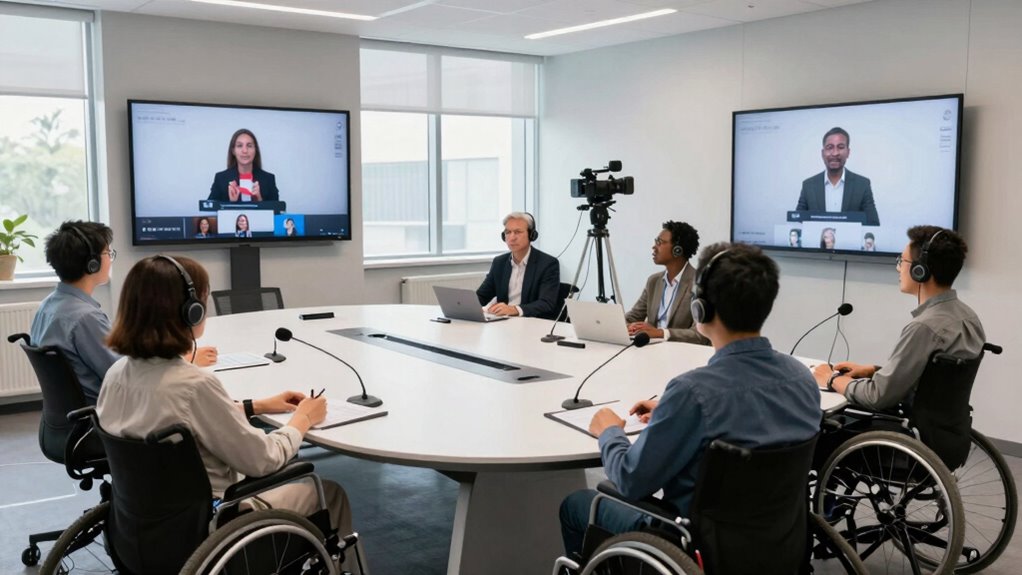
Seating arrangements matter considerably in hybrid setups, especially for in-person attendees. You need to design the space so that everyone feels comfortable and included. Clear sightlines to the speaker and presentation materials are essential, so arrange seats to avoid obstructions. Consider creating designated areas for participants who use assistive devices or require specific accommodations, such as wheelchair-accessible spots or seats with space for assistive tech. This not only demonstrates your commitment to accessibility but also fosters a collaborative atmosphere. Also, ensure that your space layout supports easy movement and access for all participants, including those with mobility challenges. When planning the layout, think about proximity to microphones and screens, so participants don’t have to strain or stretch to be heard and seen. Good seating arrangements reduce distractions and help maintain focus, making the meeting more productive for everyone.
In addition to physical setup and technology, communication methods should be accessible. Use plain language, avoid jargon, and provide multiple ways for participants to ask questions or share input—whether via chat, verbal discussion, or written notes. This guarantees that those with different needs can contribute in ways that suit them best. Remember, accessibility isn’t a one-time consideration but an ongoing process. Regularly seek feedback from participants about their experience and be ready to adapt your setup accordingly. Small adjustments, like repositioning a microphone or adding captioning options, can make a big difference in how inclusive your hybrid meetings feel.
Ultimately, creating an accessible hybrid meeting setup boils down to thoughtful planning and genuine consideration for diverse needs. By incorporating assistive technology seamlessly and designing inclusive seating arrangements, you make sure everyone can participate fully. This not only enhances communication but also builds a more equitable environment where all voices are valued and heard.
hybrid meeting captioning device
As an affiliate, we earn on qualifying purchases.
As an affiliate, we earn on qualifying purchases.
Frequently Asked Questions
How Do I Ensure All Participants Can Hear Each Other Clearly?
To guarantee all participants can hear each other clearly, prioritize audio clarity by using high-quality microphones placed correctly—closer to speakers, but not too close to cause distortion. Test the microphone placement beforehand to avoid echoes or muffled sound. Encourage participants to speak clearly and stay close to their microphones. Also, consider using sound mixers or audio processors to balance volume levels, creating a seamless listening experience for everyone.
What Technology Ensures Real-Time Captioning During Hybrid Meetings?
Think of real-time captioning as a bridge connecting everyone. To guarantee this, use technology with assistive listening devices and visual alerts that display captions instantly. Platforms like Zoom and Webex offer built-in live captioning features, while third-party tools like Otter.ai can enhance accuracy. These tools work together, creating a seamless flow of information, ensuring every voice is heard and understood, no matter where participants are.
How Can I Accommodate Participants With Mobility Challenges?
You can accommodate participants with mobility challenges by implementing accessible design and assistive technologies. Guarantee your meeting space is wheelchair-friendly with ramps, wide doorways, and adjustable tables. Use voice recognition tools and ergonomic controls for those who need them. Incorporate adjustable seating and remote participation options to enhance comfort and inclusivity. These measures create a more accessible environment, allowing all participants to engage fully in your hybrid meetings.
What Are Best Practices for Engaging Remote Attendees?
Don’t let remote attendees feel like they’re on the sidelines. Engage them with interactive icebreakers that encourage participation, and guarantee inclusive seating so everyone feels involved. Use clear visuals and audio, and check in regularly to make sure everyone’s heard. By creating a welcoming environment, you turn the meeting into a two-way street, making sure remote participants stay connected and energized, no matter where they’re tuning in from.
How Do I Troubleshoot Common Technical Issues During Hybrid Meetings?
When troubleshooting common technical issues during hybrid meetings, start by checking your internet connection and ensuring your virtual backgrounds aren’t causing lag. Adjust camera angles to improve visibility and engagement. If participants face audio issues, test microphones and speakers beforehand. Keep a troubleshooting guide handy and encourage remote attendees to update their software. Regularly practicing these steps minimizes disruptions, helping your hybrid meetings run smoothly and inclusively.
Conclusion
By embracing accessible hybrid meeting setups, you’re opening the door to a world where everyone’s voice can be heard, no matter where they are. Think of it as weaving a vibrant tapestry where each thread adds richness and depth. When you prioritize inclusion, you create a space where connection blossoms and barriers fade away. So, step into this bright future with confidence—together, you’re crafting a symphony of voices that resonate far beyond the room.
Evergreen bestsellers Picks
bestsellers
As an affiliate, we earn on qualifying purchases.