
TL;DR

Get everyday helpers delivered free with Prime
- Fast, free delivery on millions of items
- Prime Video, Amazon Music and more included
- Member-only deals all year
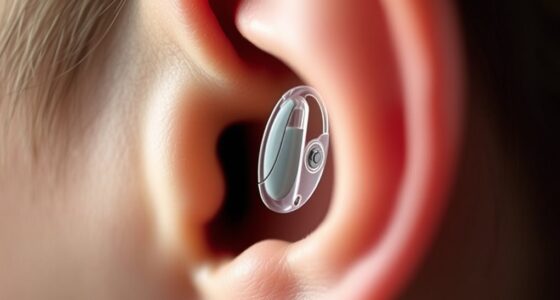
Wireless hearing aids use radio links to exchange sound or control information with compatible phones, TVs, and accessories. Features such as hands-free calls, direct streaming, and rechargeable batteries vary by model, and wireless does not mean every sound is streamed. Check your exact phone and hearing aid compatibility, then choose based on fit, daily listening needs, and total cost.
A hearing aid can stream your phone call straight to your ears and still need a separate box to play your TV. Wireless hearing aids offer useful connections, but the word “wireless” does not tell you exactly what will connect or how well.
Here’s how the technology works, what you can connect, and what to check before buying. You’ll also see why a good fit and the right sound settings matter more than a long list of wireless features.
Wireless hearing aids connect through model-specific links; they do not necessarily stream every sound around you.
Test your exact phone and hearing aid models together, especially for hands-free calling and automatic reconnection.
A TV streamer or remote microphone may help more than phone streaming if television or noisy conversations are your main challenge.
Streaming can use more battery, so compare rechargeable and replaceable options against your daily routine.
Choose for hearing needs, comfort, fitting support, and total cost as well as wireless features.
What wireless hearing aids connect to
Wireless hearing aids use radio technology to exchange sound or control information with compatible phones, TVs, computers, accessories, and sometimes each other. Inside each aid, microphones pick up sound, a processor shapes it, and a receiver plays it into your ear. A wireless link adds another route for sound or commands: it might carry a phone call, send a volume adjustment, or let the left and right aids coordinate what they do. These uses can feel similar because they all involve a connection, but they solve different problems.
That means “wireless” does not necessarily mean every sound is streamed. Your aids might receive calls from a phone but rely on their own microphones for the sounds around you. A TV may need a separate streamer because its audio connection uses a method the aids do not support directly. This distinction affects both convenience and cost: before buying, ask which sounds can go straight to your aids, which controls work through an app, and which features require extra equipment.
Which phone features you can use day to day
Wireless hearing aids can stream calls, music, or podcasts when the hearing aid and phone support compatible connection features. Some models use their own microphones to pick up your voice for hands-free calls; others send incoming audio to your ears but use the phone microphone for your voice. That difference matters in everyday use: if you expect to leave your phone in a bag or across the room, a model that picks up your voice may be more practical. If you usually hold the phone, using its microphone may be perfectly workable.
Compatibility varies by hearing aid model, phone, operating system, and Bluetooth implementation. Labels such as Made for iPhone, Android streaming, Bluetooth Classic, and Bluetooth LE Audio describe different capabilities; none guarantees that every feature works with every phone. A connection that supports music, for example, may not support hands-free calls or the app controls you want. Before buying, ask the provider to test your exact phone and hearing aid models together, including a call and a music stream, and check whether those features still work after the phone locks or reconnects.
Newer Bluetooth audio options, including Bluetooth LE Audio and its broadcast feature Auracast, are appearing in consumer devices and hearing products. They may eventually make it easier to receive audio in public places without a dedicated personal connection, but availability depends on the equipment at both ends. A venue having an Auracast broadcast does not help if your hearing aids cannot receive it, and a compatible phone does not substitute for compatible hearing aids. Check the manufacturer’s current specifications for the exact model and ask whether the feature is ready to use where you live.
How TV streamers and microphones help in real situations
A TV streamer sends television audio directly to compatible hearing aids, while a remote microphone can bring a nearby speaker’s voice forward in a noisy setting. These accessories address different listening challenges: a TV streamer gives you a more direct signal from the show, while a remote microphone makes a particular speaker easier to pick out from competing sound. That can matter more than phone streaming if television or group conversations, rather than calls and music, are where you struggle most.
Imagine sitting with family while the TV murmurs in the background: a streamer can send the show to your aids while others hear the room normally. Depending on the model, you may be able to adjust the streamed TV volume separately from the room sound, which can help you follow the show without making it too loud for everyone else. At lunch, a remote microphone placed near the person speaking may help more than turning up general volume, because it improves the balance between that voice and surrounding noise. Ask which accessories your preferred model supports, whether they cost extra, and whether you can try them in the places where you need help.
A phone app may let you change volume or switch programs, and some providers offer remote support or adjustments. These controls can help you respond to a new listening situation without taking the aids out, but they work best when the underlying fitting is already comfortable. If an app setting makes speech sound harsh or tiring, more volume may amplify the problem rather than solve it. Ask your hearing care professional to review the fit and settings, especially if you find yourself making the same adjustment repeatedly.
Check these five things before you choose
To choose wireless hearing aids, test the exact model with your phone and ask which features need accessories, then weigh battery, fit, support, and total cost. A quick showroom pairing can reveal whether calls and controls work as expected before you commit. The checklist also helps you compare what you will use regularly with features that sound appealing but may add cost or complexity:
- Phone compatibility: Confirm your exact phone model and operating system support the features you want, including hands-free calling if that matters to you. Test incoming and outgoing call audio; a connection that handles one direction well may not provide the hands-free experience you expect.
- Accessories: Ask whether TV listening, remote microphones, or computer connections need a separate streamer or intermediary device. Include its price and setup in your comparison, since the hearing aid alone may not provide the listening route you need.
- Everyday fit: Wear the aids during a normal conversation and ask about comfort, sound quality, and follow-up adjustments. Connectivity can make sound easier to access, but it cannot compensate for discomfort or settings that make speech tiring.
- Battery routine: Compare rechargeable and replaceable-battery models, including how you charge or change batteries and how streaming affects use time. A rechargeable option reduces battery changes but requires a charging routine; replaceable batteries offer quick swaps but mean keeping spares available.
- Total price: Check whether wireless features and accessories are included, and ask what your insurance plan covers in your location. The useful comparison is the cost of the setup you will actually use, including fitting and follow-up support where applicable.
For example, someone who rarely listens to music but watches television every evening may get more value from a TV streamer than from a premium phone-streaming feature. Another person who takes calls throughout the day may care more about hands-free calling and reliable reconnection. The best choice depends on your hearing needs, dexterity, phone habits, budget, and the settings where you want support.
Balance battery life, privacy, and connection reliability
Streaming can use more battery power than ordinary hearing aid use, so battery life depends on the model, settings, streaming time, and battery age. Rechargeable models spare you frequent battery changes, and some come with portable charging cases; replaceable batteries may suit people who prefer quick swaps or do not want to charge overnight. The tradeoff is mainly between a regular charging habit and keeping spare batteries on hand. Ask the provider how the model performs during your typical day, including calls and TV use, rather than relying only on a best-case battery estimate.
Wireless reliability also depends on compatible devices and a stable connection. Pairing steps, automatic reconnection, and the number of devices you can connect differ by manufacturer, so check what happens when you switch from a laptop call to your phone. A system that reconnects automatically can save time, while managing several paired devices may require extra steps. If streaming cuts out, the phone’s Bluetooth settings, distance, or a needed software update may be involved; follow the manufacturer’s troubleshooting guidance and ask the provider to help if interruptions continue.
Wireless connections are designed to link devices, but good habits still matter: use your phone’s normal security settings, follow the manufacturer’s guidance, and keep device software current. If you are concerned about who can connect, ask how pairing and access work for your model. Costs also vary: some features are built into the purchase price, while accessories and insurance coverage depend on the model, provider, location, and plan. Comparing the complete setup helps you avoid choosing on the hearing aid price alone and later finding that the feature you need requires extra equipment.
Get the sound fit right before chasing more features
Wireless convenience cannot replace suitable hearing care. A wireless connection sends or controls sound; it does not by itself make speech clearer in every setting. The hearing aids still need to be matched to your hearing and adjusted so sounds are comfortable and useful. Choosing a device should start with your hearing needs, comfort, daily activities, and a suitable evaluation and fitting from a qualified hearing professional.
For example, if a café conversation remains hard to follow, raising the volume may amplify clattering dishes along with your friend’s voice. A remote microphone may help separate that voice from the noise, while a sound adjustment from your provider may address a fitting issue. The right approach depends on why that conversation is difficult, so discuss where you struggle most and ask to try the devices in realistic listening conditions when possible.
Frequently Asked Questions
Will wireless hearing aids connect to my iPhone or Android phone?
Some models connect directly, but support varies by the exact hearing aid, phone, operating system, and feature. Ask a provider to test your own devices together for calls, streaming, and app controls before you buy.
Can I make hands-free calls and stream music?
Many compatible models can stream calls and music, but hands-free calling works differently across devices. Some aids use their microphones for your voice; others rely on the phone microphone for outgoing speech.
Do wireless hearing aids connect to a TV or laptop?
They may connect directly or need a compatible accessory, such as a TV streamer or intermediary device. Check the exact model and ask whether any extra equipment is included in the price.
Does streaming drain hearing aid batteries faster?
Streaming can use more power than ordinary hearing aid use. Actual battery life depends on the model, settings, streaming time, and battery age, so ask how the model performs during a typical day like yours.
Can wireless hearing aids help me hear better in noisy places?
Wireless features may help when paired with an accessory such as a remote microphone, which can bring a nearby speaker’s voice forward. Results depend on the setting and your hearing needs, so discuss difficult situations with a qualified hearing care professional.
Conclusion
Choose wireless hearing aids by testing the connections you will actually use and checking the full cost of any accessories. Then give equal weight to comfort, sound fitting, and follow-up support. A good connection is handy; a good fit is what makes it part of your day.
Halloween Picks
halloween
As an affiliate, we earn on qualifying purchases.