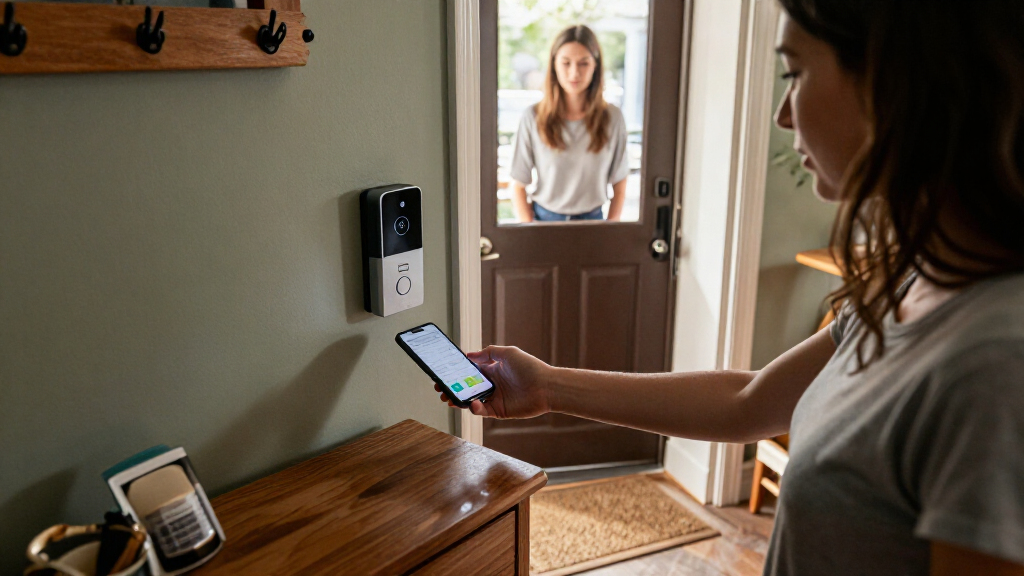

Smart doorbells with visual alerts range from camera systems that send motion notifications to indoor monitors that show visitors at a glance. My best overall pick is the Arlo Video Doorbell 2K (2nd Gen) with Chime 2 for buyers who want a high-resolution camera paired with an indoor alert; the KeonBell 10.1-inch touchscreen system stands out for a large in-home display, while the Ring Battery Doorbell 2K (2nd Gen) suits shoppers who favor a battery-powered setup. The main tradeoffs are app alerts versus a dedicated monitor, battery convenience versus wired installation, and a larger screen versus a smaller footprint. Not every product here offers the same kind of visual alert, so matching the alert method to your routine matters. Read on for the full breakdown and a guide to choosing the right setup.

Get everyday helpers delivered free with Prime
- Fast, free delivery on millions of items
- Prime Video, Amazon Music and more included
- Member-only deals all year
Key Takeaways
- The roundup splits into two distinct groups: camera doorbells with app alerts and systems that include a dedicated indoor monitor. Choose based on where you need to see alerts, not just the camera resolution.
- Arlo and Ring are the clearest camera-first options: both list 2K video, while Arlo includes Chime 2 and Ring is a battery-powered model.
- KeonBell’s 10.1-inch touchscreen is the largest listed display: it makes more sense for households that want a central indoor viewing point than for buyers seeking a discreet entryway device.
- The wired YINTIN system offers a different installation tradeoff: its 7-inch monitor may suit a fixed indoor setup, but wiring requirements matter before choosing it.
- Monitor size and alert delivery are not interchangeable: the 4.5-inch monitor model is a compact-display alternative, while PHYSEN’s plug-in chime and two-button model is aimed at audible and visual notification needs across more than one entry point.
| KeonBell 1080p Smart Video Doorbell Intercom with 10.1-Inch Touchscreen |  | Best for a Full-Size Indoor Intercom | Camera resolution: 1080p | Monitor: 10.1-inch touchscreen | Viewing angle: 130° | VIEW LATEST PRICE | See Our Full Breakdown |
| Orbitell 1080p Wireless Video Doorbell Camera |  | Best for Person-Filtered Alerts | Resolution: 1080p | Connectivity: 2.4GHz Wi-Fi only | Audio: Two-way audio | VIEW LATEST PRICE | See Our Full Breakdown |
| YINTIN 1080P Wired Smart Video Doorbell Intercom System with 7-Inch Monitor |  | Best Value for Local Recording | Camera resolution: 1080p | Monitor: 7-inch touchscreen | Connectivity: Wired with dual-band Wi-Fi | VIEW LATEST PRICE | See Our Full Breakdown |
| KALOGL Wireless Video Doorbell with 1080p Camera and Monitor |  | Best for Phone-Free Viewing | Video resolution: 1080p | Viewing angle: 160° | Monitor: Built-in monitor | VIEW LATEST PRICE | See Our Full Breakdown |
| Arlo Video Doorbell 2K (2nd Gen) with Chime 2 |  | Best Premium Visual Coverage | Video resolution: 2K | Field of view: 180° | Weather resistance: IP65 | VIEW LATEST PRICE | See Our Full Breakdown |
| PHYSEN Smart WiFi Doorbell with 2 Buttons and Plug-In Chime |  | Best for Multiple Entry Points | Buttons: 2 remote buttons | Receiver: 1 plug-in chime | WiFi: 2.4 GHz | VIEW LATEST PRICE | See Our Full Breakdown |
| PHYSEN WiFi Wireless Doorbell with App Alerts |  | Best for Simple Smartphone Alerts | Included configuration: 1 transmitter and 1 receiver | WiFi: 2.4 GHz | Chime volume: Up to 110 dB | VIEW LATEST PRICE | See Our Full Breakdown |
| Ring Battery Doorbell 2K (2nd Gen), Matte Mocha |  | Best for High-Detail Video Alerts | Video resolution: Retinal 2K | Zoom: Up to 6x enhanced zoom | Field of view: 140° horizontal and 140° vertical | VIEW LATEST PRICE | See Our Full Breakdown |
| Wireless Video Doorbell System with 7-Inch Touchscreen Monitor |  | Best for a Large Indoor Viewing Screen | Camera resolution: 1080p | Monitor: 7-inch touchscreen | Field of view: 160° | VIEW LATEST PRICE | See Our Full Breakdown |
| Wireless Video Doorbell Camera with 4.5-Inch Monitor | 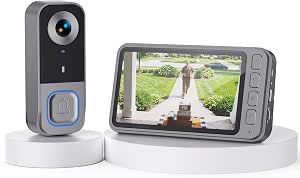 | Best for Phone-Free Visitor Viewing | Connection: Private 2.4 GHz signal; no WiFi required | Indoor monitor: 4.5-inch IPS display | Video resolution: 1080p | VIEW LATEST PRICE | See Our Full Breakdown |
| smart doorbells with visual alert | Connectivity | Storage | Warranty |
|---|---|---|---|
| KeonBell 1080p Smart Video Doo | Wired; Wi-Fi and Tuya app support | Supports a 32GB SD card; card not included | — |
| Orbitell 1080p Wireless Video | 2.4GHz Wi-Fi only | AES-128 encrypted cloud storage | — |
| YINTIN 1080P Wired Smart Video | Wired with dual-band Wi-Fi | 32GB microSD card included; supports up to 128GB | 2 years |
| KALOGL Wireless Video Doorbell | Wireless Bluetooth | Local recording; microSD card not included | — |
| Arlo Video Doorbell 2K | 2.4GHz Wi-Fi | — | — |
| PHYSEN Smart WiFi Doorbell wit | — | — | 18 months |
| PHYSEN WiFi Wireless Doorbell | — | — | 18 months |
| Ring Battery Doorbell 2K | Wi-Fi 4, 2.4 GHz single band | — | One-year limited warranty |
| Wireless Video Doorbell System | WiFi, 2.4 GHz and 5 GHz | Included TF card; local storage | 1 year |
| Wireless Video Doorbell Camera | — | MicroSD up to 128GB; card sold separately | — |
More Details on Our Top Picks
KeonBell 1080p Smart Video Doorbell Intercom with 10.1-Inch Touchscreen
The large 10.1-inch touchscreen makes KeonBell the strongest choice here for households that want to check visitors and unlock a gate from a fixed indoor station, rather than rely on a phone. Its 1080p camera, 130° view, and infrared night vision cover everyday visitor checks, while person detection lets you tailor motion alerts to a chosen area. Compared with the smaller-screen YINTIN, KeonBell gives up the included memory card but offers a noticeably larger display and more listed access methods, including five RFID cards and NFC phone unlocking. Local recording avoids a required subscription, though you must supply the microSD card. The main compromise is installation: this is a wired two-wire system, not a quick battery-powered replacement, and the separate door opener is not included.
Pros:- Large 10.1-inch touchscreen makes visitor video and access controls easy to see indoors.
- Person detection has adjustable sensitivity and a customizable detection area for more targeted alerts.
- Supports local recording without a required subscription.
- Includes five RFID cards and supports touchscreen, app, NFC phone, and door-opener access.
Cons:- Requires a wired two-wire installation and a 24V 1A power supply.
- The 32GB SD card needed for local recording is not included.
- A compatible door opener must be purchased separately for that unlocking method.
Best for: Households with a wired entry point or gate that want a large indoor screen, remote visitor communication, and several ways to grant access.
Not ideal for: Renters or buyers who cannot run two-wire cabling, or anyone seeking a simple battery doorbell with no indoor installation.
- Camera resolution:1080p
- Monitor:10.1-inch touchscreen
- Viewing angle:130°
- Night vision:Infrared, up to 5 m
- Installation:Wired two-wire connection with polarity protection
- Power supply:24V 1A
- Connectivity:Wired; Wi-Fi and Tuya app support
- Storage:Supports a 32GB SD card; card not included
- Unlocking:Touchscreen, Tuya app, five included RFID cards, NFC-enabled phone, or separately supplied door opener
Our verdict“Choose KeonBell if you want a large, feature-rich wired intercom station and can handle the installation and separate storage card.”
Orbitell 1080p Wireless Video Doorbell Camera
AI person detection is Orbitell’s clearest advantage for buyers focused on visual alerts: it can filter vehicles and animals, helping keep notifications centered on people approaching the door. The 1080p camera, infrared night vision, and two-way audio cover the basic check-and-respond routine without the indoor wiring required by KeonBell or YINTIN. Its wireless form and IP65 rating suit a straightforward exterior installation, but this model only connects to 2.4GHz Wi-Fi, so homes relying on 5GHz-only networks should skip it. Orbitell also stores video in encrypted cloud storage, unlike YINTIN’s included microSD card; the tradeoff is that pre-capture recording requires a cloud subscription. Choose it for focused alerts and a simple camera setup, not for a local-storage-first system or a dedicated indoor monitor.
Pros:- AI person detection filters vehicles and animals to reduce irrelevant motion notifications.
- Two-way audio supports conversations with visitors from a connected device.
- Infrared night vision supports nighttime visitor checks.
- IP65 weather resistance suits outdoor installation.
Cons:- Connects only to 2.4GHz Wi-Fi, with no 5GHz support.
- Pre-capture recording requires a cloud subscription.
- Does not include the dedicated indoor touchscreen monitor found with KeonBell and YINTIN.
Best for: Buyers who want wireless visitor alerts that distinguish people from common vehicle and animal motion, and have 2.4GHz Wi-Fi.
Not ideal for: Households with 5GHz-only Wi-Fi or buyers who want included local storage, a dedicated monitor, or pre-capture footage without a cloud subscription.
- Resolution:1080p
- Connectivity:2.4GHz Wi-Fi only
- Audio:Two-way audio
- Night vision:Infrared LEDs
- Motion detection:AI person detection; filters vehicles and animals
- Storage:AES-128 encrypted cloud storage
- Weather resistance:IP65
- Dimensions:1.77 × 1.34 × 5.4 inches
Our verdict“Pick Orbitell if person-filtered alerts matter more than local storage or a built-in indoor viewing screen.”
YINTIN 1080P Wired Smart Video Doorbell Intercom System with 7-Inch Monitor
Included 32GB microSD storage gives YINTIN a practical advantage over KeonBell, which requires a separately purchased card, and Orbitell, which relies on cloud storage. Its 7-inch touchscreen is smaller than KeonBell’s 10.1-inch display, but still gives visitors a dedicated indoor screen alongside app access. The system’s local intercom and unlocking can work when Wi-Fi is unavailable, a useful distinction for households that do not want a dropped network to block basic entry functions. Wired power avoids battery charging, while touchscreen, smartphone, and RFID unlocking cover the common access needs. The tradeoffs are a more involved hardwired installation and inconsistent weather-resistance information: the description says IP65, while product details list IP55. I would favor this over KeonBell when included storage and offline local operation matter more than screen size.
Pros:- Includes a 32GB microSD card and supports expansion up to 128GB.
- Local intercom and unlocking remain available if Wi-Fi is interrupted.
- Offers touchscreen, smartphone app, and RFID keycard unlocking.
- Wired power avoids routine battery replacement or recharging.
Cons:- Hardwired installation may call for wiring experience or professional help.
- Weather-resistance ratings conflict: IP65 appears in the description and IP55 in product details.
- The 7-inch monitor is smaller than KeonBell’s 10.1-inch screen.
Best for: Homeowners seeking a wired intercom with included local storage, app access, and basic visitor communication that can continue without Wi-Fi.
Not ideal for: Renters or DIY buyers unable to work with hardwiring, and shoppers who need a clearly stated, consistent weather-resistance rating.
- Camera resolution:1080p
- Monitor:7-inch touchscreen
- Connectivity:Wired with dual-band Wi-Fi
- Storage:32GB microSD card included; supports up to 128GB
- Night vision:Infrared
- Motion detection:Adjustable PIR sensor
- Unlocking:Touchscreen, smartphone app, and RFID keycards
- Weather resistance:IP65 in description; IP55 in product details
- Warranty:2 years
Our verdict“Choose YINTIN if included local recording and offline local controls outweigh the appeal of KeonBell’s larger screen.”
KALOGL Wireless Video Doorbell with 1080p Camera and Monitor
KALOGL’s built-in monitor sets it apart from Orbitell and Arlo: you can view a visitor at the included screen without relying on a phone app or Wi-Fi. That makes its visual alerts a better fit for homes where someone wants a direct indoor check, but not a full wired intercom installation like KeonBell or YINTIN. The 160° viewing angle is wider than KeonBell’s 130° view, helping show more of the area around the entrance, and local recording avoids a required cloud plan. Battery power and wireless Bluetooth connectivity also reduce dependence on doorbell wiring. There are tradeoffs: the microSD card is not included, and the supplied details do not specify a weather-resistance rating beyond describing it as weatherproof. Choose this for a simple screen-led setup, not for clearly documented networked app features.
Pros:- Built-in monitor allows visitor viewing without a phone app or Wi-Fi.
- A 160° viewing angle captures a broad area around the entrance.
- Local recording avoids a required cloud subscription.
- Battery power avoids a wired doorbell installation.
Cons:- The microSD card for local recording is not included.
- Product details list Bluetooth connectivity rather than Wi-Fi or remote app access.
- Weatherproofing is described without a specific IP rating.
Best for: Households that want an indoor screen for checking visitors without using a phone app or Wi-Fi connection.
Not ideal for: Buyers who want specified Wi-Fi or app-based remote alerts, included recording storage, or a clearly stated IP weather-resistance rating.
- Video resolution:1080p
- Viewing angle:160°
- Monitor:Built-in monitor
- Connectivity:Wireless Bluetooth
- Power source:Battery
- Storage:Local recording; microSD card not included
- Audio:Two-way audio
- Video format:MP4
Our verdict“Pick KALOGL if a phone-free indoor screen and wide view matter more than remote app access or clearly specified weather protection.”
Arlo Video Doorbell 2K (2nd Gen) with Chime 2
2K video and a 180° field of view give Arlo the broadest, highest-resolution picture among these five picks, which can help when the approach to a door is wide or visitors are close to the camera. Unlike the monitor-focused KeonBell and YINTIN, Arlo is built around connected alerts, with two-way audio and flexible battery or wired power. The included Chime 2 adds customizable melodies and an 80+ dB siren, so it offers a more substantial indoor alert than a doorbell camera alone. Its weather-resistant design and smart-home compatibility also make it a strong fit for an existing connected home. The main compromise is ongoing service dependence for advanced detection and 60-day video history after the trial; wireless use also means recharging. Compared with Orbitell, Arlo offers sharper, wider video, but its advanced alert and history features require a paid plan.
Pros:- 2K video and a 180° field of view provide the strongest stated visual coverage in this group.
- Can use rechargeable battery power or wired trickle charging.
- Includes Chime 2 with customizable melodies and an 80+ dB siren.
- Works with Alexa, Apple Home, Google Home, SmartThings, and IFTTT.
Cons:- Advanced detection and 60-day video history require a paid Arlo Secure plan after the trial.
- Battery installation requires periodic recharging.
- Uses 2.4GHz Wi-Fi rather than 5GHz Wi-Fi.
Best for: Smart-home households that want a wide, detailed visitor view, flexible power, and an included indoor chime with a siren.
Not ideal for: Buyers who want advanced detection and extended video history without a paid plan, or who prefer an included local-storage option.
- Video resolution:2K
- Field of view:180°
- Weather resistance:IP65
- Connectivity:2.4GHz Wi-Fi
- Power options:Rechargeable battery or wired trickle charging
- Audio:Two-way audio
- Included accessory:Arlo Chime 2
- Chime siren:80+ dB
- Subscription features:Advanced detection and 60-day video history require a paid plan after the trial
Our verdict“Choose Arlo for the sharpest, widest view and a versatile chime, provided you accept plan requirements for advanced detection and extended history.”
PHYSEN Smart WiFi Doorbell with 2 Buttons and Plug-In Chime
The two-button setup makes this PHYSEN a practical fit for homes with a front and side entrance, or for separating household and business arrivals. Each button can use a different ringtone, while free app push notifications add a visual alert on a smartphone. Compared with the single-transmitter PHYSEN WiFi Wireless Doorbell with App Alerts, this package covers more entrances from the start; its plug-in chime also provides an audible backup, with an LED indicator for a visible cue indoors.
The tradeoff is that this is an alert-focused system, not a video doorbell: the app notifications do not let you see who is at the door. It also requires a plug-in receiver and supports 2.4 GHz WiFi only. Choose it for flexible doorbell alerts across multiple doors, not for visitor video or a wire-free indoor setup.
Pros:- Two remote buttons can use different ringtones for separate entrances.
- Free app push notifications add smartphone alerts.
- Chime offers five volume levels up to 110 dB and an LED indicator.
- Expandable pairing supports up to 32 transmitters.
Cons:- Does not provide video or visual identification of visitors through a camera.
- Works with 2.4 GHz WiFi only.
- The included receiver needs an electrical outlet.
Best for: Households with two entrances that want distinct app notifications and chime tones without adding a video camera.
Not ideal for: Buyers who want to see visitors on a phone, or anyone without a suitable outlet for the plug-in chime.
- Buttons:2 remote buttons
- Receiver:1 plug-in chime
- WiFi:2.4 GHz
- Chime volume:5 levels, up to 110 dB
- Ringtones:32
- Expandable pairing:Up to 32 transmitters
- Battery:Included A23 alkaline battery
- Warranty:18 months
Our verdict“Choose this PHYSEN for app and chime alerts at two doors, but skip it if visual visitor identification means live video to you.”
PHYSEN WiFi Wireless Doorbell with App Alerts
For buyers who want a phone notification without paying for a video doorbell, this single-button PHYSEN keeps the setup straightforward. Its app push alerts provide a visual cue on a smartphone, while the included receiver adds a loud 110 dB chime and LED indicator at home. The settings also remain in place after a power outage, so the selected melody and volume do not need to be reset. Compared with the two-button PHYSEN Smart WiFi Doorbell, this package suits one entrance rather than splitting alerts across two doors.
That simplicity comes with a clear limit: it offers no camera or live visitor view, so the app alert tells you someone rang but not who is there. It also relies on 2.4 GHz WiFi and an outlet for the receiver. I’d pick it for basic, subscription-free app notifications, not for buyers seeking the video alerts offered by the Ring Battery Doorbell 2K.
Pros:- Sends smartphone app notifications without subscription fees.
- Included chime reaches 110 dB and has an LED indicator.
- Offers 32 ringtone choices and retains settings after power outages.
- Supports pairing with up to 32 transmitters.
Cons:- No camera, live video, or visual confirmation of visitors.
- Supports 2.4 GHz WiFi only.
- The receiver must occupy an electrical outlet.
Best for: People with one main entrance who want free smartphone doorbell alerts alongside an indoor chime.
Not ideal for: Buyers who need video, multiple door buttons, or a setup that avoids both 2.4 GHz WiFi and a plug-in receiver.
- Included configuration:1 transmitter and 1 receiver
- WiFi:2.4 GHz
- Chime volume:Up to 110 dB
- Ringtones:32
- Maximum paired transmitters:32
- Weight:5.9 ounces
- Included battery:A23
- Warranty:18 months
Our verdict“Pick this model for simple app and chime alerts at one door; choose a camera-equipped option if you need to see visitors.”
Ring Battery Doorbell 2K (2nd Gen), Matte Mocha
The Ring Battery Doorbell 2K is the clearest pick here for buyers who want video as the main visual alert. Its Retinal 2K resolution and up to 6x enhanced zoom can make it easier to inspect a visitor or activity near the entrance, while the 140° horizontal and vertical view gives a broad look at the doorway. Motion alerts, Live View, and two-way talk add ways to check and respond remotely. Unlike the PHYSEN app-alert models, it can show who is outside; compared with the Wireless Video Doorbell System with 7-Inch Touchscreen Monitor, it relies on a phone and app rather than an included indoor display.
The built-in rechargeable battery avoids doorbell wiring, but it also means recharging is part of ownership, and the USB-C cable is not included. Some recording and AI features require a Ring Protect subscription, and video quality can vary with bandwidth. This is the stronger fit for detail and remote interaction, not for buyers seeking subscription-free local storage.
Pros:- Retinal 2K video with up to 6x enhanced zoom.
- 140° horizontal and vertical field of view.
- Live View, motion alerts, and two-way talk support remote checks and replies.
- Rechargeable battery and Alexa integration.
Cons:- Some recording and AI features require a Ring Protect subscription.
- USB-C charging cable is not included, and the battery needs recharging.
- Video quality may vary with internet bandwidth.
Best for: Smartphone-first households that want detailed video, a broad doorway view, and two-way communication without wired installation.
Not ideal for: Buyers who want included local recording without a subscription, a dedicated indoor screen, or an entirely hands-off power setup.
- Video resolution:Retinal 2K
- Zoom:Up to 6x enhanced zoom
- Field of view:140° horizontal and 140° vertical
- Audio:Two-way talk
- Power:Built-in lithium-ion battery
- Charging:USB-C; cable not included
- Connectivity:Wi-Fi 4, 2.4 GHz single band
- Warranty:One-year limited warranty
Our verdict“Choose Ring for detailed smartphone video and remote conversation, but look elsewhere for subscription-free local recording or an included monitor.”
Wireless Video Doorbell System with 7-Inch Touchscreen Monitor
The standout here is the included 7-inch touchscreen monitor: it gives household members a direct way to view and answer the door without relying on a phone. A 1080p camera, two-way audio, and night vision cover everyday visitor checks, while local TF card storage avoids a required recording subscription. Compared with the Ring Battery Doorbell 2K, this system trades higher stated video resolution and enhanced zoom for a dedicated indoor display and local storage. Its 160° field of view is also wider on paper than the Ring’s listed 140° view.
The camera’s motion detection range is up to 5 meters, so buyers should not assume it will catch activity farther from the entrance. It works with the TuyaSmart app and supports both 2.4 GHz and 5 GHz WiFi, but it remains a battery-powered system. I’d favor it for homes where a shared screen and subscription-free local recording matter more than zoom detail or a phone-first experience.
Pros:- 7-inch touchscreen provides a large dedicated view indoors.
- Local TF card storage does not require a recording subscription.
- Includes two-way audio, motion alerts, and night vision.
- Supports 2.4 GHz and 5 GHz WiFi and TuyaSmart app use.
Cons:- Motion detection range is specified for up to 5 meters.
- 1080p video lacks the stated 2K resolution and enhanced zoom of the Ring Battery Doorbell 2K.
- Battery-powered operation may require attention to charging or battery performance.
Best for: Households that want a shared indoor screen for answering the door and local video storage without a required subscription.
Not ideal for: Buyers who need long-range motion detection, a smartphone-only setup, or more detail and zoom than its 1080p camera provides.
- Camera resolution:1080p
- Monitor:7-inch touchscreen
- Field of view:160°
- Motion detection range:Up to 5 meters
- Night vision range:10 meters
- Connectivity:WiFi, 2.4 GHz and 5 GHz
- Storage:Included TF card; local storage
- Battery capacity:5000 amp-hours
- Warranty:1 year
Our verdict“Choose this system for a large shared monitor and local recording, but not if long-range motion coverage or higher-detail video is your priority.”
Wireless Video Doorbell Camera with 4.5-Inch Monitor
This doorbell is aimed at buyers who want to see and speak with visitors without adding WiFi, an app, or a subscription. Its 4.5-inch indoor monitor connects over a private 2.4 GHz signal, and the 1080p camera, two-way audio, and infrared night vision support direct visitor checks from inside. Compared with the Wireless Video Doorbell System with 7-Inch Touchscreen Monitor, the screen is smaller and the connection avoids WiFi altogether; that makes this a more focused, phone-free setup rather than a broader app-connected system.
The central compromise is alert coverage: recording starts only when someone presses the button. There is no motion detection or automatic recording, so passing activity can go unseen. The microSD card is sold separately, and the monitor needs wall power for regular use, though it has a backup battery. Choose this for simple live visitor viewing, not continuous monitoring or unattended motion capture.
Pros:- Private connection works without WiFi, an app, or a subscription.
- Dedicated 4.5-inch IPS monitor allows visitor viewing without a smartphone.
- Provides 1080p video, two-way audio, and infrared night vision.
- Supports local microSD recording up to 128GB.
Cons:- No motion detection or automatic recording; recording is triggered by a doorbell press.
- MicroSD card must be purchased separately.
- The indoor monitor needs wall power for regular use.
Best for: People who want a dedicated indoor screen and two-way visitor calls without WiFi, smartphone apps, or subscription services.
Not ideal for: Buyers who want motion alerts, automatic event recording, or a larger display and app access.
- Connection:Private 2.4 GHz signal; no WiFi required
- Indoor monitor:4.5-inch IPS display
- Video resolution:1080p
- Viewing angle:120°
- Wireless range:Up to 120 meters
- Storage:MicroSD up to 128GB; card sold separately
- Night vision range:Up to 32 feet
- Recording trigger:Doorbell press only; no motion detection
- Outdoor battery life:Up to 2 months per charge
Our verdict“Pick this for phone-free, button-triggered visitor video, but skip it if you need motion-based alerts or automatic recording.”
How We Picked
I compared these doorbells through the lens of visual alerts: where a visitor appears, how an alert reaches the household, and whether the setup relies on a phone, a plug-in chime, or a dedicated monitor. I also weighed the listed camera resolution, power and installation style, screen size, and the likely fit for different home layouts. A larger screen can be helpful inside the home, but it is not automatically more useful than an app alert if household members are often away.
The ranking favors products with a clearly defined alert setup and a useful combination of camera, notification, and viewing options. Arlo leads for its 2K camera and included Chime 2; KeonBell ranks highly for its large touchscreen intercom approach. Ring stands out for a battery-powered 2K camera, while monitor-based and simpler PHYSEN models fill more specific needs. Where the product name alone does not establish details such as subscription terms, compatibility, or exact alert behavior, I avoid treating those as confirmed advantages and recommend checking them before purchase.
Factors to Consider When Choosing Smart Doorbells With Visual Alerts
The right choice depends less on a single headline specification than on how you want to receive and view an alert. Before choosing a model, think through who needs to respond, where they will be, and what installation your entryway allows.
Choose Between a Phone Alert and an Indoor Screen
A phone notification is convenient when you are away, but it assumes someone has a charged phone, an active connection, and permission to access the app. A dedicated monitor can make visitor viewing more immediate for people who prefer not to rely on a phone, or for households where not everyone shares one account. The tradeoff is placement: a monitor only helps when someone is near it, and a larger screen may need a suitable spot and power. Avoid choosing by screen size alone; first decide where the person most likely to answer will be. If the product listing does not clearly explain whether alerts also reach phones, verify that before buying.
Check Power and Wiring Before Comparing Features
Battery models can simplify installation and avoid running new cable, but they need periodic charging or battery maintenance. Wired systems may suit a home with compatible doorbell wiring and a preferred fixed monitor, though installation can take more planning. A common mistake is assuming that “wireless” means every part runs without wires: the camera may connect wirelessly while a monitor or chime still needs power. Confirm what is included, how each component is powered, and whether your existing wiring matches the doorbell’s requirements. If you cannot verify compatibility from the product details, ask the manufacturer or installer before ordering.
Treat Resolution as One Part of Visitor Visibility
A higher resolution can preserve more detail, but the view also depends on camera angle, lighting, placement, and how much of the entrance fits in frame. Think about whether you need to see a face at the door, packages near the ground, or a wider approach to the property. A camera specification cannot fix a poor mounting position or a blocked view. Check the field of view and mounting options in the listing, and compare the camera’s intended angle with your doorway. If the image is only useful when you open an app, make sure the alert itself arrives in a way you will notice.
Plan for Everyone Who Needs to Respond
Doorbell alerts are household tools, so consider whether several people need access or whether a visitor should be visible from a shared indoor space. An app-centered setup may suit a single user who carries a phone, while a screen or chime can help other household members notice a visitor. For multiple entrances, check whether a two-button model supports the way you plan to label and respond to each door. Do not assume that extra buttons mean separate monitors, separate app permissions, or distinct alert tones; confirm those functions in the product details. A simple alert path that every household member understands is often more useful than a feature-rich setup that only one person can manage.
Check Connectivity, Storage, and Ongoing Requirements
Visual alerts depend on a reliable connection between the camera, home network, phone, and any included monitor or chime. A weak signal near the entrance can delay notifications or make live viewing less dependable, so check coverage at the mounting location before installation. Also look for details about video storage, subscription requirements, app compatibility, and whether key alerts work without a paid plan. These terms can change the long-term usefulness of a doorbell even when the camera specifications look appealing. If the listing is unclear, confirm what functions remain available without a subscription rather than assuming every feature is included.
Frequently Asked Questions
Should I choose a doorbell with a dedicated monitor or one that sends alerts to my phone?
Choose a dedicated monitor if someone at home needs to see visitors without reaching for a phone or opening an app. A phone-focused doorbell makes more sense when household members are often out and want to check alerts remotely. Some setups may offer both, but confirm that the model supports both alert paths rather than assuming the monitor replaces app access. Also consider where the screen will sit and whether it needs a constant power connection. The best fit is the alert method the person answering the door will actually notice.
Is a 2K doorbell camera worth choosing over a 1080p model?
A 2K camera may capture more image detail, which can help when viewing a visitor or a package, but resolution alone does not promise a clearer usable view. Camera angle, lighting, connection quality, and the way the image is displayed all affect what you can see. A 1080p system with a well-placed indoor monitor may suit someone who values quick household viewing over extra camera detail. Compare the full alert setup and mounting view, not only the resolution label. If you need evidence of a specific feature, check the manufacturer’s specifications rather than inferring it from resolution.
Can I install a wireless video doorbell without existing doorbell wiring?
Some battery-powered wireless models are designed to avoid a wired doorbell connection, but wireless connectivity does not mean every included component is battery powered. A monitor or chime may still need an outlet, and batteries require upkeep. Wired intercom systems can depend on existing wiring or a more involved installation, so check the requirements for the camera and indoor unit separately. Before buying, confirm what power sources are included and whether the product works with your entryway. If wiring is uncertain, a qualified installer can help verify compatibility.
Do I need a subscription to receive visual alerts or view recorded video?
Subscription rules vary by model and can affect cloud recording, saved clips, or other app features. A live alert and a stored recording are different functions, so check each one separately in the product’s current terms. Do not assume that buying a doorbell includes ongoing video storage or that all notifications require a paid plan. If you prefer not to subscribe, look for clear details about local storage and which features remain available without a plan. Confirm those terms before choosing between otherwise similar models.
What should I check if a visual alert might be missed at home?
Start by deciding who needs to notice the alert and where that person is likely to be. A phone-only notification can be easy to miss when the phone is silent or out of reach, while a plug-in chime or dedicated screen may provide a more noticeable in-home cue. Check whether the doorbell supports the alert types you need and whether the chime or monitor is included. For homes with multiple entrances, verify how each button or camera is identified so visitors are not confused. Test the chosen alert placement and sound settings after installation.
Conclusion
For most buyers, I’d start with the Arlo Video Doorbell 2K (2nd Gen) with Chime 2, which pairs a 2K camera with a dedicated indoor alert. Choose the KeonBell system as the best fit for a large-screen intercom setup, especially if an in-home touchscreen matters more than a compact installation. The Ring Battery Doorbell 2K (2nd Gen) is my pick for battery-powered convenience, while the Orbitell 1080p model is a value-minded camera option for shoppers who want a simpler wireless camera setup and are satisfied with its listed features. For beginners, the PHYSEN WiFi Wireless Doorbell with App Alerts is the straightforward place to start if phone notifications are the priority; for a fixed monitor setup, compare YINTIN’s wired 7-inch system with the wireless monitor models and confirm power needs first. If you need alerts at two entry points, look at the PHYSEN two-button model. The best choice is the one whose alert method, installation demands, and viewing setup match your household.