
TL;DR

Get everyday helpers delivered free with Prime
- Fast, free delivery on millions of items
- Prime Video, Amazon Music and more included
- Member-only deals all year
Building your own AI workstation used to save money, but in 2026, prebuilt systems often match or beat DIY prices due to component shortages and bulk buying. The choice now hinges on your need for speed, customization, and support.
Imagine having an AI project deadline looming. You need a machine that’s ready to go yesterday. Building your own rig used to be the obvious choice for saving money and customizing every detail. But in 2026, that’s no longer a given.
The AI boom has reshaped the landscape—component shortages, skyrocketing prices, and bulk buying have flipped the script. Now, prebuilt workstations often come at a price that’s hard to beat, especially when you factor in time and risk. So, before you start sourcing parts or clicking “Order Now,” let’s break down the real tradeoffs—cost, speed, control, and future-proofing.
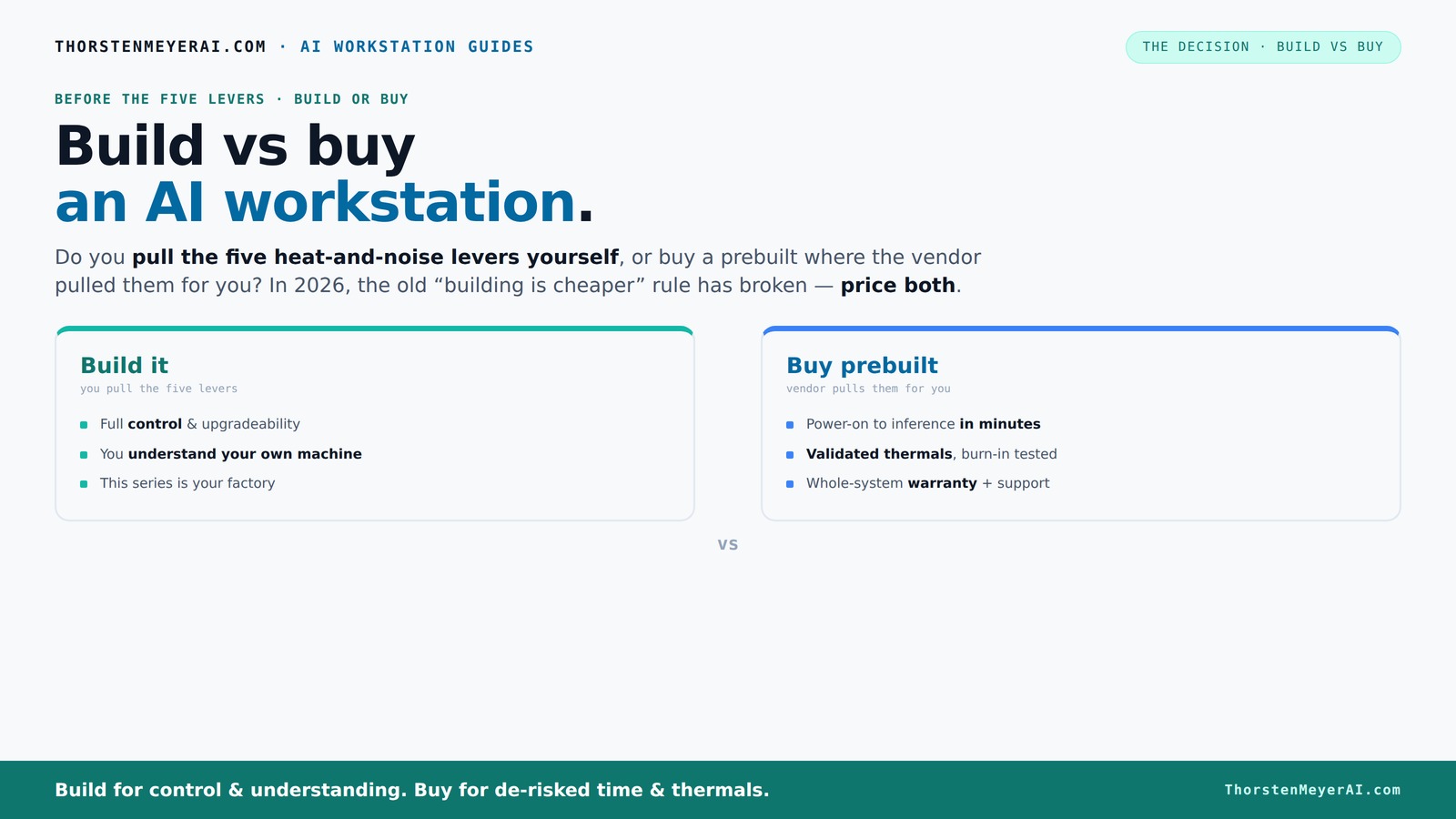
Build vs buy
an AI workstation.
The real question behind this whole series: do you pull the five heat-and-noise levers yourself, or buy a prebuilt where the vendor pulled them for you? And in 2026, the old “building is cheaper” rule has broken. Match your situation in Part 3.
Key Takeaways
- In 2026, component shortages and bulk buying have closed the price gap between build and buy, shifting the decision focus to speed and support.
- Prebuilt workstations save time with factory validation, tested thermals, and included software, making them ideal for urgent projects.
- Building offers unmatched customization but comes with hidden costs, longer timelines, and operational risks.
- Support and warranty are vital—prebuilt vendors often provide better coverage, reducing downtime in mission-critical AI tasks.
- Hybrid approaches combine the best of both worlds, allowing quick deployment with room for tailored upgrades.
As an affiliate, we earn on qualifying purchases.
Why 2026 Changes Everything About Building vs Buying
Building your own AI workstation isn’t just about saving money anymore. Prices for GPUs, DDR5 RAM, and SSDs have soared—sometimes by 30% or more—thanks to global shortages and high demand [1].
Meanwhile, prebuilt vendors bulk-buy components, locking in lower prices and offering ready-to-run systems at a compelling value. That means the old rule—"build cheaper"—no longer holds true without serious shopping around. Learn more about build vs buy options.
For example, what used to be a $1,000 DIY build now often costs $1,250+ due to component costs. Meanwhile, a prebuilt might sit around the same or even less, with the added bonus of validated thermals and support. This shift makes it essential to compare both options based on today’s prices, not assumptions from the past.
The Real Cost of Building Your Own AI Workstation
Building your own rig sounds like a money-saver, but the hidden costs add up quickly. Think about time spent sourcing parts, troubleshooting compatibility, and tuning performance. Each of these tasks involves a learning curve—missteps can lead to delays or suboptimal performance, ultimately affecting your project timelines and results. See why build costs can be underestimated.
For instance, hours spent undervolting a GPU or adjusting fan profiles aren’t just about saving power or noise—they’re part of ensuring stability under heavy loads. Missteps here can cause thermal throttling or crashes during critical training runs, risking data loss or extended downtime.
And don’t forget upgrades. When your project outgrows the initial build, adding more GPUs or extra RAM isn’t always straightforward or cheap. Proprietary motherboard slots, power supply limitations, or BIOS restrictions can force costly replacements or complex workarounds, which may extend timelines and inflate costs over the long run.
What Prebuilt AI Workstations Bring to the Table
Prebuilt systems from brands like Lambda or Puget come with validated thermals, factory tuning, and robust support. They undergo extensive testing—often under simulated heavy workloads—to ensure stability and performance. This validation process is crucial because it reduces the risk of thermal throttling, hardware failures, or unpredictable behavior during intensive training sessions, which can significantly impact project timelines and data integrity. Learn about prebuilt workstation validation.
Moreover, these systems arrive with pre-installed software stacks—CUDA, TensorFlow, Docker—optimized and tested for compatibility. This saves days, if not weeks, of setup and troubleshooting, allowing your team to focus immediately on development rather than configuration issues.
If your team values speed, reliability, and peace of mind over tinkering, prebuilt options are often a strategic asset. For example, Lambda’s water-cooling configurations don’t just reduce noise—they help maintain consistent performance during prolonged workloads, minimizing downtime and the need for manual thermal management, which is often overlooked in DIY setups.
Performance Tuning and Customization: Build or Buy?
If you want total control over thermals, airflow, and component choice, building your own system offers unmatched customization. You can select specific GPU models optimized for your workload, design a cooling system tailored for silence or maximum thermal efficiency, and configure the system to precisely match your operational environment. This degree of control can lead to marginal gains in performance and efficiency, especially for specialized tasks or unique workflows. Explore build vs buy customization.
However, this flexibility comes with tradeoffs. Tuning fans, undervolting GPUs, and optimizing airflow demand significant expertise—errors can cause thermal throttling, hardware failures, or reduced lifespan. Without vendor validation, you risk instability during extended training sessions, which can lead to costly downtime or data corruption.
Prebuilts, on the other hand, come pre-tuned and validated—meaning they’ve been stress-tested to ensure thermal and power stability across multi-GPU configurations. This validation minimizes the risk of thermal issues and hardware failures, saving you time and reducing operational uncertainty, especially when deploying complex setups that demand tight thermal controls.
Which Option Saves You Time and Gets You to Productivity Faster?
Time-to-deploy is often the decisive factor, particularly in competitive or deadline-driven environments. Building a custom rig involves sourcing parts, waiting for shipments, assembling, troubleshooting, and tuning—steps that can easily extend over several weeks, especially amid ongoing component shortages. Each delay can push back project timelines and increase costs. See how build time impacts productivity.
Conversely, a prebuilt arrives in days, fully assembled and tested, with software pre-installed and optimized. This ready-to-run state allows your team to hit the ground running—starting model training, data processing, or deployment immediately—saving precious weeks or even months.
In urgent projects—such as deploying a new AI service for a client with a tight deadline—this speed differential is critical. The ability to rapidly deploy a reliable, validated system can mean the difference between winning or losing a contract, making prebuilt solutions strategically advantageous in time-sensitive scenarios.
Support, Warranty, and Long-Term Reliability
Support and warranty services are vital considerations because they directly influence operational continuity. Prebuilt vendors often provide comprehensive warranties—sometimes up to 5 years—and dedicated support teams that can swiftly address hardware failures or compatibility issues. This reduces downtime and ensures your AI projects stay on schedule, especially when dealing with complex multi-GPU setups or high-performance components prone to thermal or power issues.
In contrast, building your own system means you’re responsible for troubleshooting, warranty claims, and upgrades. Without vendor support, you might face extended downtimes if a GPU fails or if compatibility issues arise during software updates. This can lead to significant delays and increased operational costs, especially in mission-critical environments where uptime is non-negotiable.
For example, a GPU failure during a major training run could halt your progress unless you have an active support plan. Prebuilt vendors often include rapid replacement policies, minimizing such risks and ensuring your AI development pipeline remains uninterrupted.
Upgradeability and Future-Proofing: How Do They Compare?
Building your own system generally offers the highest degree of upgradeability. You can select motherboards with multiple PCIe slots, easily add more RAM, SSDs, or even additional GPUs as your needs grow. This flexibility allows you to extend the lifespan of your investment and adapt to evolving project requirements without replacing the entire system.
Prebuilt systems, however, often come with proprietary components or limited upgrade paths—designed for specific configurations—making future upgrades more complex or costly. Some vendors employ custom cases or power supplies that restrict adding new GPUs or upgrading CPUs, which can lock you into a certain performance tier or force costly replacements down the line.
That said, many top-tier prebuilt systems now incorporate accessible slots and modular designs, reducing these limitations. The key is to assess each system’s upgrade options carefully—what’s feasible today, and what future expansion might require costly modifications or complete replacements.
Should You Go Hybrid? Combining Building and Buying
Hybrid strategies are increasingly popular because they offer a flexible middle ground. You might purchase a prebuilt base system from a trusted vendor—such as a high-performance CPU and GPU—and then customize or upgrade critical components yourself, like adding additional SSDs, custom cooling, or specialized RAM modules. This approach allows you to leverage the reliability and validation of a prebuilt while tailoring certain aspects to your specific needs.
Such hybrid configurations can significantly reduce deployment time compared to a full custom build, while still providing room for performance tuning and upgrades. It’s especially advantageous for teams with some technical expertise who want to control costs and performance without sacrificing support or risking compatibility issues.
For example, buying a validated system and then adding your own NVMe drives or custom cooling solutions can optimize performance and noise levels, providing a balanced approach tailored to your operational environment.
Frequently Asked Questions
Is a prebuilt AI workstation better than building one myself?
It depends on your priorities. If speed, support, and validated performance matter most, a prebuilt often wins. Building might be better if you need full control, specific components, or a unique workflow.How much more expensive is a prebuilt workstation over a custom build?
In 2026, prices are comparable or sometimes favor the prebuilt, thanks to bulk buying and component shortages. Always compare specific configurations, as the gap varies.Can I upgrade a prebuilt system later?
Many high-end prebuilt workstations are designed for upgrades—adding RAM or SSDs is usually straightforward. However, some proprietary parts can limit future GPU or CPU upgrades, so check the vendor’s upgrade paths.How fast can I deploy a prebuilt workstation?
Typically within days. You get a ready-to-run system with software preinstalled, letting you start your AI projects weeks faster than building from scratch.Which option offers better security for sensitive data?
Buying from a reputable vendor often provides better governance, audit trails, and support for compliance. Building your own gives more control but requires rigorous internal security measures.Conclusion
Choosing between building and buying your AI workstation is no longer just about saving money. It’s about aligning your workflow, timeline, and risk appetite. In 2026, a well-chosen prebuilt system can often deliver faster, more reliable results—freeing you to focus on your AI breakthroughs.
Remember: it’s not just a machine. It’s your competitive edge. Decide wisely, and your AI projects will run smoother, quieter, and smarter than ever before.
Halloween Picks
halloween
As an affiliate, we earn on qualifying purchases.